12
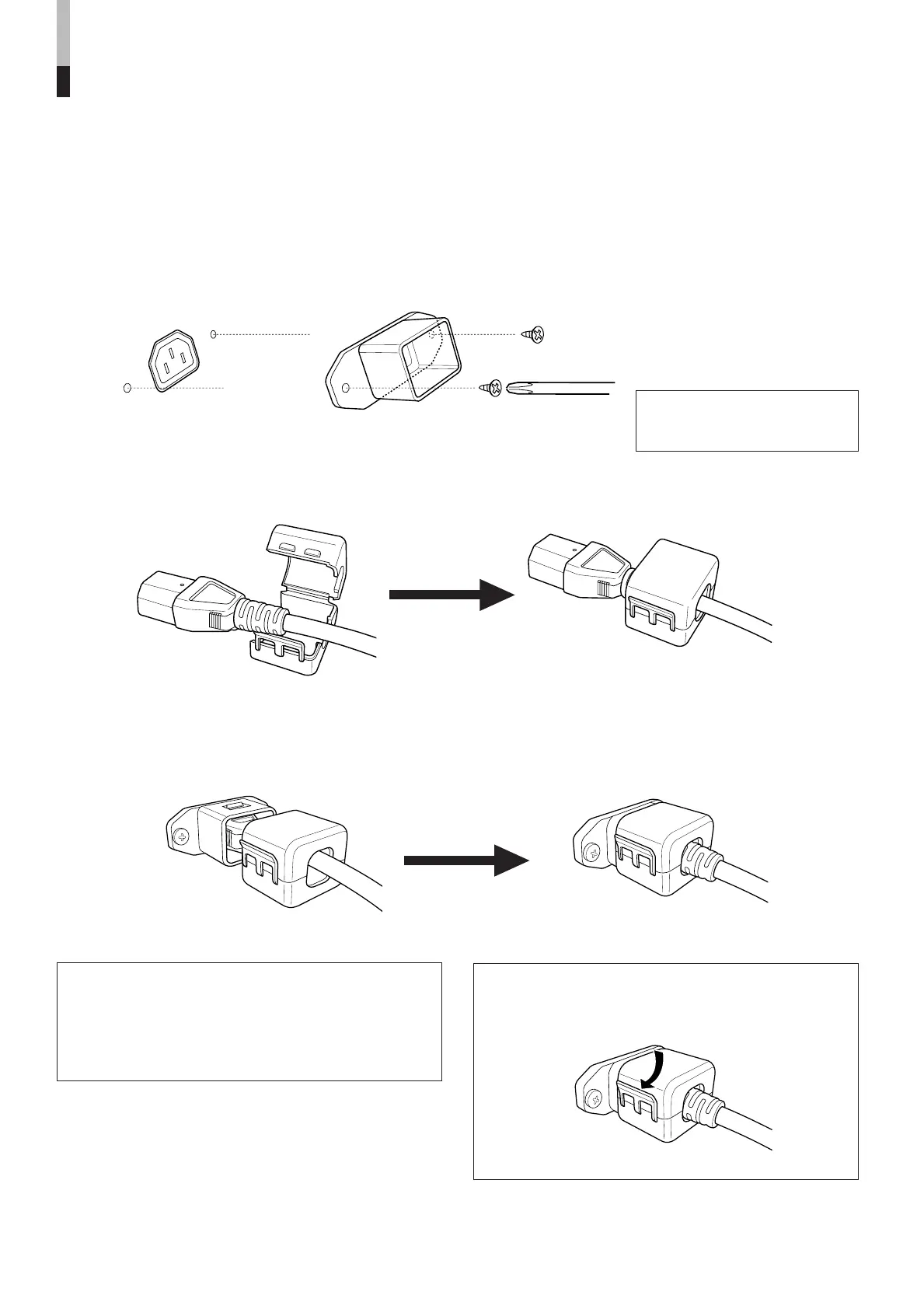
1. Attach the Power Cord Holder case to the AC inlet on the back of the monitor with 2 screws
(provided).
2. Attach the Power Cord Holder cover to the AC power cord.
3. Connect the AC power cord to the AC inlet, and join the Power Cord Holder cover with the
case.
ATTACHING THE POWER CORD HOLDER
• The provided Power Cord Holder prevents accidental disconnection of the AC power cord from the AC inlet.
• The Power Cord Holder consists of two parts; a case and cover.
Press the cover until it clicks.
Hold until it clicks.
Caution:
• A different plug shape will result in the cover being
attached to a different position.
• Check to make sure the plug doesn't pull out after the
cover is attached.
Note:
To disconnect the power cord, click the tab to open the
cover.
Caution:
Use only the provided screws.
PREPARATION (cont'd)
LCT1424-001A_EN_p2-17 11/4/03, 5:08 PM12


 To Next Page
 Loading...