ENGLISH
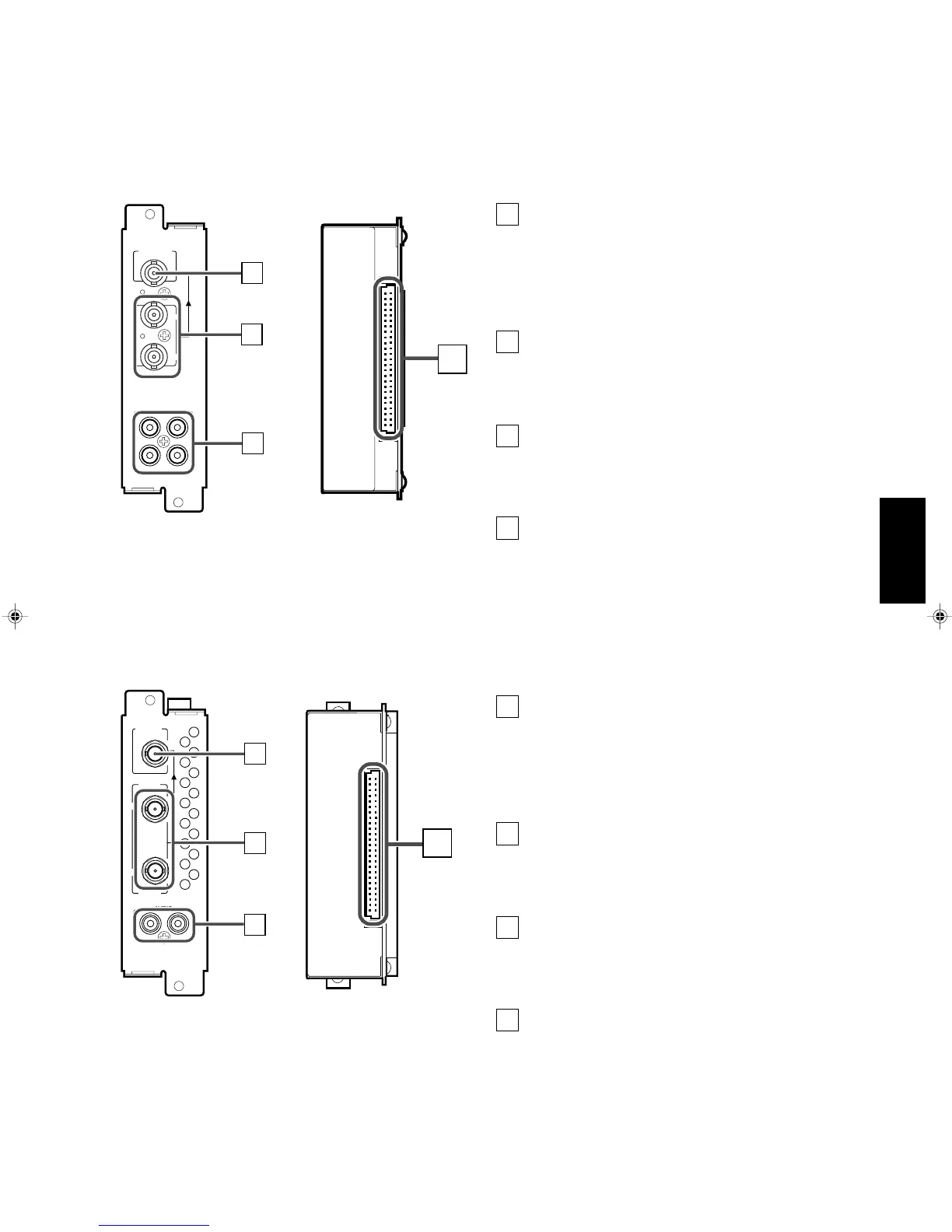
䡵 SDI INPUT CARD (OPTIONAL: IF-C01SDG)
AUDIO 2
AUDIO 1
OUT
IN
SWITCHED
OUT
SDI 1
SDI 2
IN
IN
1
2
3
4
Output terminal for a selected component
serial digital signal
Output terminal for a selected digital signal (the input
displayed on the screen). The output signal is cable-
compensated.
NOTE: When the monitor’s power is OFF, no digital
signal is output.
Input terminals for component serial digital
signals
Input terminals for the digital signal.
Select SDI 1 : press INPUT SELECT A/C/E button
Select SDI 2 : press INPUT SELECT B/D/F button
Audio input/output terminals
Input (IN) and output (OUT) terminals for the analogue
signals corresponding to SDI 1 and SDI 2.
NOTE: This input card cannot decode audio data even if
contained in the input digital signal.
Connection terminal (to a Multi-Format
Monitor)
Attach to the connection terminal of your Multi-Format
Monitor.
1
䡵 Compatible signal formats: 480/60i, 576/50i, 576/50p
2
3
4
䡵 HD SDI INPUT CARD (OPTIONAL: IF-C01HSDG)
䡵 Compatible signal formats: 720/60p, 1035/60i, 1080/50i,
1080/60i, 1080/24psF
Output terminal for a selected component
serial digital signal
Output terminal for a selected digital signal (the input
displayed on the screen). The output signal is cable-
compensated.
NOTE: When the monitor’s power is OFF, no digital
signal is output.
Input terminals for component serial digital
signals
Input terminals for the digital signal.
Select HD SDI 1 : press INPUT SELECT A/C/E button
Select HD SDI 2 : press INPUT SELECT B/D/F button
Audio input/output terminals
Input (IN) and output (OUT) terminals for the analogue
audio signals.
NOTE: This input card cannot decode audio data even if
contained in the input digital signal.
Connection terminal (to a Multi-Format
Monitor)
Attach to the connection terminal of your Multi-Format
Monitor.
1
2
3
4
AUDIO
OUT
IN
SWITCHED
OUT
HD SDI 1
HD SDI 2
IN
IN
1
2
3
4
7
LCT1116-001A(EN) 02.1.29, 2:53 PM9


 To Next Page
 Loading...