— : Turn down the
volume
+ : Turn up the
volume
Speaker volume
Playing Back Files
Video Playback
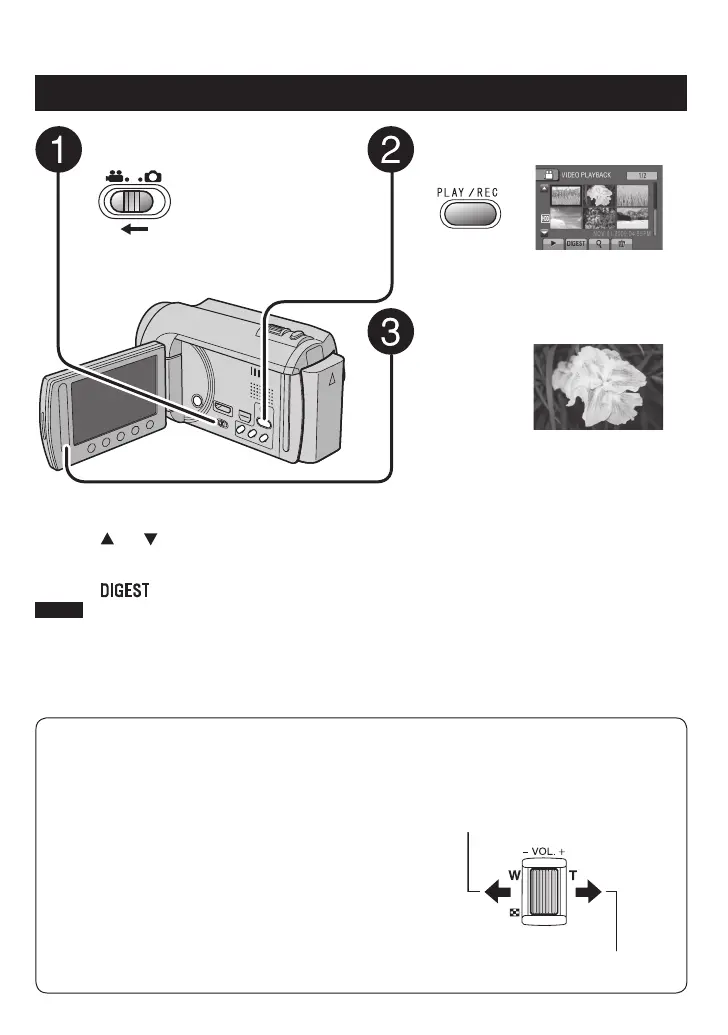
Slide the mode switch to select !
(video) mode.
Press PLAY/REC to select the
playback mode.
The index screen appears.
Select the desired file.
To move to the previous or next page
Touch [ ] or [ ] for over a second.
To play back a few seconds from the
beginning of each video
Touch [ ].
NOTE
•
In some cases, parts of video other than the
beginning may be played back.
•
Some video may not be played back at all.
To delete a video
Select $ when playback is stopped.
To change the number of thumbnails
(6 thumbnails/12 thumbnails)
Move the zoom lever to [W].
To zoom in the video during pause
(Remote Control Only)
Press T on the remote control.
•
Press ¡, ¢, £, ¤ on the remote control to
move the zoom area.
•
Press and hold W on the remote control to
cancel zoom in.
Operations during Video Playback
On-screen buttons
N
:
Return to the first scene of the file
O
:
Go to the first scene of the next file
L
:
Return to the index screen
J
:
Reverse search (during playback)
E
:
Frame-by-frame playback in reverse
direction (during pause)*
F
:
Playback
Q
:
Pause
K
:
Forward search (during playback)
G
:
Frame-by-frame playback in forward
direction (during pause)*
* Slow playback starts when you keep touching the
sensor button under
E
/
G
for a while.



 To Next Page