Masterpage:Right
EN
19
Filename [DVS3U_1a-EN.fm]
Page 19 January 10, 2002 5:00 pm
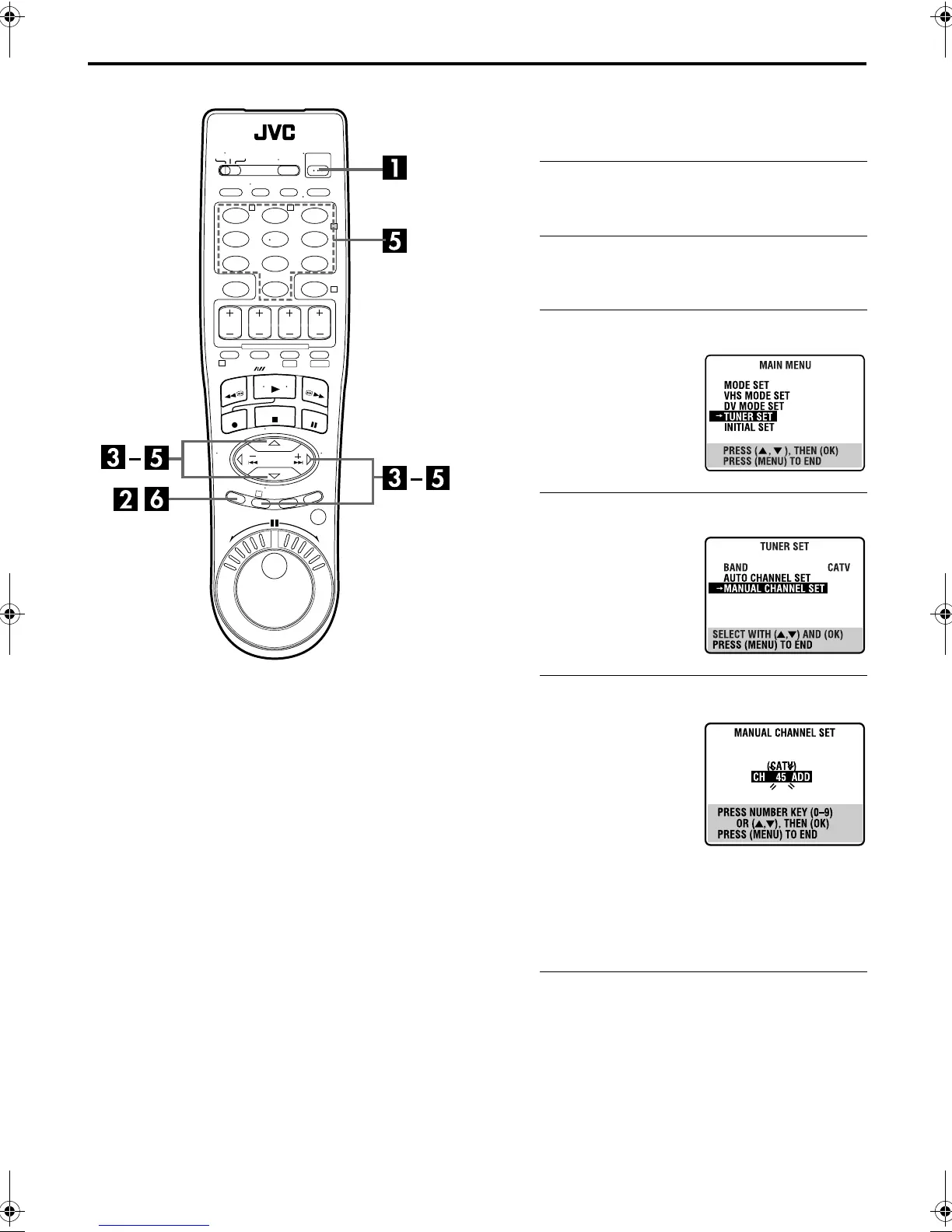
Manual Channel Set
You can add the channels you want or delete the channels you
do not want manually.
A
Turn on the VCR.
Press
POWER
.
B
Access the Main Menu screen.
Press
MENU
.
C
Access the Tuner Set screen.
D
Access the Manual Channel Set screen.
E
Add or skip the desired channels.
To add channels
A
Press the
number keys
to
input a channel number you
want to add.
B
Press
OK
or
e
to set to
“ADD”.
C
Repeat
A
to
B
to add other
channels.
To skip channels
A
Press
rt
or the
number keys
to select a channel
number you want to skip.
B
Press
OK
or
e
to set to “SKIP”.
C
Repeat
A
and
B
to skip other channels.
F
Return to the normal screen.
Press
MENU
.
123
456
7
89
0
2
4
1
3
T W
DV S-VHS
Press
rt
to move the
highlight bar (arrow) to
“TUNER SET”, then press
OK
or
e
.
Press
rt
to move the
highlight bar (arrow) to
“MANUAL CHANNEL SET”,
then press
OK
or
e
.
DVS3U_1a-EN.fm Page 19 Thursday, January 10, 2002 5:00 PM



 To Next Page