INSTALLATION
● The same installation procedure applies to all Input Cards.
● If the Input Card is installed correctly, your Multi-Format Monitor will automatically
recognise it.
● Refer to the user manual provided with your Multi-Format Monitor for details on adjustment
or setting of input signals via the Input Card.
䡵 PREPARATION
• Wear gloves to protect your hands from metal parts on the Input Card’s board.
• You will need a 6-mm Phillips screwdriver.
• Turn off the Multi-Format Monitor’s main power and unplug the power cable from the AC outlet.
䡵 CAUTIONS
• Do not touch the terminal connected to the monitor or board pattern. (Doing so may produce static
electricity that will damage the Input Card.)
• Do not remove slot covers from the monitor’s slots if they are not in use.
• Do not force the Input Card into the monitor’s slot.
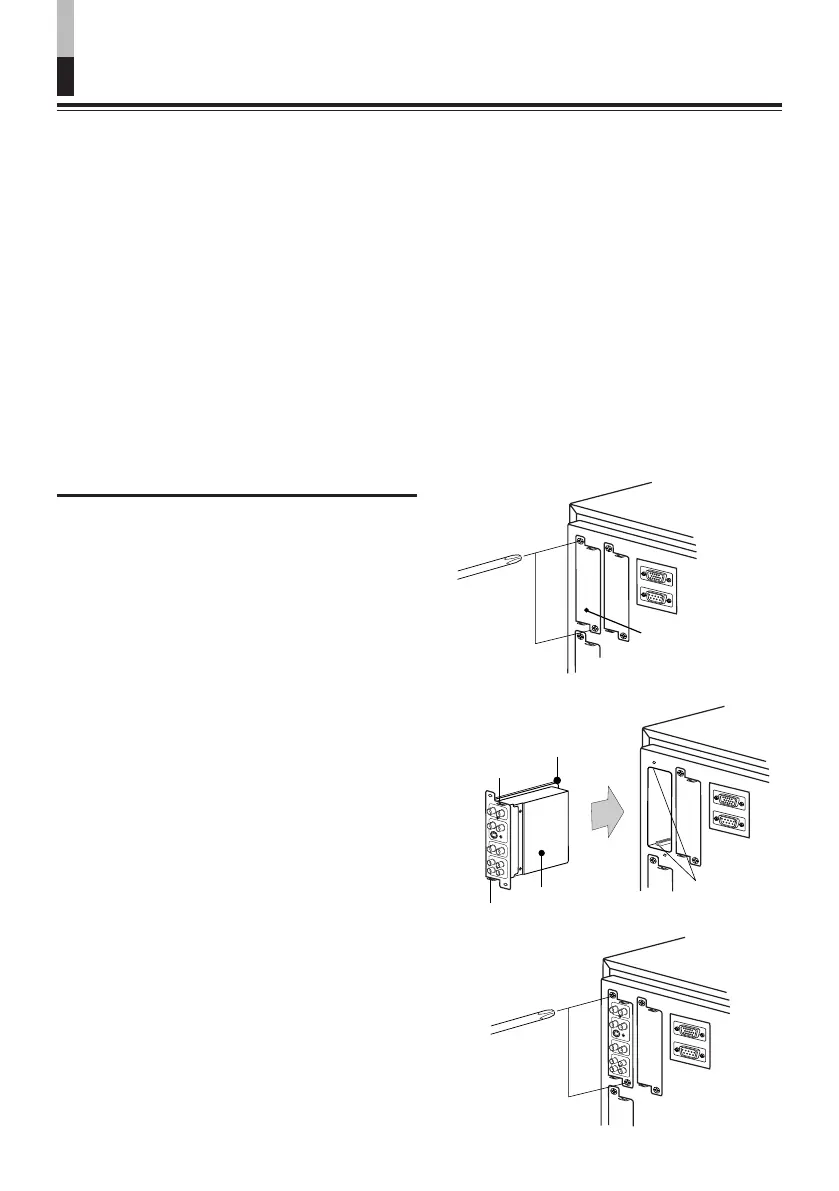
䡵 INSTALLATION PROCEDURE
1.
Unscrew the screws and remove
the slot cover from the slot (on the
rear side of the monitor) in which
you are going to install the card.
2.
Inser t the Input Car d’s board
(green-coloured) into the slot,
fitting the board into the guide
rails on the top and bottom of the
slot.
3.
Push the Input Card in so that its
fr ont panel touches the monitor’ s
rear panel. (Insert the Input Card
holding the knobs at the top and
bottom.)
4.
Secure the Input Card by replacing
the screws removed in Procedure
1.
● Make sure the Input Card is correctly
installed by checking “SLOT CONDITION”
in the Main Menu of the Multi-Format
Monitor. (Also refer to the Multi-Format
Monitor’s instruction manual.)
Slot cover
Fit the board to
the guide rails.
Knob
Rear side of the multi-format
monitor
Knob
Input card (the
illustration shown is
of the IF-C01PNG)
Guide rails
2



 To Next Page