11
ENGLISH
○○○○○○○○○
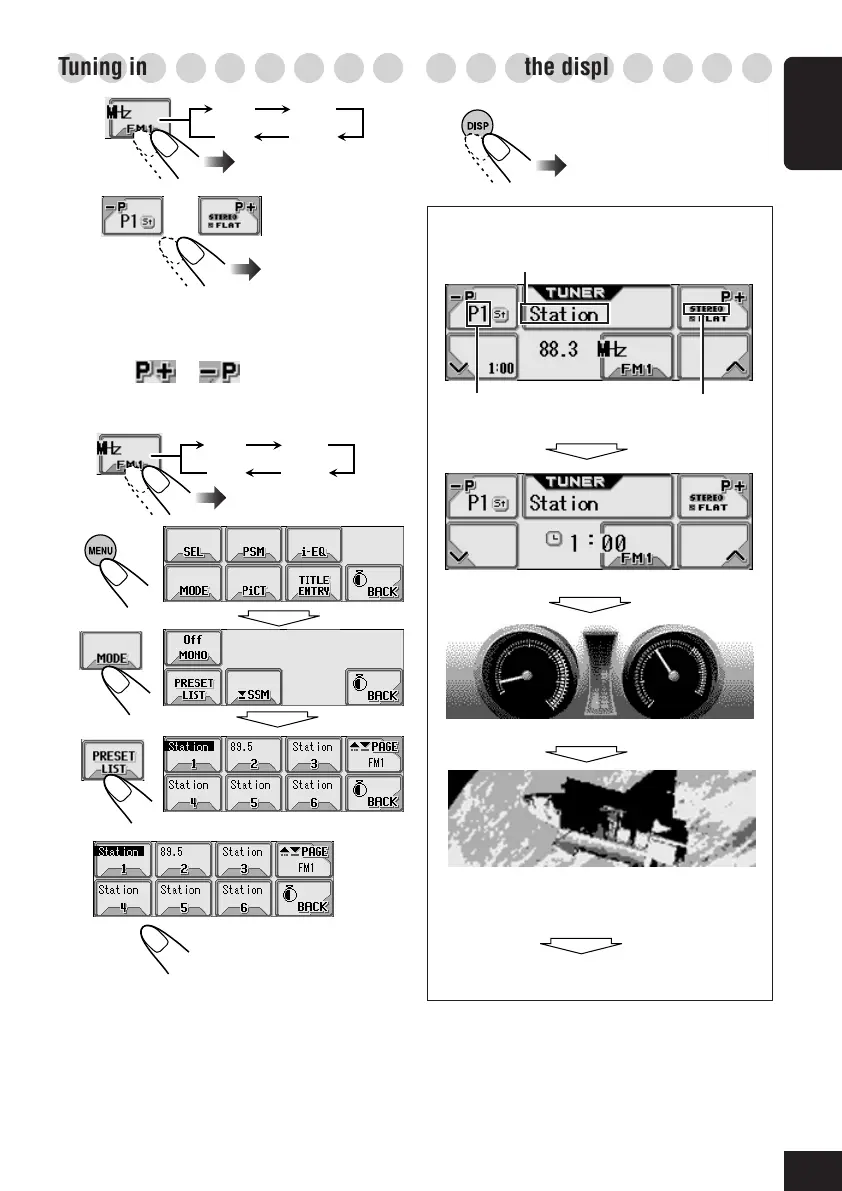
Tuning in to a preset station
1
2
To select a preset station using the
Preset Station List
• Holding
or on the Tuner
Operation screen can also display the Preset
Station List.
1
2
3
4
5
FM1 FM2
FM3AM
FM1 FM2
FM3AM
Select a preset
number.
Select a preset number.
○○○○○○○○○
Changing the display pattern
Station name if assigned
Preset number
if any
Lights while receiving
an FM stereo program
Clock time is enlarged.
Audio Level Meter* (see page 30)
Graphic screen*
(Appears only after you have
download a file, see page 25)
Goes back to the Tuner Operation screen.
Tuner Operation screen
* These screens will be temporarily canceled
when you operate the unit.
06-11_KD-AR_LHX5000[J]f.p65 1/27/04, 9:16 PM11



 To Next Page