20
ENGLISH
○○○○○○○○○
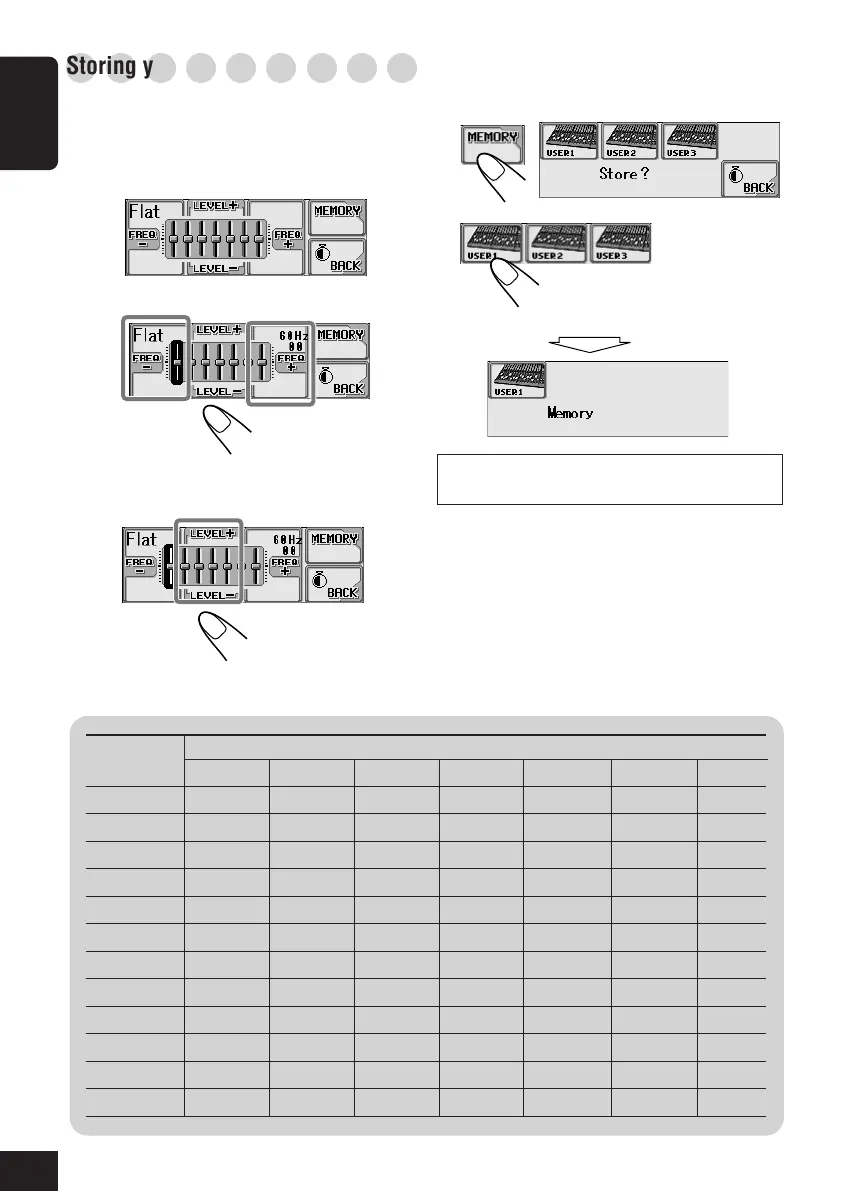
Storing your own sound modes
You can adjust the sound modes and store your
own adjustments in memory.
1
Repeat steps
1
to
3
on page 19 to select a
sound mode you want to adjust.
2
3
Ex. When you select “Flat”
Select the frequency band—60Hz, 150Hz,
400Hz, 1kHz, 2.4kHz, 6kHz, 12kHz.
Adjust the level of the selected band
within the range of –05 to +05.
4
Repeat steps
2
and
3
to adjust the other
frequency bands.
5
6
For details about the preset settings of each
sound mode, see below.
Sound Preset equalizing values
Mode 60 Hz 150 Hz 400 Hz 1 kHz 2.4 kHz 6 kHz 12 kHz
Flat 00 00 00 00 00 00 00
Hard Rock +03 +03 +01 00 00 +02 +01
R & B +03 +02 +02 00 +01 +01 +03
Pop 00 +02 00 00 +01 +01 +02
Jazz +03 +02 +01 +01 +01 +03 +02
Dance +04 +02 00 –02 –01 +01 +01
Country +02 +01 00 00 00 +01 +02
Reggae +03 00 00 +01 +02 +02 +03
Classic +02 +03 +01 00 00 +02 00
User 1 00 00 00 00 00 00 00
User 2 00 00 00 00 00 00 00
User 3 00 00 00 00 00 00 00
Select one of the user modes to
store your adjustment (ex. when
you selecting “USER1”).
18-20_KD-AR_LHX5000[J]f.p65 1/27/04, 9:18 PM20



 To Next Page