40
ENGLISH
○○○○○○○○○
Locating a track or folder on a disc
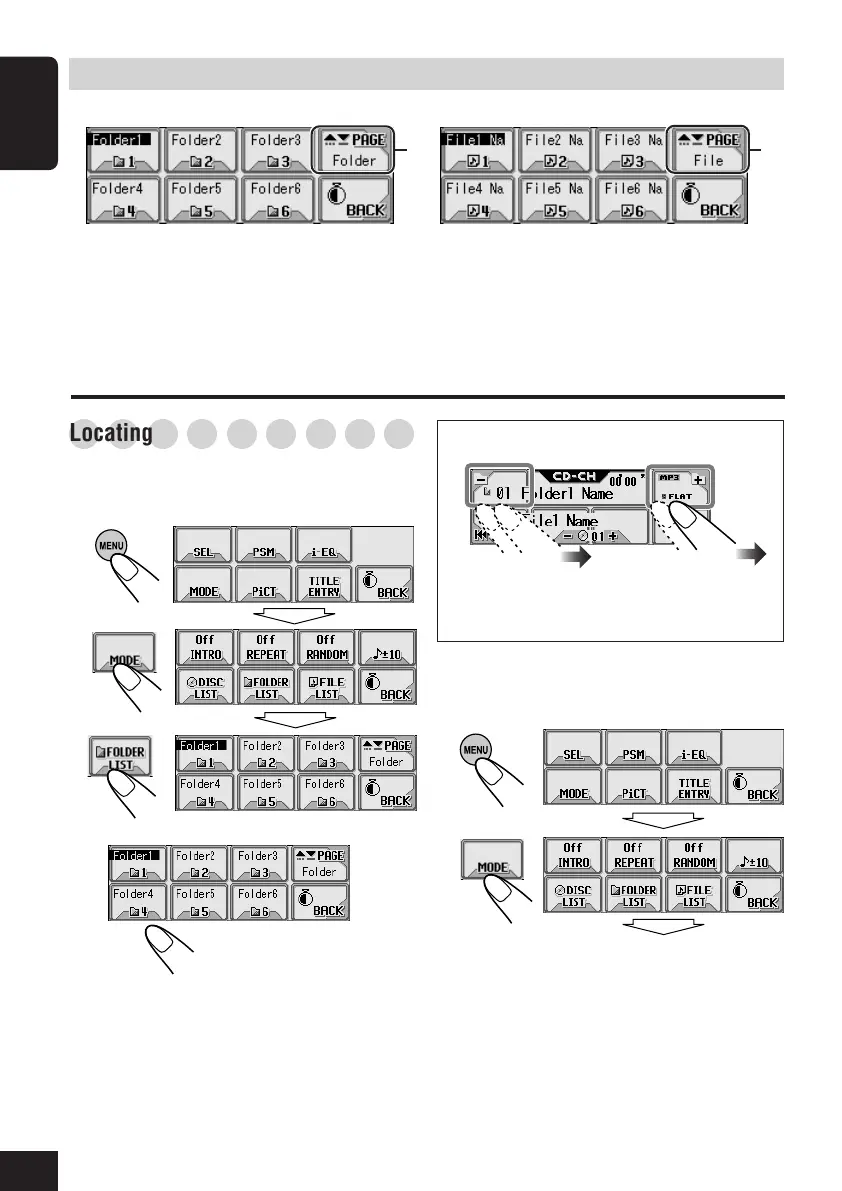
To locate a folder on the screen (only
for MP3 discs)
1
2
3
4
• If you select the currently selected folder
(highlighted on the screen), the File List
screen (see step
3
of the left column on
page 41), then you can select a track to
start with.
The current folder is highlighted.
Select a folder number.
Main touch panels used in this section
• To return to the previous screen, press “BACK”
(if shown)
You can also select a folder....
• If you hold the icon, the Folder List will
appear on the display.
To locate a track on the screen (only for
MP3 discs)
1
2
Folder List screen (only for MP3)*
1
File (Track) List screen (only for MP3)*
1
*
2
*
2
*
1
The lists show the folder/file names actually
recorded (the first 8 characters).
*
2
Press to go to the next list; hold to go back to
the previous list.
37-43_KD-AR_LHX5000[J]f.p65 1/27/04, 9:21 PM40



 To Next Page