23
ENGLISH
2
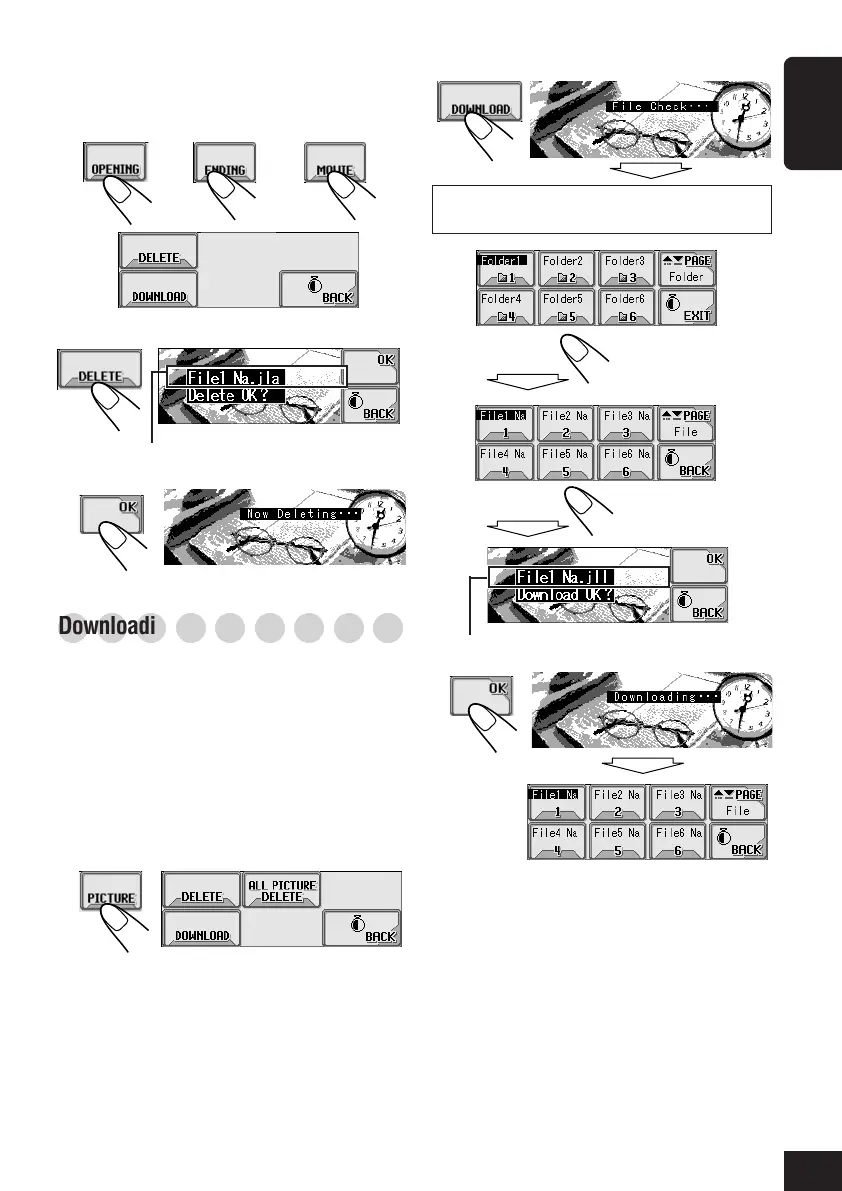
Only the folders including the <jll> files are
shown.
3
4
5
To delete the stored animation:
1
Repeat steps
1
to
4
on page 21, then in
step
5
...
2
3
○○○○○○○○○
Downloading the files for “PICTURE”
Download pictures (total of 30 still images:
each one frame—see also page 48) which can
be used for the graphic screen.
• To activate the downloaded animation, see
page 25.
To download pictures
1
Repeat steps
1
to
4
on page 21, then in
step
5
...
or or
Select a folder.
(once for the
currently selected;
twice for the others)
Select a file.
File name of the selected file appears.
File name of the stored file appears.
To be continued...
21-26_KD-AR_LHX5000[J]f.p65 1/27/04, 9:19 PM23



 To Next Page