27
ENGLISH
General Settings—PSM
○○○○○○○○
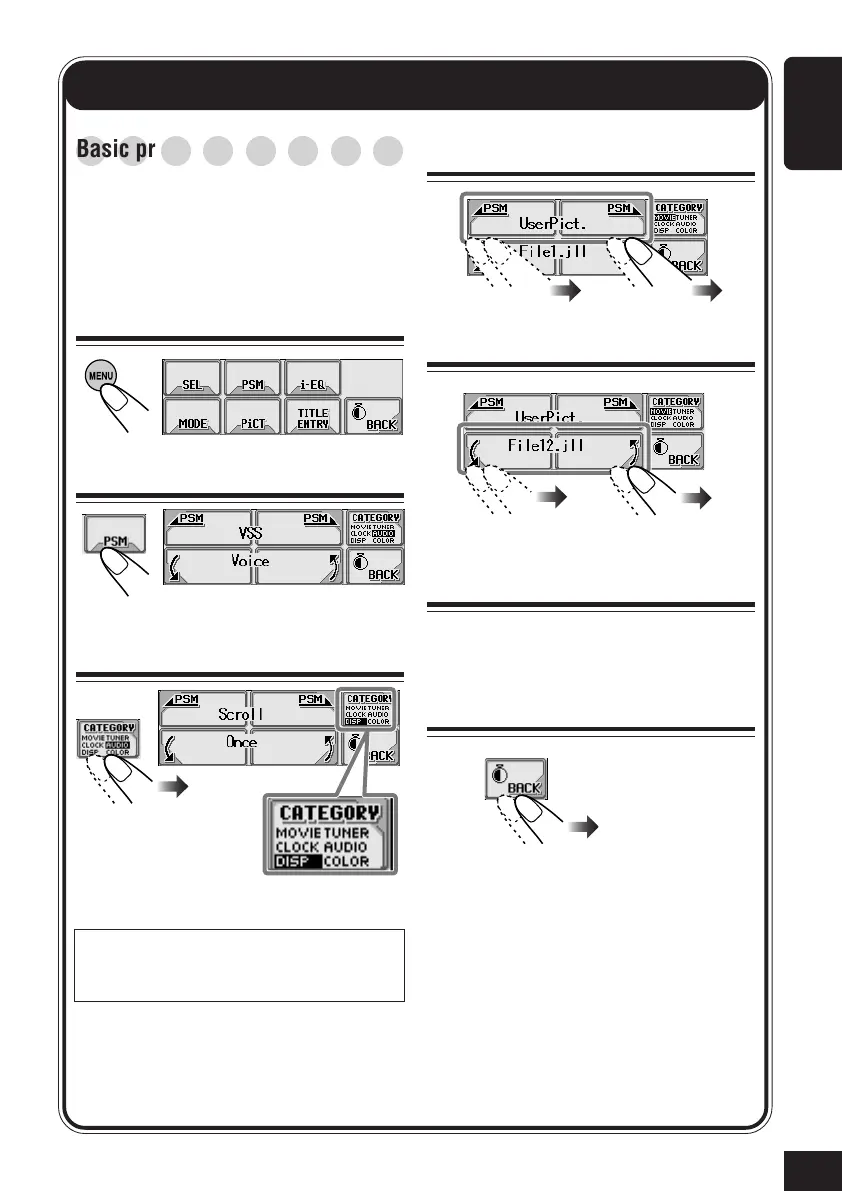
Basic procedure
You can change the Preferred Setting Mode
(PSM) items listed on the table that follows.
• The PSM items are grouped into six
categories—MOVIE, CLOCK, DISP
(display), TUNER, AUDIO, and COLOR.
1
Show the Main Menu
2
Show the PSM setting screen
3
Select a PSM category
4
Select a PSM item
5
Change or adjust the setting
6
Change or adjust other PSM
items
If necessary, repeat steps
3
to
5
to change
other PSM item settings.
7
Exit
The last selected item appears.
Ex. When selecting
“DISP.”
The first listed PSM item
in the selected category
appears.
Without selecting a PSM category, you can
move to a different category by simply
changing the PSM items (in step
4
).
27-34_KD-AR_LHX5000[J]f.p65 1/27/04, 9:20 PM27



 To Next Page