ENGLISH
18
Selecting a preset sound mode
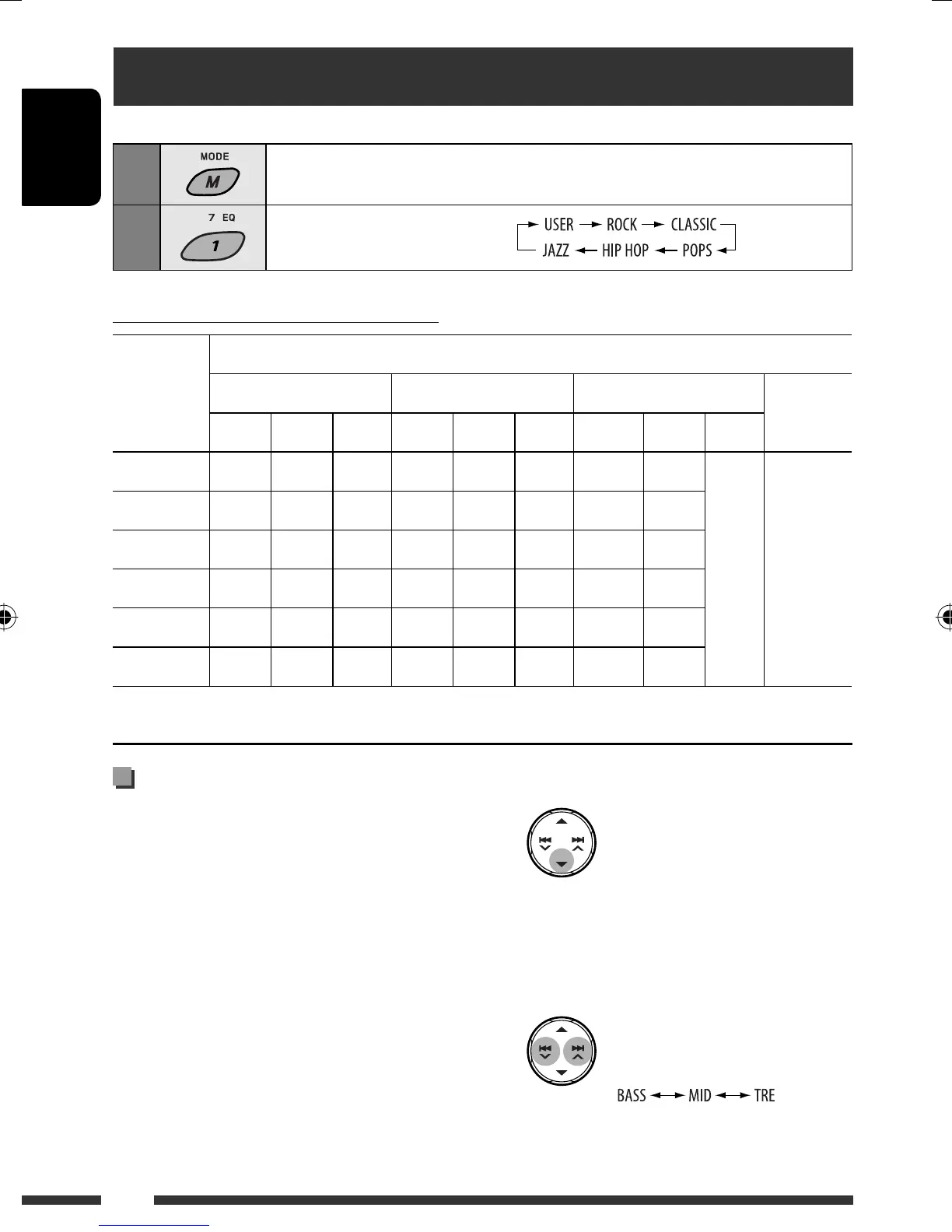
You can select a preset sound mode suitable to the music genre (iEQ: intelligent equalizer).
1
Enter functions mode.
2
Select a preset sound mode.
Preset value setting for each sound mode
Sound
mode
Preset value
BASS (bass) MID (mid-range) TRE (treble) LOUD
(loudness)
Freq. Level Q Freq. Level Q Freq. Level Q
USER 60 Hz 00 Q1.25 1.0 kHz 00 Q1.25 10.0 kHz 00
Fix OFF
ROCK 100 Hz +03 Q1.0 1.0 kHz 00 Q1.25 10.0 kHz +02
CLASSIC 80 Hz +01 Q1.25 1.0 kHz 00 Q1.25 10.0 kHz +03
POPS 100 Hz +02 Q1.25 1.0 kHz +01 Q1.25 10.0 kHz +02
HIP HOP 60 Hz +04 Q1.0 1.0 kHz –02 Q1.0 10.0 kHz +01
JAZZ 80 Hz +03 Q1.25 1.0 kHz 00 Q1.25 10.0 kHz +03
Freq.: Frequency Q: Quality slope
2 Enter the adjustment mode.
This mode will be canceled if no operations are
done for about 5 seconds.
3 Select a tone.
Storing your own sound mode
You can adjust the sound modes and store your own
adjustments in memory.
• The adjustment you make will be stored for the
currently selected sound mode (iEQ) including
“USER.”
1 Select a sound mode.
EN18-23_KD-BT11[EE]_6.indd 18EN18-23_KD-BT11[EE]_6.indd 18 12/17/07 5:13:36 PM12/17/07 5:13:36 PM



 To Next Page