EasyManua.ls Logo

JVC KD-D30 - Mechanical Assembly; Mechanical Parts; Electrical Parts

JVC KD-D30
29 pages
Print Icon
To Next Page IconTo Next Page
To Previous Page IconTo Previous Page
Loading...
Enclosure
assembly
parts
1.
Cassette
door
Push
the
EJECT
button
to
open
the
cassette
door.
Slide
off
the
cassette
door
upwards
to
unlock
its
pawls
off
both
sides.
2.
Top
cover
Remove
6
screws
Qa).
(left,
right
and
rear
......
2
screws
on
each.)
3.
Bottom
cover
Remove
6
screws
4.
Front
plate
assembly
Remove
6
screws
(4
screws
GB)
on
upper
side
and
2
screws
on
bottom
side).
5.
Cassette
holder
Remove
2
screws
fastening
the
door
bracket
ass’y.
Mechanical
assembly
Remove
6
screws
(6)
fastening
the
mechanical
ass’y
(2
screws
on
the
front
bracket,
and
4
screws
on
the
chassis.)
Mechanical
parts
The
removal
methods
of
mechanical
parts
are
the
same
as
model
KD-D20.
Please
refer
to
service
manual
of
KD-D20
(No.
4208
page
6).
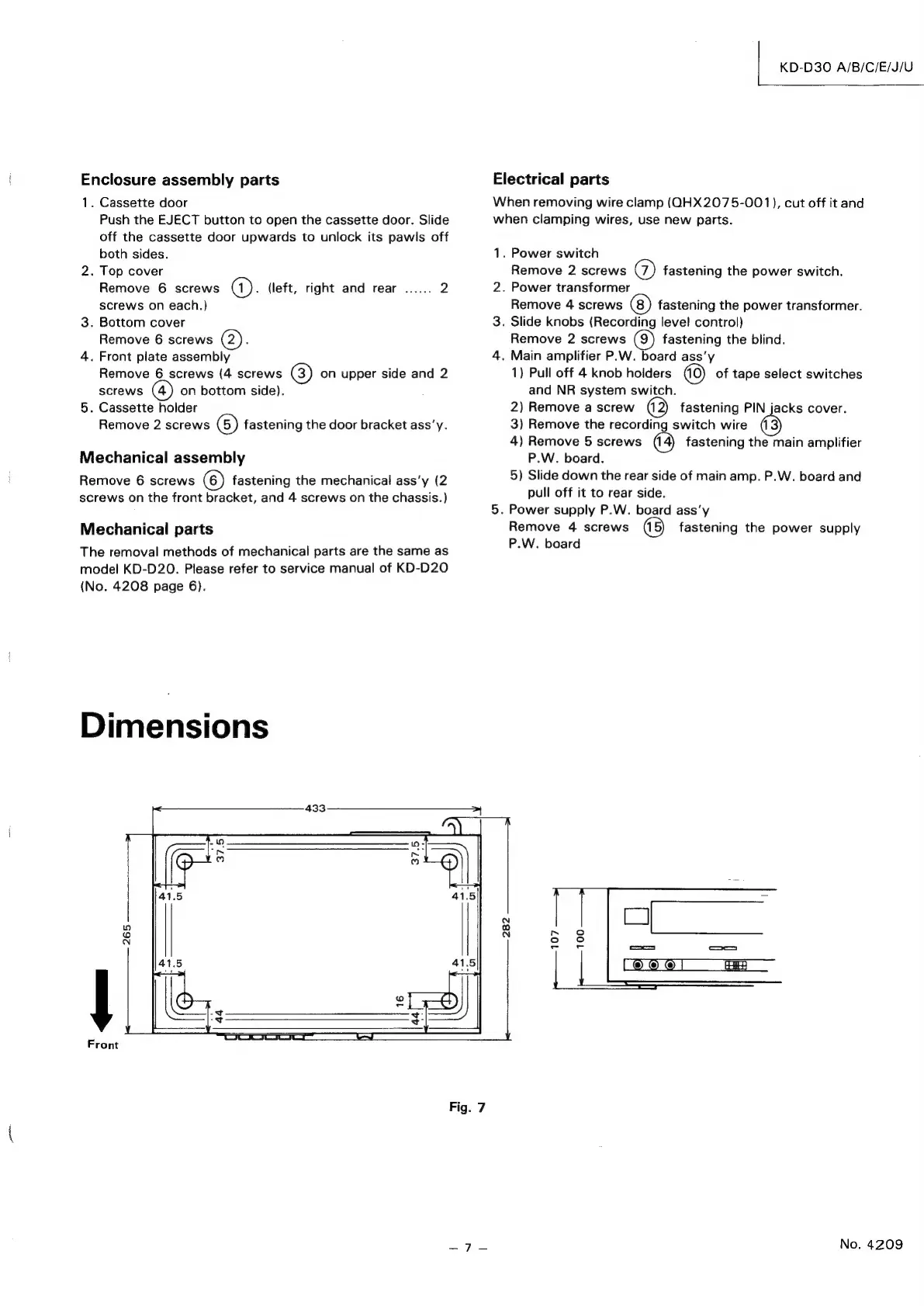
Dimensions
Front
KD-D30
A/B/C/E/J/U
Electrical
parts
When
removing
wire
clamp
(QHX2075-001),
cut
off
it
and
when
clamping
wires,
use
new
parts.
1.
Power
switch
Remove
2
screws
@)
fastening
the
power
switch.
2.
Power
transformer
Remove
4
screws
fastening
the
power
transformer.
3.
Slide
knobs
(Recording
level
control)
Remove
2
screws
fastening
the
blind.
4.
Main
amplifier
P.W.
board
ass’y
1)
Pull
off
4
knob
holders
of
tape
select
switches
and
NR
system
switch.
2)
Remove
a
screw
fastening
PIN
jacks
cover.
3)
Remove
the
recording
switch
wire
4)
Remove
5
screws
fastening
the
main
amplifier
P.W.
board.
5)
Slide
down
the
rear
side
of
main
amp.
P.W.
board
and
pull
off
it
to
rear
side.
5.
Power
supply
P.W.
board
ass’y
Remove
4
screws
fastening
the
power
supply
P.W.
board
Fig.
7
ny
No.
4209

Related product manuals