EasyManua.ls Logo

JVC KD-D30 - Main Adjustments

JVC KD-D30
29 pages
Print Icon
To Next Page IconTo Next Page
To Previous Page IconTo Previous Page
Loading...
KD-D30
A/B/C/E/J/U
Main
Adjustments
{1}
Equipment
and
measuring
instruments
used
for
adjustment
.
Electrical
adjustment
1)
Electronic
voltmeter
2)
Audio
frequency
oscillator
(range:
50—20
kHz
and
output
O
dB
with
impedance
600
Q)
3)
Attenuator
4)
Standard
tapes
for
REC/PB
Maxell
UD
SF
tape
TDK
SA
SA
tape
JVC
ME
Metal
tape
5)
Reference
tapes
for
playback
(JVC
Test
Tape)
VTT-658
(for
head
azimuth
adj.)
VTT-656
(for
motor
speed,
wow
flutter
adj.)
VTT-664
(for
Reference
Level
1
kHz)
VTT-675N
(for
playback
frequency
response)
6)
Resistor
600
2
(for
attenuator
matching)
or
equivalent
2.
Mechanical
adjustment
1)
Torque
testing
cassette
gauge,
CTG-N.
2)
Blank
tape
(C-120)
for
tape
running
checker.
[li]
Mechanical
adjustment
This
adjustment
is
the
same
as
those
of
the
service
manual
for
PC-3
JW/W/WHIC
(No.
1470).
1469)
or
PC-3L/LB
(No.
Please
refer
to
the
service
manua!
of
PC-3
JW/W/WH/C
(No.
1469,
page
17)
or
PC-3L/LB
(No.
1470
page
17).
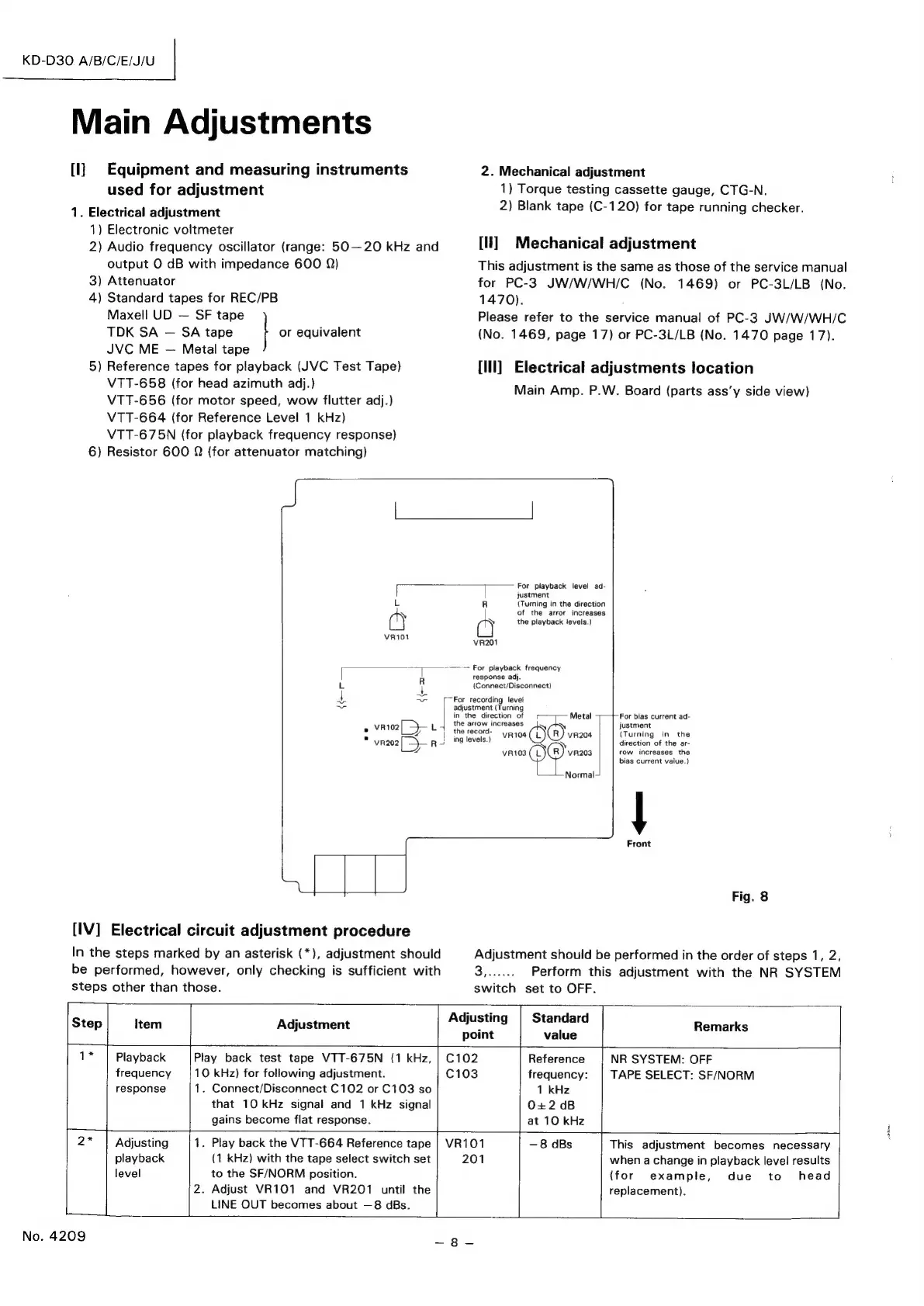
[lll]
Electrical
adjustments
location
Main
Amp.
P.W.
Board
(parts
ass’y
side
view)
[
L
fa
VRi01
R
L
4
4
ae
x
vrto2[
—}—
L
s
vr202
|)
R
For
(Tu
of
the
Z
a
VR201
response
adj.
playback
level
ad-
justment
ning
in
the
direction
the
arror
increases
playback
levels.)
-
For
playback
frequency
{Connect/Disconnect)
For
recording
level
adjustment
(Turning
in
the
direction
of
the
arrow
increases
|
the
record-
|}
ing
levels.)
¥R104
VR103
———
Metal
(8)
vaaos
Qo
(R)
vraos
‘—Normal
[IV]
Electrical
circuit
adjustment
procedure
In
the
steps
marked
by
an
asterisk
(*),
adjustment
should
be
performed,
however,
only
checking
is
sufficient
with
steps
other
than
those.
3,
For
bias
current
ad-
justment
{Turning
in
the
direction
of
the
ar-
row
increases
the
bias
current
value.)
|
Front
Fig.
8
Adjustment
should
be
performed
in
the
order
of
steps
1,
2,
Perform
this
adjustment
with
the
NR
SYSTEM
switch
set
to
OFF.
Step
Item
Adjustment
AUBTING
miancard
Remarks
point
value
1*
Playback
Play
back
test
tape
VTT-675N
(1
kHz,
|
C102
Reference
NR
SYSTEM:
OFF
frequency
10
kHz)
for
following
adjustment.
C103
frequency:
TAPE
SELECT:
SF/NORM
response
1.
Connect/Disconnect
C102
or
C103
so
1
kHz
that
10
kHz
signal
and
1
kHz
signal
O+2
dB
gains
become
flat
response.
at
10
kHz
2*
leery
1.
Play
back
the
VTT-664
Reference
tape
|
VR101
—8
dBs
This
adjustment
becomes
necessary
playback
(1
kHz)
with
the
tape
select
switch
set
201
when
a
change
in
playback
level
results
level
to
the
SF/NORM
position.
(for
example,
due
to
head
2.
Adjust
VR101
and
VR201
until
the
replacement).
L
I
LINE
OUT
becomes
about
—8
dBs.
ae.
No.
4209

Related product manuals