EasyManua.ls Logo

JVC KD-D30 - Page 9

JVC KD-D30
29 pages
Print Icon
To Next Page IconTo Next Page
To Previous Page IconTo Previous Page
Loading...
KD-D30
A/B/C/E/J/U
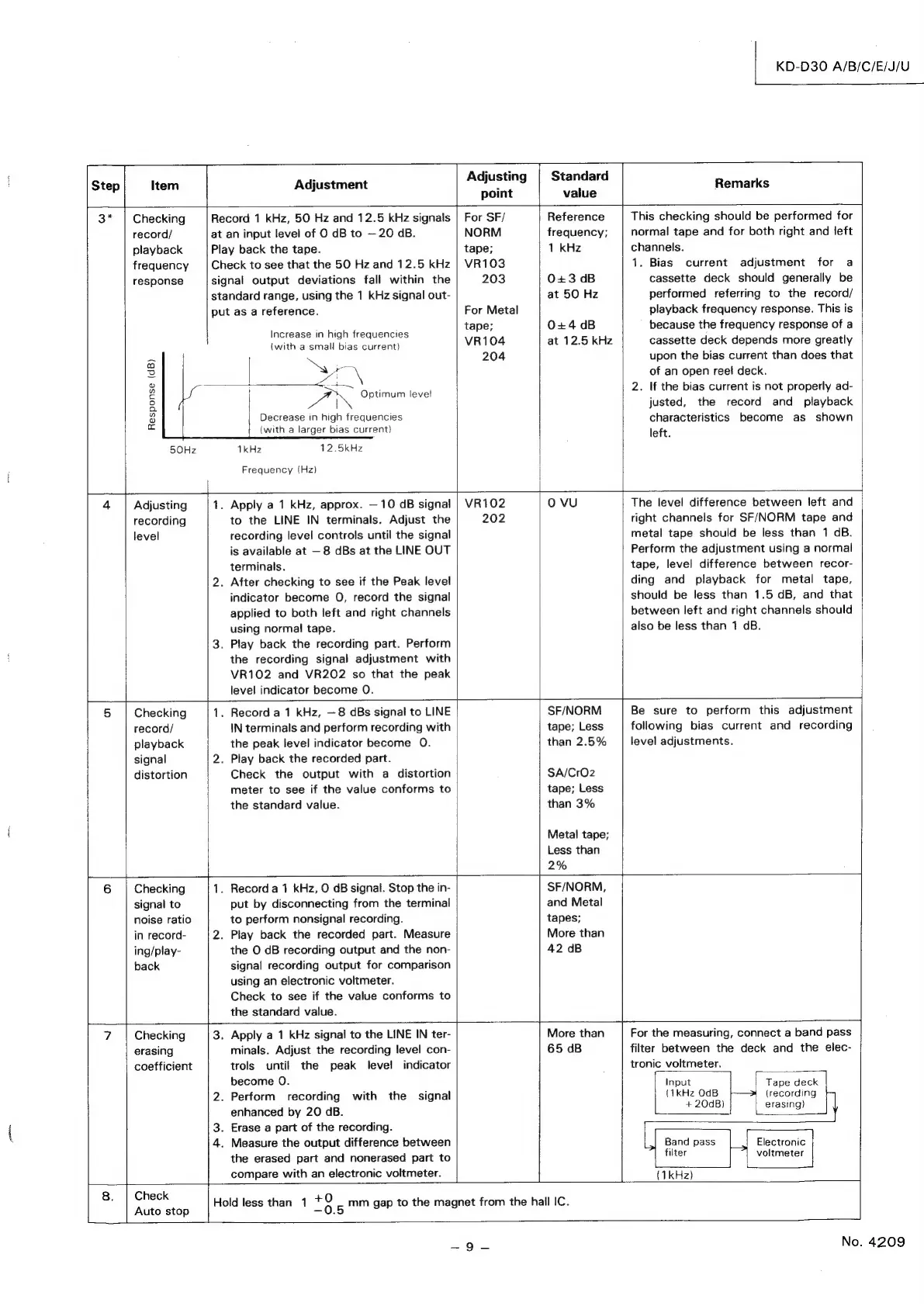
is
available
at
8
dBs
at
the
LINE
OUT
terminals.
2.
After
checking
to
see
if
the
Peak
level
indicator
become
O,
record
the
signal
applied
to
both
left
and
right
channels
using
normal
tape.
3.
Play
back
the
recording
part.
Perform
the
recording
signal
adjustment
with
VR102
and
VR202
so
that
the
peak
level
indicator
become
O.
Adjusti
Step
Item
Adjustment
justing
Standard
Remarks
point
value
3*
|
Checking
Record
1
kHz,
50
Hz
and
12.5
kHz
signals
|
For
SF/
Reference
This
checking
should
be
performed
for
record/
at
an
input
level
of
O
dB
to
—20
aB.
NORM
frequency;
normal
tape
and
for
both
right
and
left
playback
Play
back
the
tape.
tape;
1
kHz
channels.
frequency
Check
to
see
that
the
50
Hz
and
12.5
kHz
|
VR103
1.
Bias
current
adjustment
for
a
response
signal
output
deviations
fall
within
the
203
0+3
dB
cassette
deck
should
generally
be
standard
range,
using
the
1
kHz
signal
out-
at
50
Hz
performed
referring
to
the
record/
put
as
a
reference.
For
Metal
playback
frequency
response.
This
is
tape;
0+4
dB
because
the
frequency
response
of
a
Increase
in
high
frequencies
:
(with
a
small
bias
current)
VR104
at
12.5
kHz
cassette
deck
depends
more
greatly
=
204
upon
the
bias
current
than
does
that
a
Ny
2
3
MA
\
of
an
open
reel
deck.
2
ON
Gatimunnlevel
2.
If
the
bias
current
is
not
properly
ad-
Q
|
justed,
the
record
and
playback
3
Decrease
in
high
frequencies
characteristics
become
as
shown
ie
(with
a
larger
bias
current)
left
50Hz
1kHz
12.5kHz
Frequency
(Hz)
4
Adjusting
1.
Apply
a
1
kHz,
approx.
10
dB
signal
|
VR102
Oo
VU
The
level
difference
between
left
and
recording
to
the
LINE
IN
terminals.
Adjust
the
202
right
channels
for
SF/NORM
tape
and
level
recording
level
controls
until
the
signal
metal
tape
should
be
less
than
1
dB.
Perform
the
adjustment
using
a
normal
tape,
level
difference
between
recor-
ding
and
playback
for
metal
tape,
should
be
less
than
1.5
dB,
and
that
between
left
and
right
channels
should
also
be
less
than
1
dB.
5
Checking
1.
Record
a
1
kHz,
—8
dBs
signal
to
LINE
SF/NORM
Be
sure
to
perform
this
adjustment
record/
IN
terminals
and
perform
recording
with
tape;
Less
following
bias
current
and
recording
playback
the
peak
level
indicator
become
0.
than
2.5%
level
adjustments.
signal
2.
Play
back
the
recorded
part.
distortion
Check
the
output
with
a
distortion
SA/CrO2
meter
to
see
if
the
value
conforms
to
tape;
Less
the
standard
value.
than
3%
Metal
tape;
Less
than
2%
6
Checking
1.
Record
a
1
kHz,
O
GB
signal.
Stop
the
in-
SF/NORM,
signal
to
put
by
disconnecting
from
the
terminal
and
Metal
noise
ratio
to
perform
nonsignal
recording.
tapes;
in
record-
2.
Play
back
the
recorded
part.
Measure
More
than
ing/play-
the
O
dB
recording
output
and
the
non-
42
dB
back
signal
recording
output
for
comparison
using
an
electronic
voltmeter.
Check
to
see
if
the
value
conforms
to
the
standard
value.
7
Checking
3.
Apply
a
1
kHz
signal
to
the
LINE
IN
ter-
More
than
For
the
measuring,
connect
a
band
pass
erasing
minals.
Adjust
the
recording
level
con-
65
dB
filter
between
the
deck
and
the
elec-
coefficient
trols
until
the
peak
level
indicator
tronic
voltmeter.
become
0.
Input
Tape
deck
2.
Perform
recording
with
the
signal
(1kHz
OdB
(recording
enhanced
by
20
dB.
|
#20dB)
erasing)
3.
Erase
a
part
of
the
recording.
4.
Measure
the
output
difference
between
Band
pass
[
Electronic
the
erased
part
and
nonerased
part
to
filter
voltmeter
compare
with
an
electronic
voltmeter.
(1kHz)
=
ee
Hold
less
than
1
oe
mm
gap
to
the
magnet
from
the
hall
IC.
=
9.2
No.
4209

Related product manuals