Only
possible
on
JVC
MP3-compatible
CD
changer
• For MP3
or
WMA
discs, you can skip tracks
within the same folder.
•
Skipping
tracks
quickly
during
play
I.Q~~I
l;a'o~1
IiiIIl
1;'oc:tJ1
liill
To
go
to
the
next
or
previous
tracks
To
fast-forward
or
reverse
the
track
To
go
to
the
next
or
previous
folders
(only
for
MP3
or
WMA
discsl.
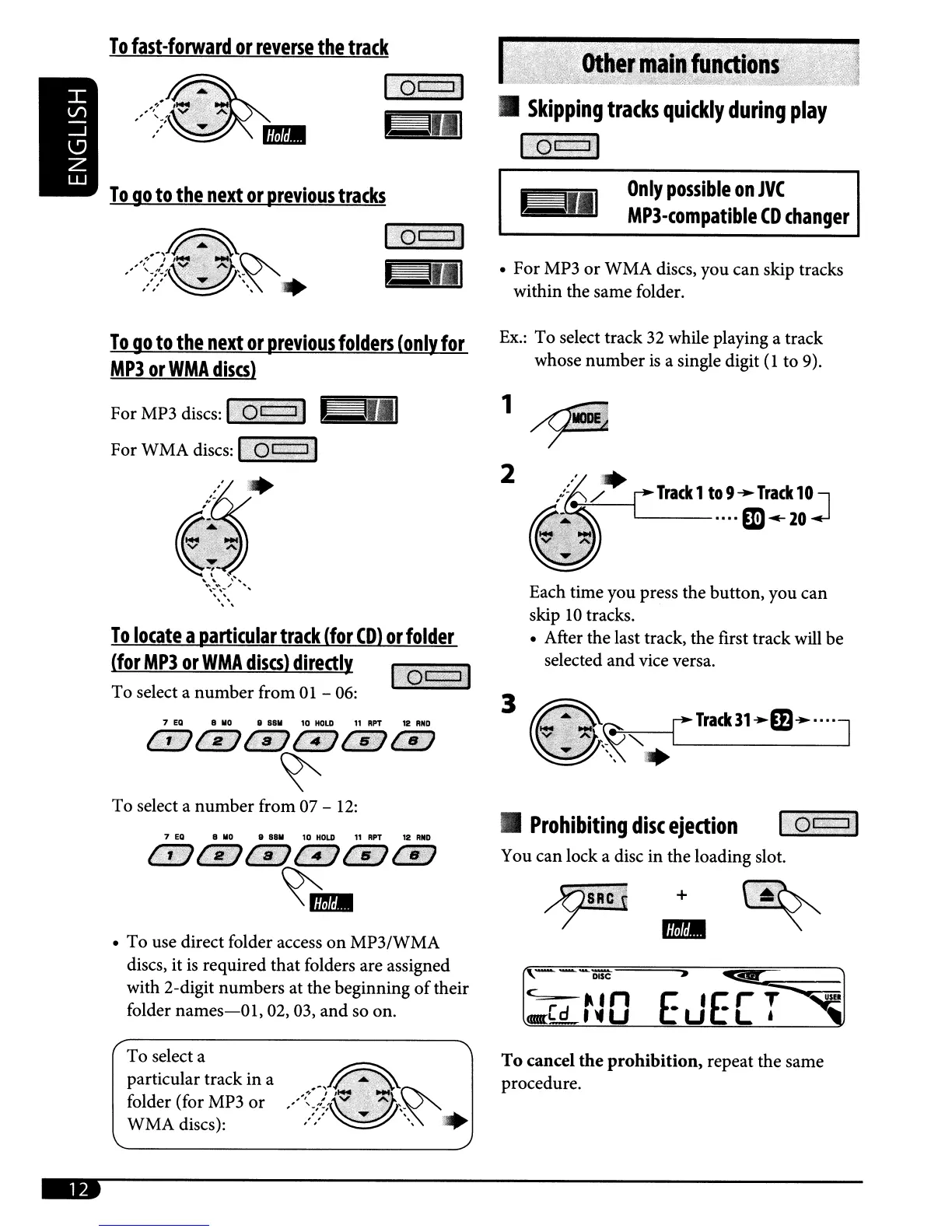
Ex.:
To select track
32
while playing a track
whose
number
is
a single digit
(l
to 9).
{~'---_[
Track
1
to
9
~
Track
10J
---····m
...
20
Each time you press the button, you can
skip
10
tracks.
• After the last track, the first track will be
selected
and
vice versa.
3
2
1
I
7
EO
8
110
8
8811
10
HOLD
"RPT
12
RNO
@~.tr;iGY
@i~
"fi
ls;
l;Ii)'
@:~4fl4fSci\'
/i8;;;f)
~
To
locate
a
particular
track
(for
CD)
or
folder
(for
MP3
or
WMA
discs)
directly
To select a
number
from
01
-
06:
•
Prohibiting
disc
ejection
loc:j:1
You can lock a disc in the loading slot.
C
'd
".
n E •Er T
<am:L._'
~
U U
L'
usn
+
7
EO
8
110
II
8811
10
HOLD
"RPT
12
R_O
{.
i,
"17
{;
a:}
f;l!tfj
~
f
1$11
t:FJ
~
..
• To use direct folder access
on
MP3/WMA
discs, it
is
required that folders are assigned
with 2-digit numbers at the beginning
of
their
folder
names-O
1,
02, 03,
and
so on.
To select a
number
from 07 -
12:
To select a
particular track in a
folder (for MP3
or
WMA discs):
To
cancel
the
prohibition,
repeat the same
procedure.



 To Next Page