56
FRANÇAIS
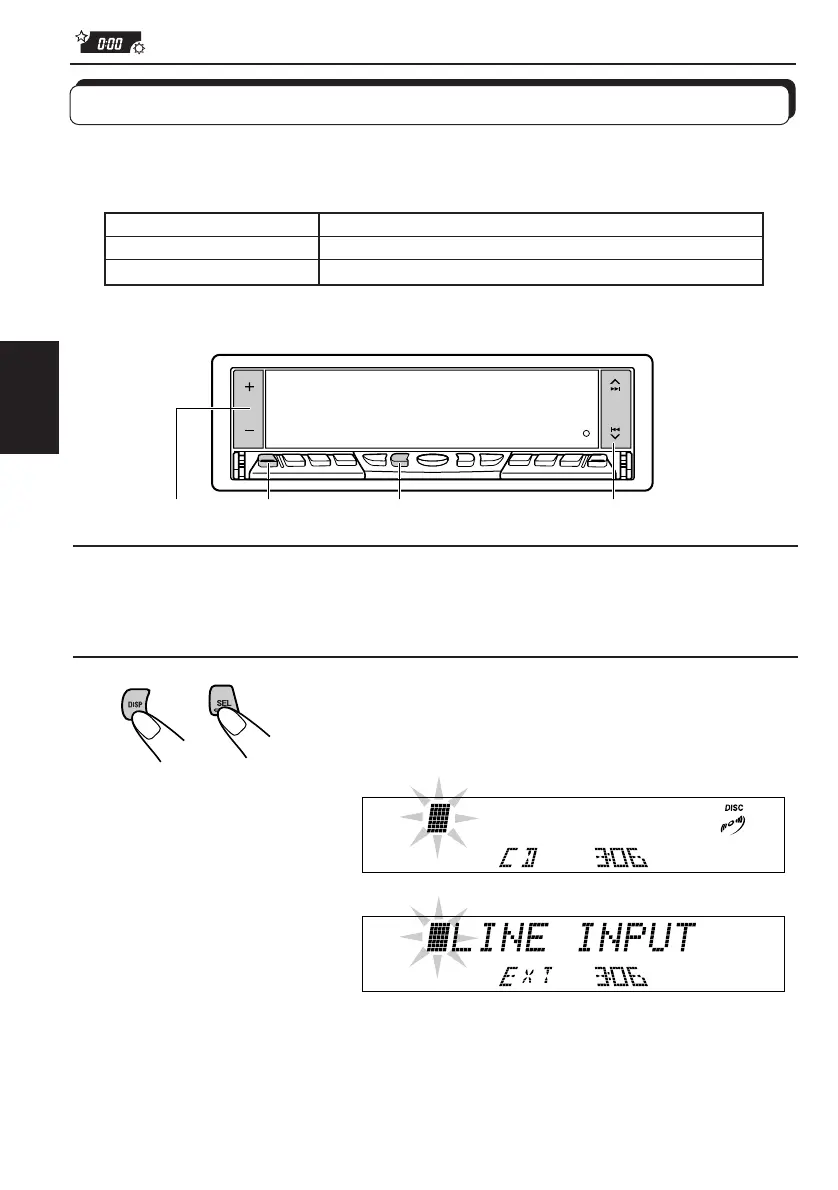
1
Choisissez une source à laquelle vous souhaitez attribuer un
nom.
2
Maintenez pressée SEL (sélection) pendant plus
de 2 secondes tout en appuyant sur DISP.
Attribution de noms aux sources
Vous pouvez attribuer un nom aux CD et à l'appareil extérieur connecté aux fiches LINE IN.
Après avoir attribué un nom, il apparaît sur l’affichage quand le CD ou l’appareil extérieur est
choisi.
* Vous ne pouvez pas attribuer un nom à un CD Text.
Sources Nombre maximum de caractères
CD* et changeur de CD* 32 caractères maximum (jusqu'à 40 disques)
Appareil extérieur 12 caractères maximum
Quand la source est un CD:
Quand vous choisissez
l’appareil extérieur connecté
à LINE IN comme source:
4 2,7
2,3
5
FR48-58.KD-LX50R[E]/f 00.3.22, 0:05 PM56



 To Next Page
 Loading...