48
ENGLISH
OTHER MAIN FUNCTIONS
Setting the clock
You can also set the clock system either 24 hours or 12 hours.
1
2
1
2
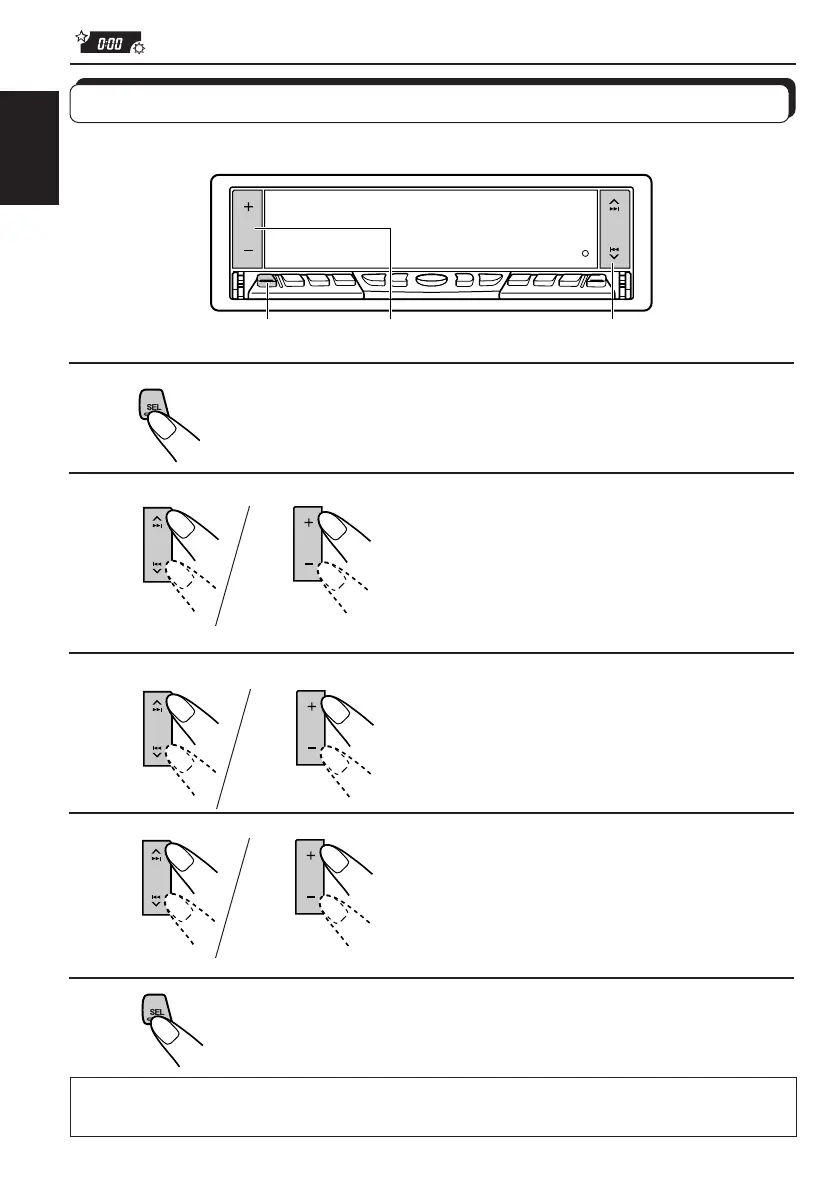
1,5 2,3,4 2,3,4
1
2
1
Press and hold SEL (Select) for more than 2 seconds
so that one of the PSM items appears on the display.
2
Set the hour.
1 Select “CLOCK HOUR” if not
shown on the display.
2 Adjust the hour.
3
Set the minute.
1 Select “CLOCK MINUTE.”
2 Adjust the minute.
4
Set the clock system.
1 Select “CLOCK24H/12H.”
2 Select “CLOCK 24HOUR” or
“CLOCK 12HOUR.”
5
Finish the setting.
To check the current clock time while the unit is turned off, press + or –.
The power turns on, the clock time is shown for 5 seconds, then the power turns off.
EN48-58.KD-LX50R[E]/f 00.3.22, 10:37 AM48



 To Next Page
 Loading...