--
~
...
--
~
Select Genre
:1~2
[34~99]
lazz
I~~~~~I
. .
......
~
rae
I
~
~
,..
ENT]
Record
• Checkbox operations
~
[105j
....
~
t:
Number
of
albums
in
the
se~ected
genre
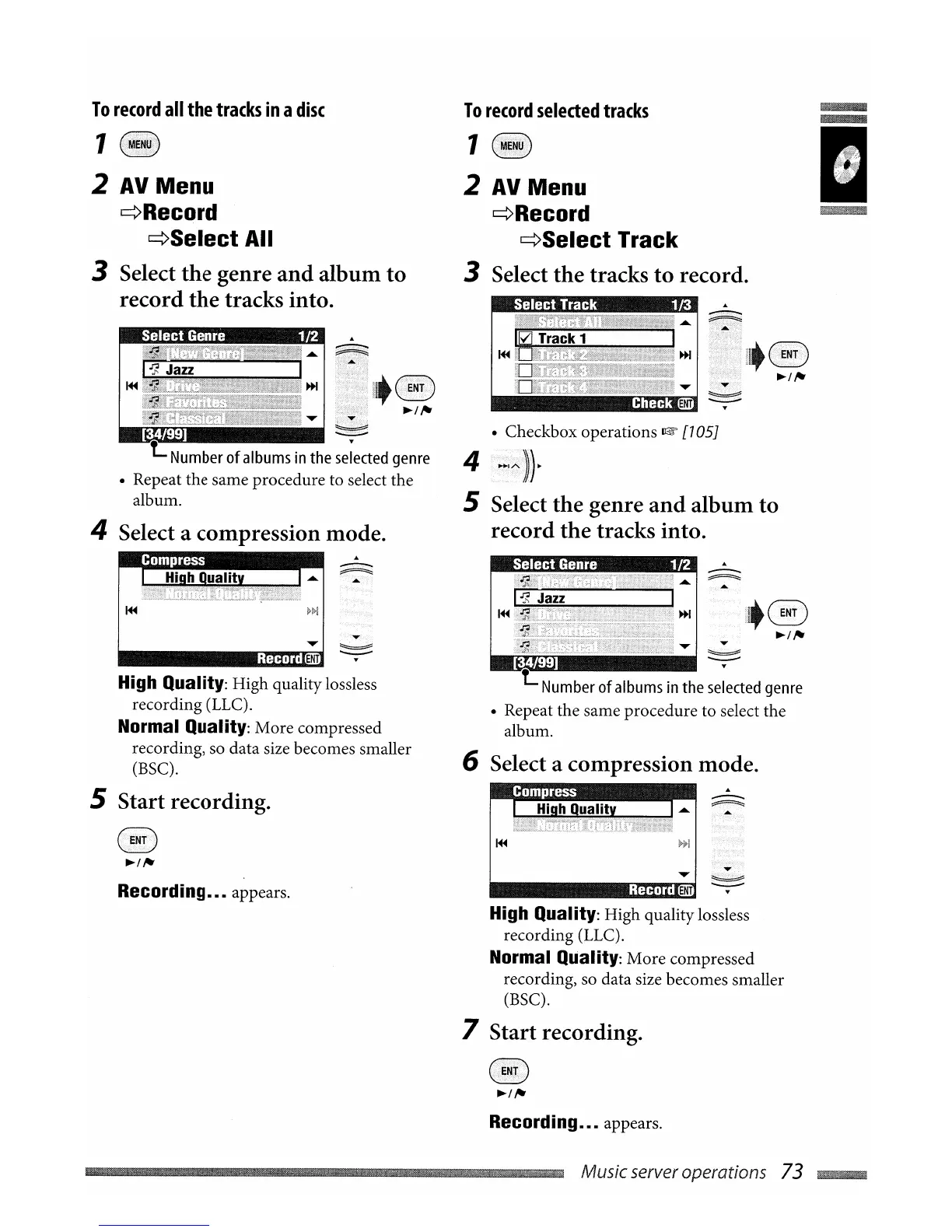
• Repeat the same procedure to select the
album.
6 Select a
compression
mode.
High Quality: High quality lossless
recording (LLC).
Normal Quality: More compressed
recording, so data size becomes smaller
(BSC).
7
Start
recording.
4
..,~.~~
.
5 Select
the
genre
and
album
to
record
the
tracks
into.
To
record
selected
tracks
1
2
AV
Menu
¢Record
¢Select
Track
3 Select
the
tracks
to
record.
--
~
I
~
-~~,
..
Record
Recording
.•.
appears.
§
~/,.
-t:
Number
of
albums
in
the
selected
genre
• Repeat the same procedure to select the
album.
4 Select a
compression
mode.
To
record
all
the
tracks
in
a
disc
1
2
AV
Menu
¢Record
¢Select
All
3 Select
the
genre
and
album
to
record
the
tracks into.
High Quality: High quality lossless
recording (LLC).
Normal Quality: More compressed
recording, so data size becomes smaller
(BSC).
5
Start
recording.
§
~/,.
Recording
.•.
appears.
~~iIII
..
iIII
..
iIII
..
~IUlIBmBm~Bm~Bm~.j.-.·.t.t
t.t Music server operations 73
~


 To Next Page