ENGLISH
13
Data Size: B6L (182 mm x 128 mm)
Book Size: B6L (182 mm x 128 mm)
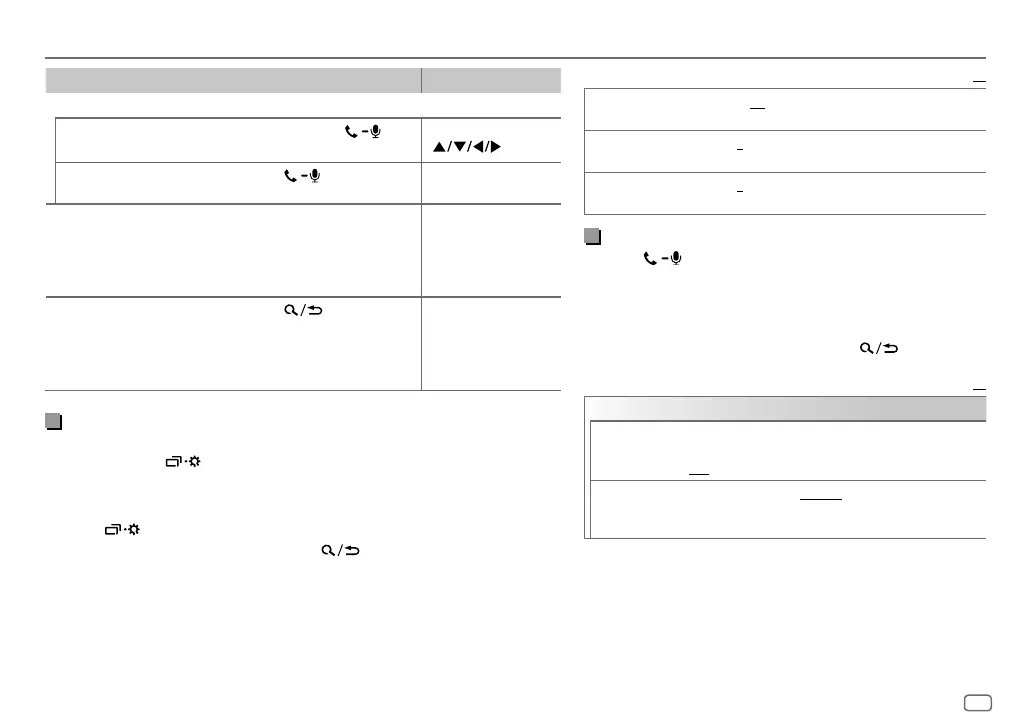
To On the faceplate On the remote control
While having two active calls...
End current call and
activate held call
Press and hold
or
the volume knob.
Press and hold
.
Swap between the
current call and held call
Press
.
( Not available )
Adjust the phone volume
[00]
to
[35]
(Default:
[15]
)
Turn the volume knob
during a call.
• This adjustment will not
affect the volume of the
other sources.
( Not available )
Switch between hands-free
and private talk modes
Press
during a call.
• Operations may vary
according to the
connected Bluetooth
device.
( Not available )
Improve the voice quality
While talking on the phone....
1 Press and hold .
2 Turn the volume knob to select an item
(
see the following table
)
, then press
the knob.
3 Repeat step 2 until the desired item is selected or activated.
4 Press to exit.
To return to the previous setting item, press .
Default:
XX
MIC LEVEL –10
—
+10
(
–4
):The sensitivity of the microphone increases
as the number increased.
NOISE RDCT –5
—
+5
(
0
):Adjust the noise reduction level until the least
noise is being heard during a phone conversation.
ECHO CANCEL –5
—
+5
(
0
):Adjust the echo cancellation delay time until the
least echo is being heard during a phone conversation.
Make the settings for receiving a call
1
Press to enter Bluetooth mode.
2 Turn the volume knob to select an item (see the following
table), then press the knob.
3 Repeat step 2 until the desired item is selected or
activated.
To return to the previous setting item, press
.
Default:
XX
SETTINGS
AUTO ANSWER
01 SEC
—
30 SEC
:The unit answers incoming call
automatically in the selected time (in seconds).;
OFF
:Cancels.
RING ILLUMI BLINK 1
—
BLINK 5
(
BLINK 2
): Selects the notification
blinking pattern for the buttons when there is an incoming
call.;
OFF
:Cancels.
BLUETOOTH®
JS_JVC_KD_SR82BT_K_EN_1.indd 13JS_JVC_KD_SR82BT_K_EN_1.indd 13 11/1/2016 9:03:48 AM11/1/2016 9:03:48 AM


 To Next Page