EasyManua.ls Logo

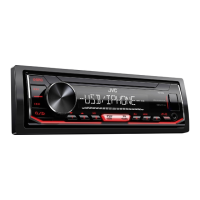
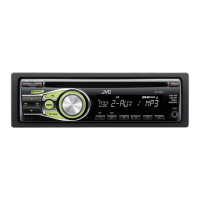
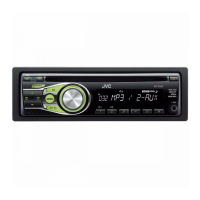
JVC KD-XD28BT - User Manual

JVC KD-XD28BT
124 pages
Print Icon
To Next Page IconTo Next Page
Loading...
Data Size: B6L (182 mm x 128 mm)
Book Size: B6L (182 mm x 128 mm)
ENGLISH
FRANÇAIS
ESPAÑOL
B5A-3840-00 [K]
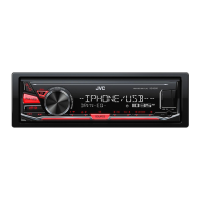
KD-X38MBS / KD-X280BT / KD-XD28BT / KD-SX27BT
DIGITAL MEDIA RECEIVER
INSTRUCTION MANUAL
RÉCEPTEUR MULTIMÉDIA NUMÉRIQUE
MANUEL D’INSTRUCTIONS
RECEPTOR DE MEDIOS DIGITALES
MANUAL DE INSTRUCCIONES
For customer Use:
Enter below the Model No. and Serial No. which are
located on the top or bottom of the cabinet. Retain this
information for future reference.
Model No.
Serial No.
KD-X38MBS_K_B5A-3840-00_Cover_1st Draft.indd 1KD-X38MBS_K_B5A-3840-00_Cover_1st Draft.indd 1 23/8/2021 4:36:56 PM23/8/2021 4:36:56 PM

Table of Contents

Other manuals for JVC KD-XD28BT

Questions and Answers

  • S
    Sarah GayAug 29, 2025
    What to do if “UNSUPPORTED DEVICE” appears on JVC Car Stereo System?
    • T
      Terri WangAug 29, 2025
      If you see the message 'UNSUPPORTED DEVICE' on your JVC Car Stereo System, verify that the connected USB device is compatible with the unit and that the file systems are in a supported format. You can also try reattaching the USB device.
  • J
    Justin MartinAug 30, 2025
    What to do if “UNRESPONSIVE DEVICE” appears on JVC KD-XD28BT?
    • L
      loganallenAug 30, 2025
      If the message “UNRESPONSIVE DEVICE” appears on your JVC Car Stereo System, make sure the USB device is not malfunctioning and reattach the USB device.
  • C
    Christopher BeltranAug 30, 2025
    What to do if “NO DEVICE” appears on JVC Car Stereo System?
    • A
      Abigail HigginsAug 30, 2025
      If your JVC Car Stereo System displays 'NO DEVICE', connect a device (USB/iPod/iPhone) and change the source to USB/iPod USB again.
  • H
    hawkinswilliamAug 25, 2025
    How to fix sound if it cannot be heard on JVC Car Stereo System?
    • B
      Brian WhiteAug 25, 2025
      If you cannot hear any sound from your JVC Car Stereo System, try the following: 1. Adjust the volume to the optimum level. 2. Check the cords and connections.
  • D
    Donna BaileySep 1, 2025
    What to do if “CHECK TUNER” appears on JVC KD-XD28BT?
    • D
      Dr. Jason RyanSep 1, 2025
      If the message “CHECK TUNER” appears on your JVC Car Stereo System, make sure the SiriusXM Vehicle Tuner is connected to the unit.
  • R
    Rhonda LewisSep 1, 2025
    What to do if “H/W ERROR” appears on JVC KD-XD28BT Car Stereo System?
    • K
      Kristen MooreSep 1, 2025
      If the message “H/W ERROR” appears on your JVC Car Stereo System, reset the unit and try the operation again. If the error persists, consult your nearest service center.
  • K
    Kaitlyn CookSep 2, 2025
    Why source cannot be selected on JVC KD-XD28BT Car Stereo System?
    • R
      Robert GarciaSep 2, 2025
      If the source cannot be selected on your JVC Car Stereo System, check the [SOURCE SELECT] setting.
  • J
    Jay HillSep 3, 2025
    Why is the radio reception poor on my JVC KD-XD28BT?
    • S
      Sarah MossSep 3, 2025
      If the radio reception is poor on your JVC Car Stereo System, connect the antenna firmly.
  • C
    Christopher ValenzuelaSep 3, 2025
    Why is the playback order not as intended on JVC KD-XD28BT?
    • R
      reginaldcooleySep 4, 2025
      If the playback order on your JVC Car Stereo System is not as intended when using a USB device, the folders are played in the order of their creation date and time. The files within each folder are played in alphabetical order by file name.
  • C
    Caroline OwensSep 4, 2025
    What to do if “NOT SUPPORT” appears and file skips on JVC KD-XD28BT Car Stereo System?
    • B
      Bill BrewerSep 4, 2025
      If the message “NOT SUPPORT” appears and the file skips on your JVC Car Stereo System, check whether the file is a playable format.

Summary

FCC Caution and Compliance

ISED Caution and Compliance

Before Use and Safety Guidelines

Device Basics and Controls

Getting Started with Your Device

Initial Setup and Configuration

Steps for initial setup, including crossover and clock settings.

USB and iPod Connectivity

JVC Remote Application Control

Bluetooth Connectivity and Features

Audio Settings and Sound Customization

Equalizer and Sound Level Adjustments

Customizing sound with EQ settings, bass boost, and loudness.

Display Settings and Illumination Customization

Troubleshooting Common Issues

General and Radio Troubleshooting

Resolving issues related to sound, unit operation, and radio reception.

USB;iPod Troubleshooting

Addressing problems with USB/iPod connectivity.

Troubleshooting Device Errors

SiriusXM and Bluetooth Troubleshooting

Resolving SiriusXM and Bluetooth connectivity issues.

Device Error Messages and Recovery

Understanding and recovering from device error messages.

Installation and Wiring Guide

Installation Parts and Basic Procedure

Components for installation and step-by-step mounting instructions.

Unit Mounting and Wiring Connections

How to install the unit and connect wiring harness and components.

JVC KD-XD28BT Specifications

General IconGeneral
BluetoothYes
Display TypeLCD
Dimensions7.21 x 2.09 x 6.22 inches
AUX InputYes
CD PlayerNo
Radio TunerAM/FM
Detachable FaceplateYes
Steering Wheel Control ReadyYes
Android Music PlaybackYes
iPhone/iPod Music PlaybackYes
DisplayLCD
Steering Wheel ControlYes
Built-in MicrophoneYes
Power Output4 x 50W
Audio Formats SupportedMP3, WMA
Equalizer13-band
USB PortYes, Front
Preamp Outputs1 Pair (Rear/Subwoofer Selectable)
Pre-amp Outputs1 Pair (Rear/Subwoofer Selectable)

Related product manuals