ENGLISH
9
Data Size: B6L (182 mm x 128 mm)
Book Size: B6L (182 mm x 128 mm)
ANALOG RADIO
MONO ON
:Improves the FM reception, but the stereo effect will be lost.;
OFF
:Cancels.
NEWS-STBY
*
ON
:The unit will temporarily switch to News Programme if available.;
OFF
:Cancels.
REGIONAL
*
ON
: Switches to another station only in the specific region using the “AF”
control.;
OFF
:Cancels.
AF SET
*
ON
: Automatically searches for another station broadcasting the same
program in the same Radio Data System network with better reception
when the current reception is poor.;
OFF
: Cancels.
TI SET
*
ON
: Allows the unit to temporarily switch to Traffic Information if
available (“TI” lights up). ;
OFF
:Cancels.
For
KW-DB92BT
: [
TI SET
] in AM band is for enabling traffic interruption
to DAB source only.
PTY SEARCH
*
Select a PTY code (see below).
If there is a station broadcasting a program of the same PTY code as you
have selected, that station is tuned in.
PTY code
:
NEWS
,
AFFAIRS
,
INFO
,
SPORT
,
EDUCATE
,
DRAMA
,
CULTURE
,
SCIENCE
,
VARIED
,
POP M
(music),
ROCK M
(music),
EASY M
(music),
LIGHT M
(music),
CLASSICS
,
OTHER M
(music),
WEATHER
,
FINANCE
,
CHILDREN
,
SOCIAL
,
RELIGION
,
PHONE IN
,
TRAVEL
,
LEISURE
,
JAZZ
,
COUNTRY
,
NATION M
(music),
OLDIES
,
FOLK M
(music),
DOCUMENT
* Only for FM source.
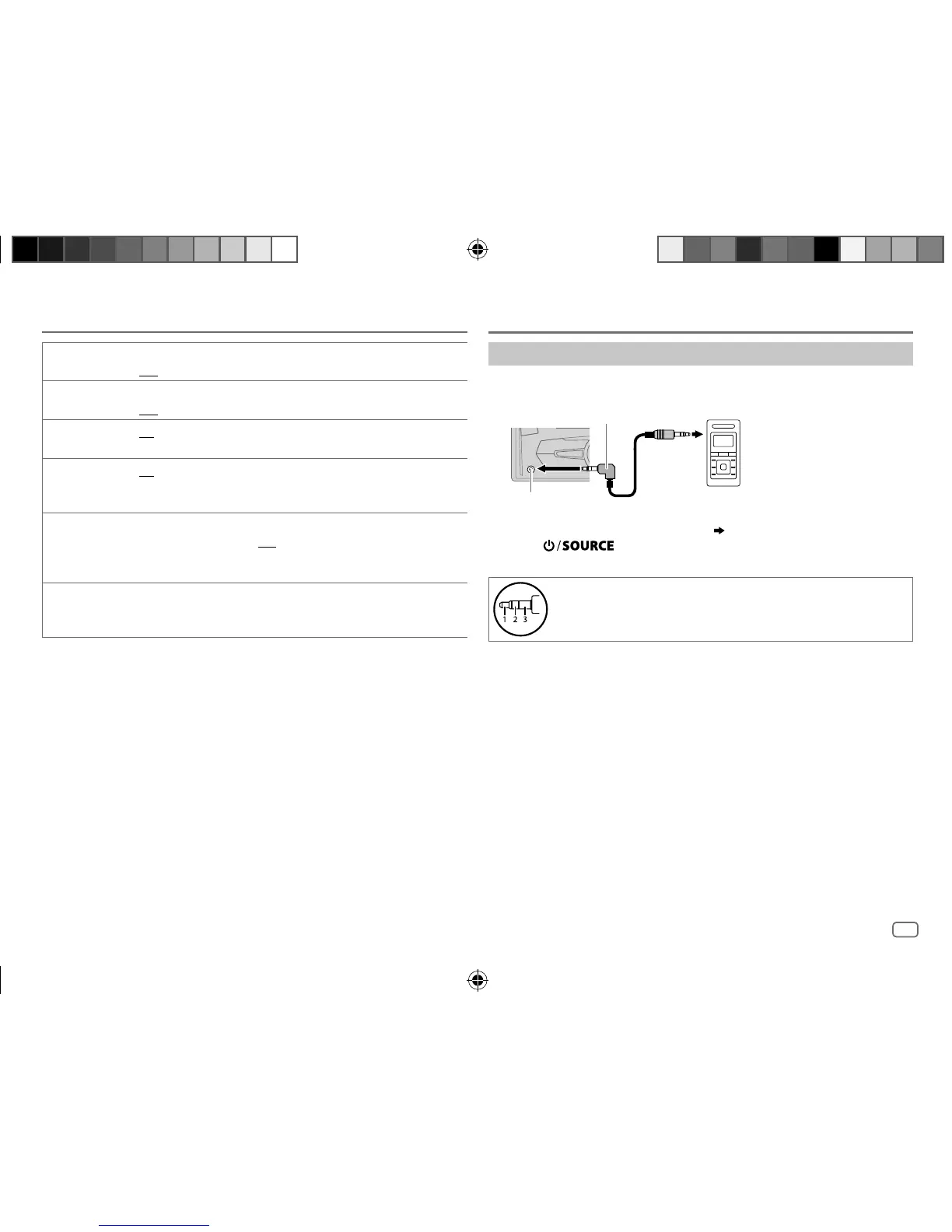
Use a portable audio player
1
Connect a portable audio player (commercially available).
2 Select [
ON
] for [
AUX
] in [
SRC SELECT
]. (
4
)
3 Press repeatedly to select AUX.
4 Turn on the portable audio player and start playback.
Use a 3-core plug head stereo mini plug for optimum audio
output.
3.5mm stereo mini plug with “L” shaped connector
(commercially available)
Portable audio player
Auxiliary input jack
AUX
JS_JVC_KW_R920BT_DB92BT_E_EN_4.indd 9JS_JVC_KW_R920BT_DB92BT_E_EN_4.indd 9 17/11/2015 3:41:02 PM17/11/2015 3:41:02 PM



 To Next Page