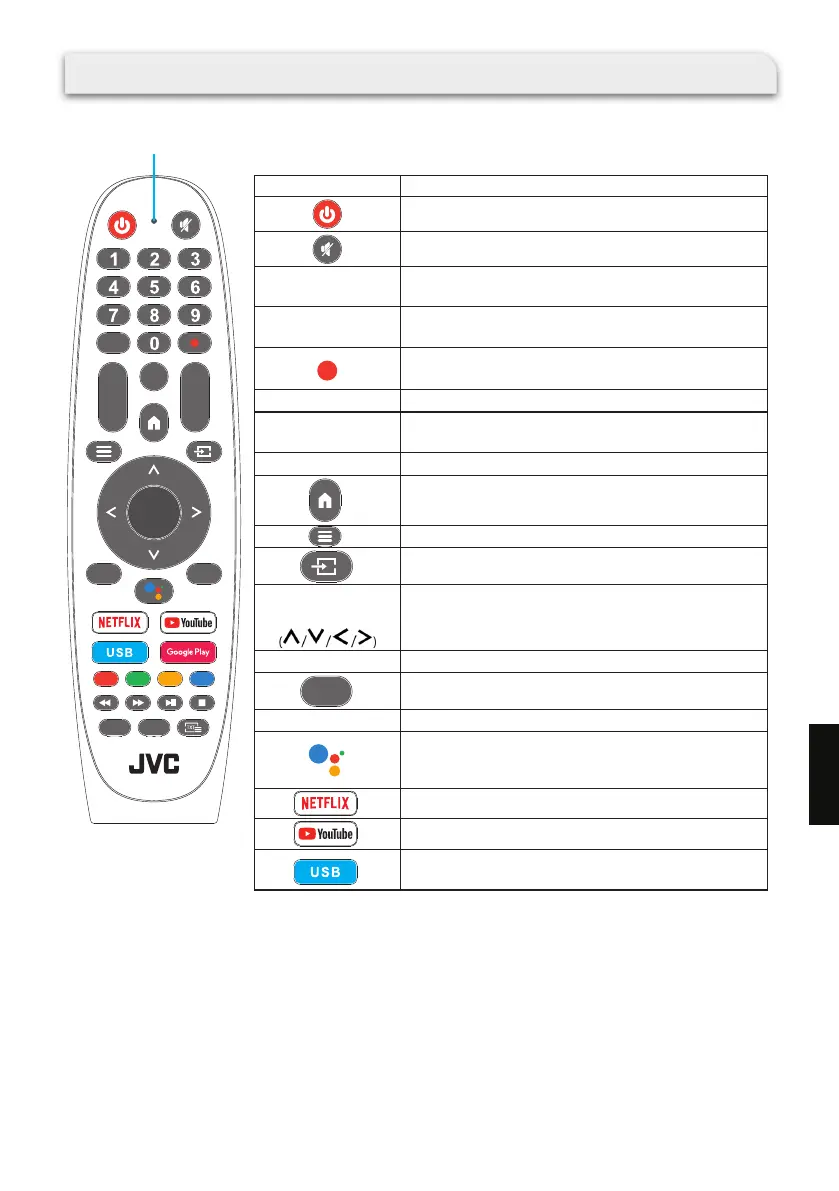
RM-C3520
+
-
VOL
+
-
CH
OK
EPG
SU BT
EXIT
INFO
BACK
AU DI O
Microphone /
Indicator light
Buttons :
Power on/Standby
Mute or restore the sound.
Choose the channel directly or input a number.
Display the Electronic Programme Guide (EPG) in
DTV mode.
Record program
(This function is not available at this model)
Increase or decrease the sound volume.
Display the present channel information such as the
current time and channel name in ATV / DTV mode.
Change to the next or previous program.
Display the Android TV homepage.
Display the on-screen display (OSD) menu.
Display/select the signal source.
Navigate the menu to select the content you need.
Conrm the selection in the OSD menus.
Return to the previous menu.
Exit the OSD menu.
Google Assistant
This function is not available in certain languages
and countries.
Access Netix.
Access Youtube.
Press this button to open multimedia player and
then play media les in USB devices.
Numeric Buttons
(0 ~ 9)
EPG
+ VOL –
INFO
+ CH –
UP/DOWN/
LEFT/RIGHT
OK
EXIT
BAC K
Remote Control
159
EN



 To Next Page