–16 –
English
Playing Back Tapes
To stop during playback, press STOP/EJECT §.
To pause playback, press PAUSE 8. To resume playback,
press PAUSE 8 again.
To fast wind to the left or to the right, press REW 1 or
FF ¡ while the tape is not running.
To remove the cassette, stop playback, and press STOP/
EJECT §.
Continuous Playback
You can play back two tapes continuously.
1 Put cassettes to be played back in both deck
A and deck B.
2 Press PLAY 3 for deck B.
The tape playback starts on deck B.
3 Press PAUSE 8 and PLAY 3 for deck A.
When the tape in deck B reaches its end, playback of the tape
stops, and playback of the tape in deck A starts automatically.
Use only the type I tapes.
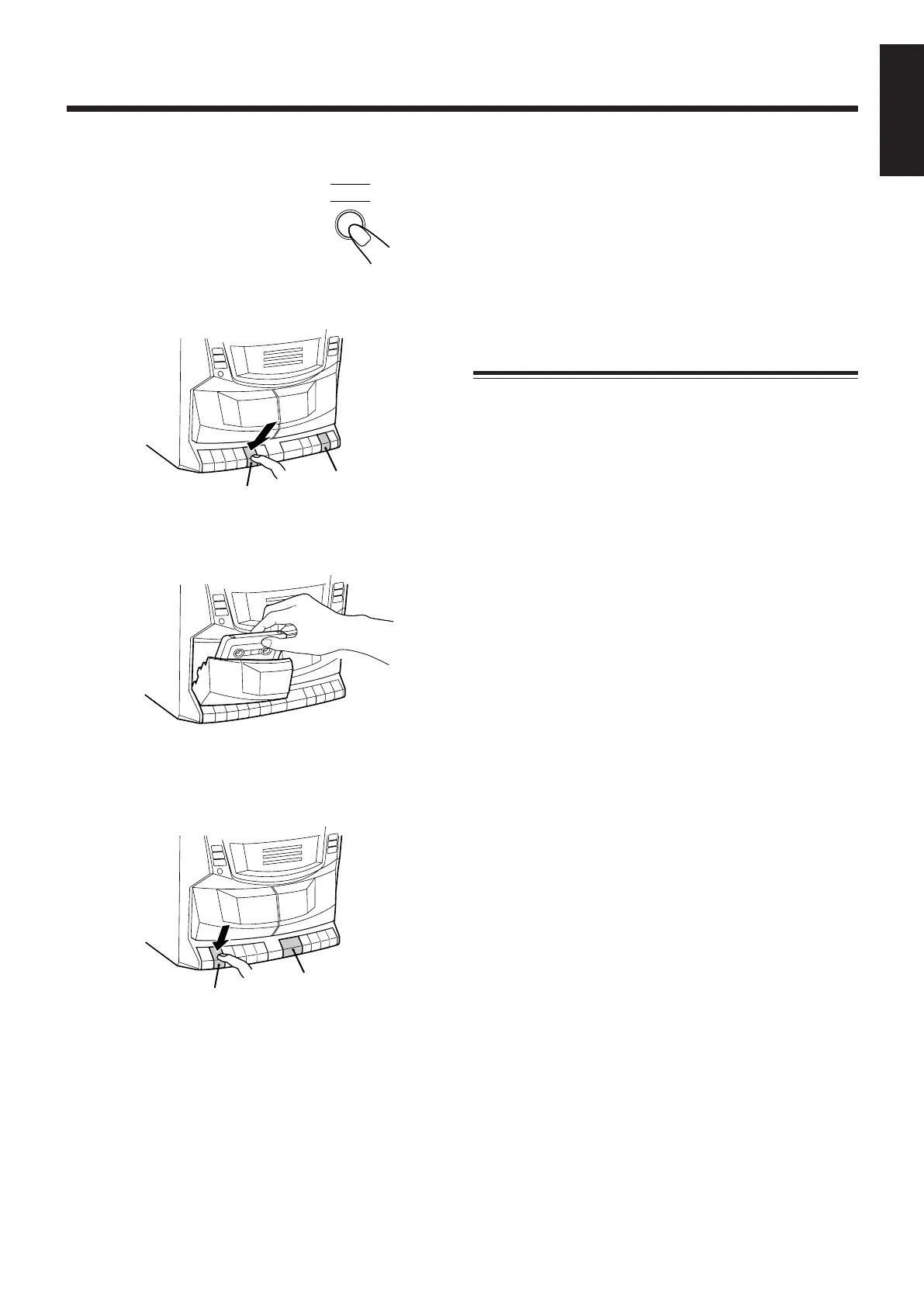
1 Press TAPE.
The unit automatically turns on.
2 Press STOP/EJECT 7/0 for the deck you
want to use.
3 Put a cassette in, with the exposed part of the
tape down.
4 Close the cassette holder gently.
5 Press PLAY 3 for the deck you put the
cassette in.
The tape playback starts.
For deck A
For deck B
For deck A
For deck B
EN01-22_PC-XC370[J]_2.p65 03.5.7, 6:14 PM16


 To Next Page