11
Turning the Radio On for the First Time
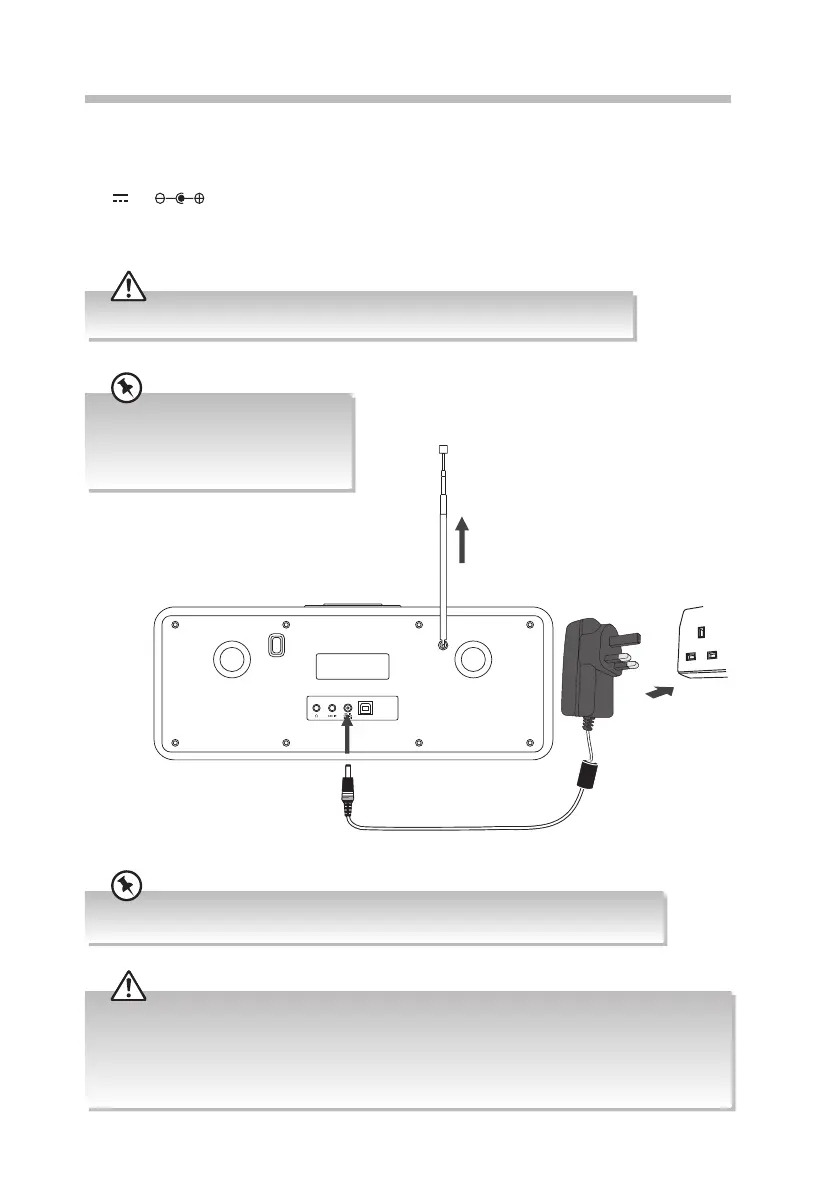
1. Fully extend the aerial before plugging the unit into the mains.
2. Connecting the unit to any other power source may damage the unit. Unwind the
mains adapter cable to its full length. Connect the end of the cable to the DC IN 12V
2A Socket at the rear of the unit and then connect the mains adapter to the
mains socket. Make sure the mains adapter is rmly inserted into the mains socket. The
unit is now connected and ready to use.
Ensure all connections are connected before connecting to the mains power socket.
To the mains socket
Rear View of the Main Unit
Extend the aerial before switching to
DAB mode for the rst time. This will
ensure that the initial scan captures all
stations in your area.
Remove the mains plug from the mains socket if you want to switch the unit o completely.
UPDATE PORT
• Ensure all audio connections of the unit are connected before connecting to the mains power socket.
• Make sure the mains plug is rmly inserted into the mains socket.
• To switch the unit o completely, remove the mains plug from the mains socket.
• Please turn the unit o completely to save energy when not in use.
• Use the mains cable as the disconnect device. The disconnect device shall remain readily operable.
RA-D77M_IB_170608_will.indd 11 13/6/2017 4:32 PM


 To Next Page
 Loading...





