9
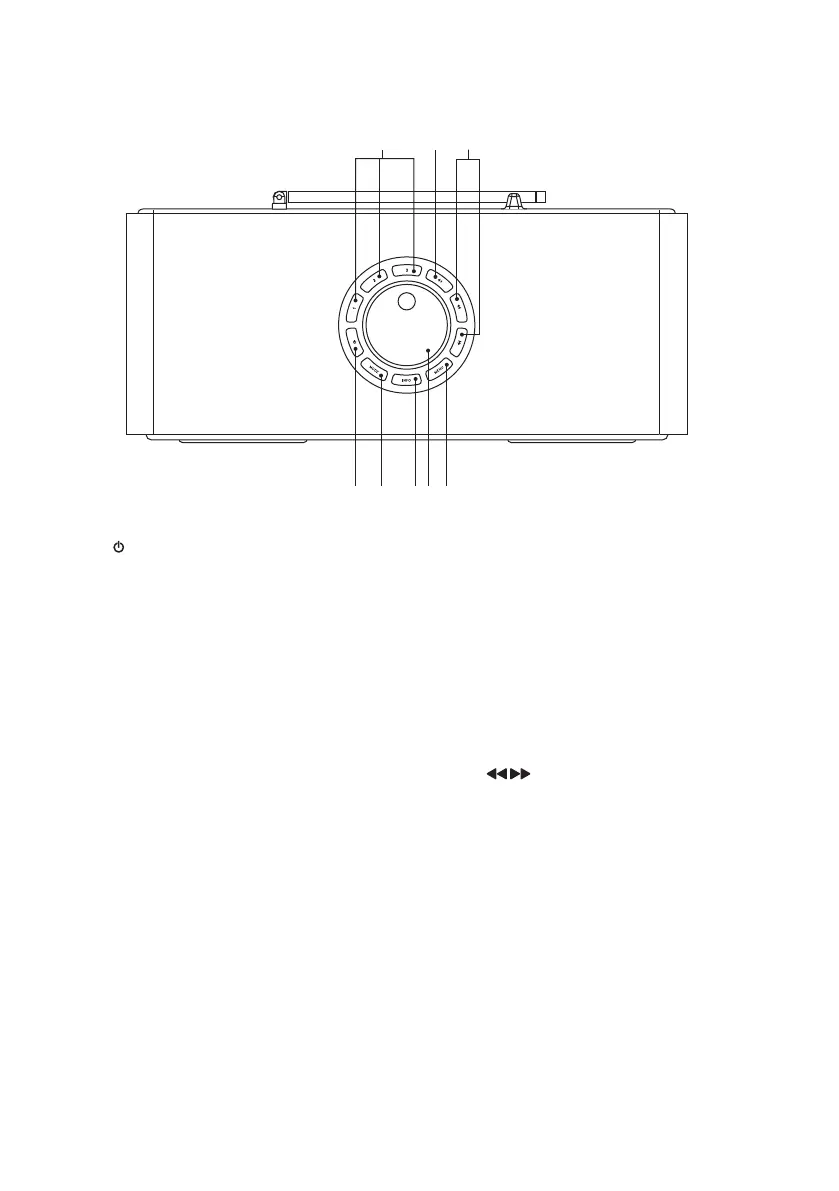
1. STANDBY Button
Switch the unit ON or into
STANDBY mode.
2. MODE Button
Press to select dierent modes.
- DAB radio - FM radio -
Bluetooth - Auxiliary input.
3. INFO Button
• Press to view radio station
information in radio modes.
• Press to view the date in
Bluetooth mode.
4. VOLUME/SELECT Dial
• Turn to adjust playback volume.
• Turn to browse options.
• Press to conrm a selection.
• Press to activate the snooze
function when the alarm sounds.
• Press to start auto scan in FM
mode.
• Press to pause/resume playback
in Bluetooth mode.
5. MENU Button
Press to enter or exit the menu.
Top View
V
O
L
U
M
E
/
S
E
L
E
C
T
2 3 4 51
76 8
6. Preset 1/2/3 Button
• Press and hold to directly save
preset station 1, 2 or 3.
• Press to directly recall preset
station 1, 2 or 3.
7. Preset 4+ Button
• Press and hold to save preset
station among 1-10.
• Press to recall preset station
among 1-10.
8. Button
• Press to move upwards/
downwards in the menu
• Press to tune FM station.
• Press to select DAB station.
• Press and hold to search for a
radio station going forwards/
backwards through accessible
radio frequencies in FM mode.
• Press to skip to the previous/
next track in Bluetooth mode.
RA-D77M_IB_170608_will.indd 9 13/6/2017 4:32 PM



 To Next Page