27
Hints and Tips
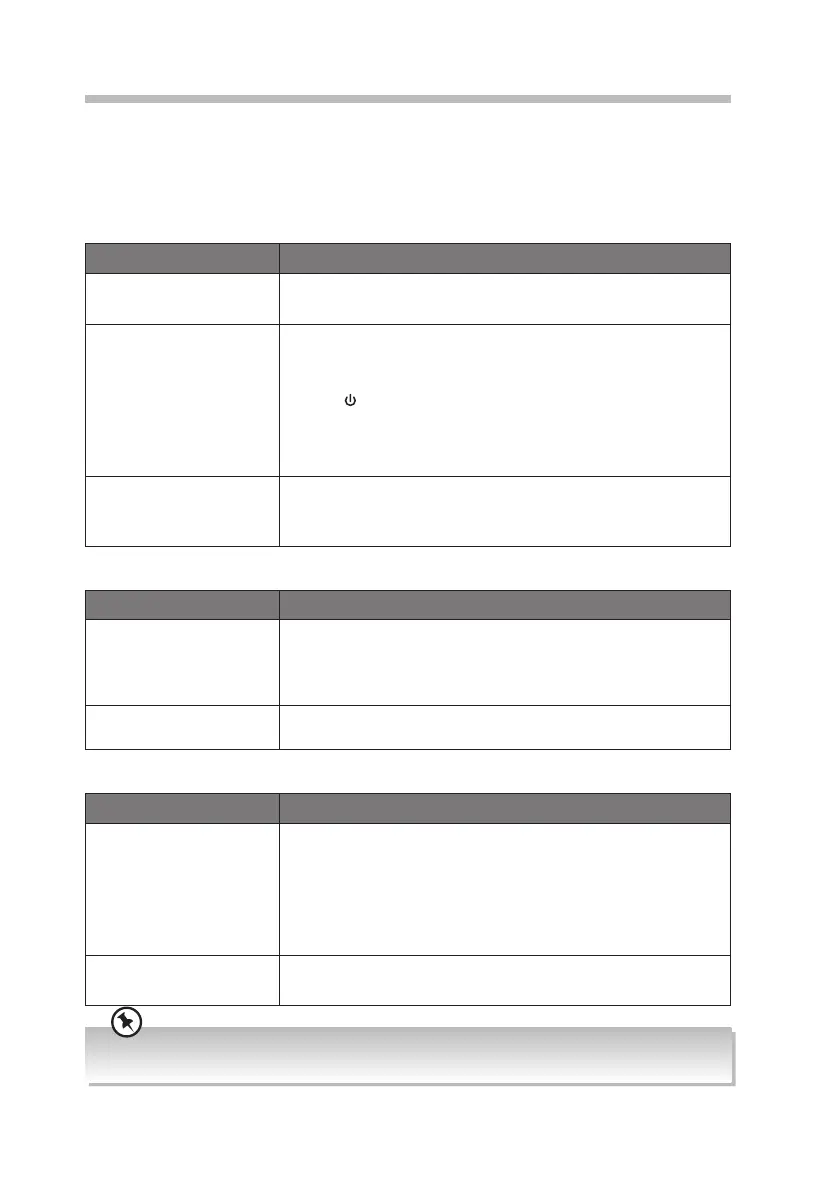
If a problem does occur, it may often be due to something very minor. The following table
contains various tips. If you require additional assistance
• For UK, please call our UK Call Centre on 0344 561 1234.
• For Ireland, please call our Ireland Call Center on 1 890 818 575.
General
Problem Solution
No power. • Ensure the mains plug is connected.
• Make sure that you select the ON mode.
No sound from the unit. Please try either one of the solutions below:
• Make sure that the unit is not muted. Turn the VOLUME/
SELECT dial on the unit to resume normal listening.
• Press on the unit to switch the unit to standby mode.
Then press the button again to switch the unit on.
• Unplug the unit from the mains socket, then plug them
again. Switch on the unit.
The unit does not
respond when pressing
any buttons.
• The unit may freeze up during use. Switch the unit o and
then on again at the mains socket to reset the unit.
Radio DAB/FM
Problem Solution
Poor radio reception. • Make sure the DAB/FM aerial is fully extended.
• Electrical interference in your home can cause poor
reception. Move the unit away from them (especially those
with motors and transformers).
Desired station not
found.
• Weak signal. Search manually.
• If reception is still poor, adjust the position of the aerial.
Bluetooth®
Problem Solution
I cannot nd
“RA-D77M” on my
Bluetooth® device.
• Ensure that the unit is switched on.
• Ensure that the Bluetooth® function is activated on your
Bluetooth® device.
• The unit has a Bluetooth® function that can receive a
signal within 10 metres. Keep a distance within 10 metres
between the unit and your Bluetooth® device.
Can’t hear the music • You may need to increase the volume on the Bluetooth
device.
If any functional abnormality is encountered, unplug the unit from the mains socket and reconnect it
again.
RA-D77M_IB_170608_will.indd 27 13/6/2017 4:32 PM



 To Next Page