EasyManua.ls Logo

JVC RC-636L - Page 4

JVC RC-636L
31 pages
Print Icon
To Next Page IconTo Next Page
To Previous Page IconTo Previous Page
Loading...
RC
636L/LB
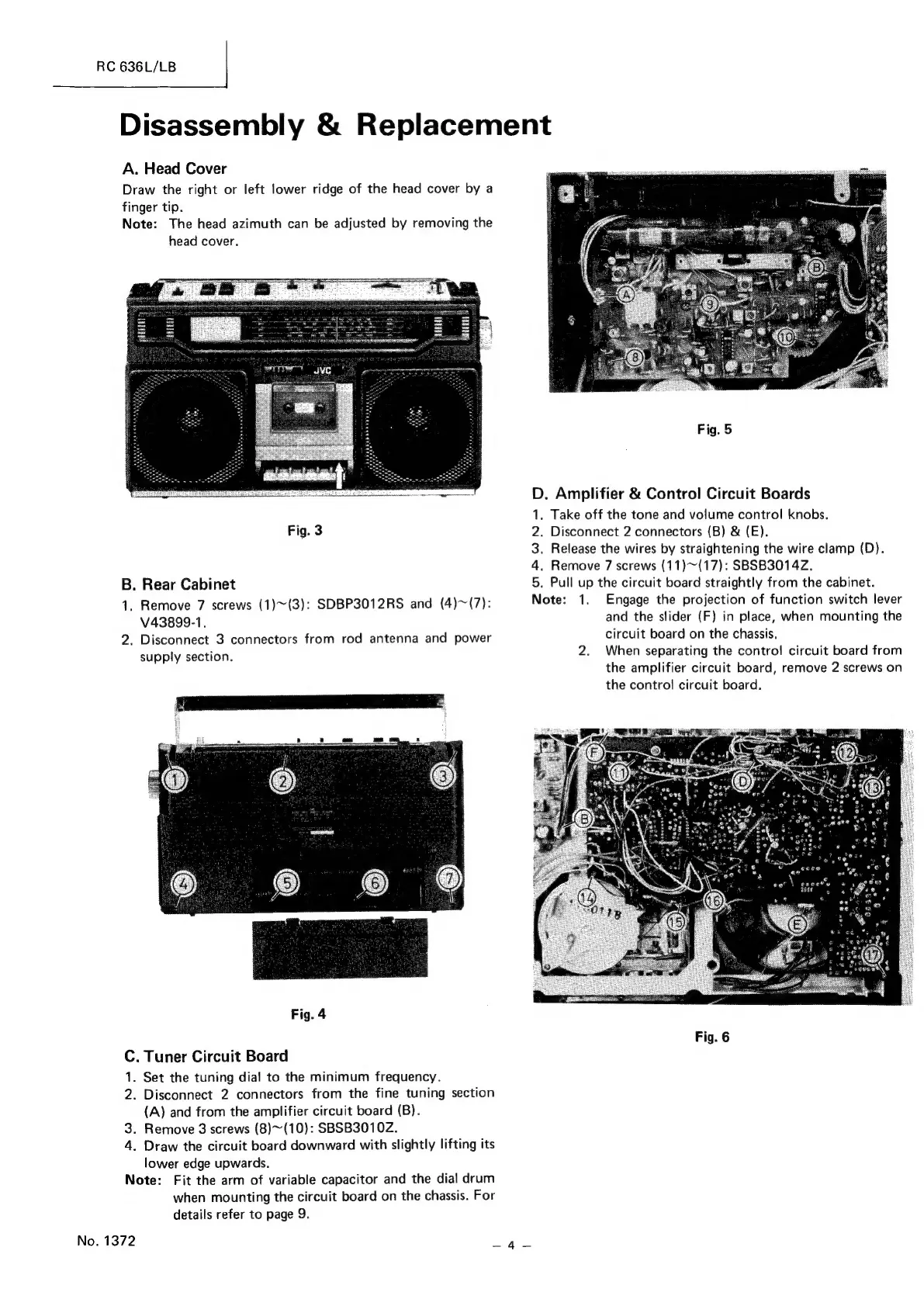
Disassembly
&
Replacement
A.
Head
Cover
Draw
the
right
or
left
lower
ridge
of
the
head
cover
by
a
finger
tip.
Note:
The
head
azimuth
can
be
adjusted
by
removing
the
head
cover.
Fig.
5
Sn
aE
eases
nn
D.
Amplifier
&
Control
Circuit
Boards
1.
Take
off
the
tone
and
volume
control
knobs.
Fig.
3
2.
Disconnect
2
connectors
(B)
&
(E).
3.
Release
the
wires
by
straightening
the
wire
clamp
(D).
4.
Remove
7
screws
(11)~(17):
SBSB3014Z.
5.
N
B.
Rear
Cabinet
Pull
up
the
circuit
board
straightly
from
the
cabinet.
1.
Remove
7
screws
(1)~(3):
SDBP3012RS
and
(4)~(7):
ote:
1.
Engage
the
projection
of
function
switch
lever
V43899-1.
and
the
slider
(F)
in
place,
when
mounting
the
2.
Disconnect
3
connectors
from
rod
antenna
and
power
circuit
board
on
the
chassis.
supply
section.
2.
When
separating
the
control
circuit
board
from
the
amplifier
circuit
board,
remove
2
screws
on
the
control
circuit
board.
Fig.
4
Fig.
6
C.
Tuner
Circuit
Board
1.
Set
the
tuning
dial
to
the
minimum
frequency.
2.
Disconnect
2
connectors
from
the
fine
tuning
section
(A)
and
from
the
amplifier
circuit
board
(B).
3.
Remove
3
screws
(8)~(10):
SBSB3010Z.
4.
Draw
the
circuit
board
downward
with
slightly
lifting
its
lower
edge
upwards.
Note:
Fit
the
arm
of
variable
capacitor
and
the
dial
drum
when
mounting
the
circuit
board
on
the
chassis.
For
details
refer
to
page
9.
No.
1372
Avaes

Related product manuals