Need help?
Do you have a question about the JVC TD-V661 and is the answer not in the manual?
Details on mains supply, fuse replacement, and wiring for UK users.
Caution against copyright infringement when re-recording.
Information regarding FCC rules and potential radio interference.
Highlights the key features of the cassette deck.
Explains the JVC Compu Link system for component integration.
Describes the Dynamics Detection Recording Processor system.
Essential safety precautions for electrical operation.
Advice on proper placement and environmental conditions for the unit.
Instructions on how to clean the exterior of the unit.
Tips for using cassette tapes correctly and avoiding issues.
Details on the automatic tape type detection feature.
Guidance on performing basic operations and system controls.
Steps for connecting the deck to a hi-fi system.
How to connect remote control cables for system functions.
Identification and explanation of front panel features.
Description of buttons for tape transport functions.
Step-by-step guide to playing a cassette tape.
Explanation of tape counter and memory stop features.
How to use the feature to locate songs.
Detailed steps for recording audio onto a cassette.
Details on automatic recording level adjustment with DDRP.
Explanation of noise reduction and headroom extension systems.
Guidance on setting optimal recording input levels.
How to use the digital display for recording level monitoring.
Procedure to adjust bias and sensitivity for tape types.
How to create silent gaps during recording.
Using the monitor function for source and tape comparison.
Connecting a CD player for direct signal input.
Details on automatic power, source selection, and synchronized recording.
Instructions for DDRP recording using a compatible CD player.
Steps for setting up timed recording or playback.
Why cleaning heads, capstan, and pinch roller is crucial.
How to clean the tape path components.
Procedure for demagnetizing heads to reduce noise.
Solutions for common playback, recording, and system problems.
Detailed technical data for the cassette deck.
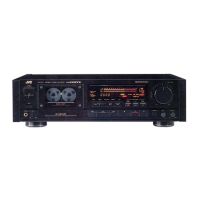
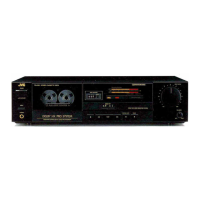
The JVC TD-V661/V662 A/B/J is a high-performance cassette deck designed for superior audio recording and playback. It incorporates advanced technologies and user-friendly features to ensure optimal sound quality and ease of use.
At its core, the TD-V661/V662 is a 3-head cassette deck, meaning it has separate heads for recording, playback, and erasing. This configuration allows for real-time monitoring of the recorded signal, enabling users to compare the source audio with the tape-recorded audio instantly. The deck features a closed-loop dual-capstan mechanism, which provides stable tape transport and minimizes wow and flutter, contributing to accurate sound reproduction. A pulse servo capstan direct drive system further enhances tape stability and speed consistency.
For recording, the deck utilizes a METAPERM combination (record + play) head and a 2-gap ferrite erase head, ensuring high-quality recordings and efficient erasure of previous content. The head winding wire is made of PCOCC (Pure Copper by Ohno Continuous Casting), which is known for its superior signal transmission properties, resulting in cleaner and more detailed audio. The deck also boasts a high bias frequency of 210 kHz, which is crucial for improved recording linearity and reduced distortion.
The TD-V661/V662 incorporates Dolby HX PRO headroom extension, a technology that dynamically adjusts the bias current during recording. This prevents high-frequency saturation, especially with complex musical passages, and significantly improves the high-frequency response and dynamic range of recordings. Importantly, recordings made with Dolby HX PRO will sound excellent even when played back on decks without this feature.
To combat tape hiss, the deck includes independent Dolby B/C noise reduction systems for both recording and playback. This allows users to select the appropriate noise reduction level based on their recording preferences and the characteristics of the tape.
The deck is also equipped with a DDRP (Dynamics Detection Recording Processor) system. When paired with a compatible JVC CD player, this feature automates the recording level adjustment, ensuring optimal recording conditions without manual intervention.
The TD-V661/V662 offers a range of features designed to enhance the user experience. Cassette loading is made easy with an electrically driven cassette holder. Simply press the OPEN/CLOSE button, load the cassette, and press the button again to close it. Playback can begin immediately after loading by pressing the play button.
The deck includes an auto tape select mechanism that automatically detects the type of tape (Normal, CrO2, or Metal) based on the detection holes in the cassette shell. This ensures that the correct bias and equalization settings are applied for optimal recording and playback.
For precise control over recordings, the deck features a calibration function. This allows users to adjust the recording bias and level according to the specific characteristics of individual tapes, minimizing distortion and achieving a flat frequency response. A built-in oscillator assists in this calibration process.
Monitoring options are flexible with a MONITOR button that allows switching between source monitoring (listening to the input signal) and tape monitoring (listening to the signal after it has been recorded on the tape). This is particularly useful for real-time quality control during recording.
The deck's display is comprehensive, featuring a 2-color fluorescent peak level indicator and a digital peak/peak level meter with a peak hold function. This allows users to accurately monitor recording and playback levels, with the peak hold function capturing the maximum level achieved. A 4-digit linear counter tracks tape position, and a DISPLAY MODE button allows switching between tape counter and digital peak display. A DIGITAL PEAK CALL button can recall the stored maximum peak value.
For convenience, the deck includes a multi music scan mechanism, enabling quick location of specific tunes on a tape in either direction. The MEMORY button allows users to set a specific point on the tape (counter "0.00") for automatic stop during fast forward or rewind, useful for finding specific sections.
Timer start mechanism allows for unattended recording or playback when connected to an optional audio timer. This is ideal for recording radio programs or playing back music at a set time.
Connectivity is streamlined with the COMPU LINK control system. This system, utilizing COMPU LINK-3 / SYNCHRO terminals, enables automatic power on/off (STANDBY), automatic source selection, and synchronized recording with compatible JVC components, such as CD players. This allows for seamless operation and simplified control of a multi-component audio system. The CD DIRECT input jacks provide a direct signal path from a CD player, bypassing the stereo amplifier for a cleaner audio signal.
Other features include an MPX filter switch for improved recording of FM stereo broadcasts with Dolby NR, and a headphone jack with a dedicated volume control for private listening.
To ensure long-term performance and optimal sound quality, the TD-V661/V662 emphasizes regular maintenance. The manual provides clear instructions for cleaning the heads, pinch roller, and capstan. These components are prone to accumulating magnetic powder and dust from the tape, which can lead to deteriorated tone quality, reduced output sound level, unsatisfactory erasing, and poor recordings. Users are advised to clean these parts every 10 hours of use with a cotton swab dipped in alcohol or a specialized cleaning kit.
Demagnetization of the heads is also crucial. Over time, magnetic objects or prolonged use can magnetize the heads, introducing noise and attenuating high frequencies on recorded tapes. The manual recommends demagnetizing the heads and other metal parts that contact the tape every 20-30 hours of use with a head demagnetizer. It is important to set the POWER switch to STANDBY before demagnetizing.
The manual also includes a troubleshooting section to help users identify and resolve common issues, such as playback or recording problems, sound quality issues, and malfunctions of specific features. This guidance empowers users to maintain their device effectively and address minor operational concerns.
 General
| Type | Cassette Deck |
|---|---|
| Track System | 4-track, 2-channel stereo |
| Tape Speed | 4.76 cm/s |
| Heads | 3 |
| Motor | DC Motor |
| Tape Type | Type I, CrO2, Metal |
| Frequency Response | 20 Hz - 20 kHz |
| Input | Line In |
| Output | Line Out |
| Inputs | 1 x RCA |
| Outputs | 1 x RCA |
| Total Harmonic Distortion | 0.8% (1kHz, 0dB) |

 To Next Page