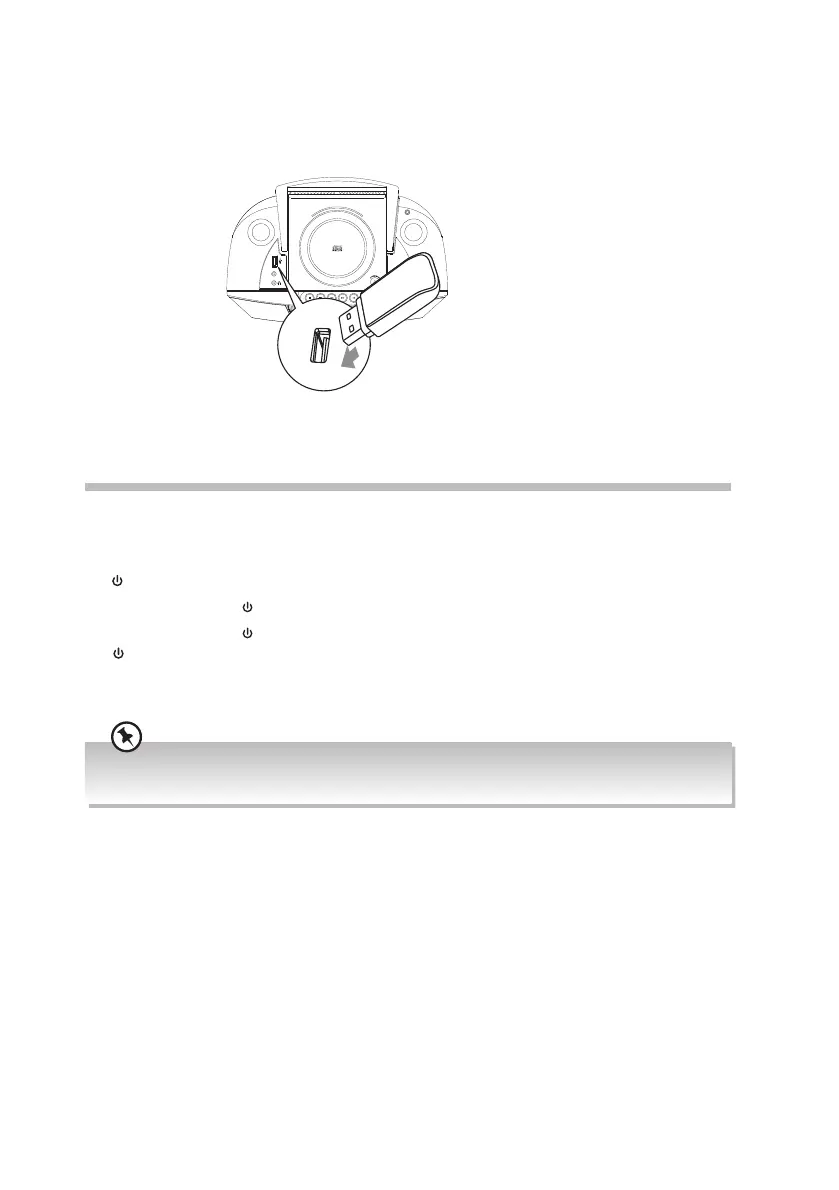
Playing MP3s from a USB Device
When a USB device is connected to the unit, press SOURCE button repeatedly on the unit
to select USB mode.
General Operation
Powering ON/OFF
When you rst connect the unit to the mains socket, the unit will be in STANDBY mode and
the
indicator will light up red.
• Press the Standby
button on the unit to switch the unit on.
• Press the Standby
button on the unit to switch the unit back to STANDBY mode. The
indicator will light up red.
• Disconnect the mains plug from the mains socket if you want to switch the unit o
completely.
Selecting Modes
Press the SOURCE button repeatedly on the unit to switch between DAB, FM, BT/AUX,
TAPE, CD and USB mode. The selected mode will show on the display.
Adjusting the Volume
• Press the VOLUME +/– button on the unit.
Auto Setting of the Clock
The clock can be updated automatically if you can receive a DAB signal in your location.
In order to synchronise to the current local time you must leave it on the DAB station for a
short period of time.
AUX-IN
Top View of Unit
To safely remove the USB switch to another mode or turn o the power, then remove the
USB.
When the unit volume is close to mute or is idle for approximately 15 minutes, it will automatically switch
to Standby.
13
RC-D327B_IB_Final190408V4.indd 13 09/04/2019 12:24


 To Next Page