EasyManua.ls Logo

JVC RC-X3 - Page 16

JVC RC-X3
41 pages
Print Icon
To Next Page IconTo Next Page
To Previous Page IconTo Previous Page
Loading...
RC-X3
B/E/G
m@
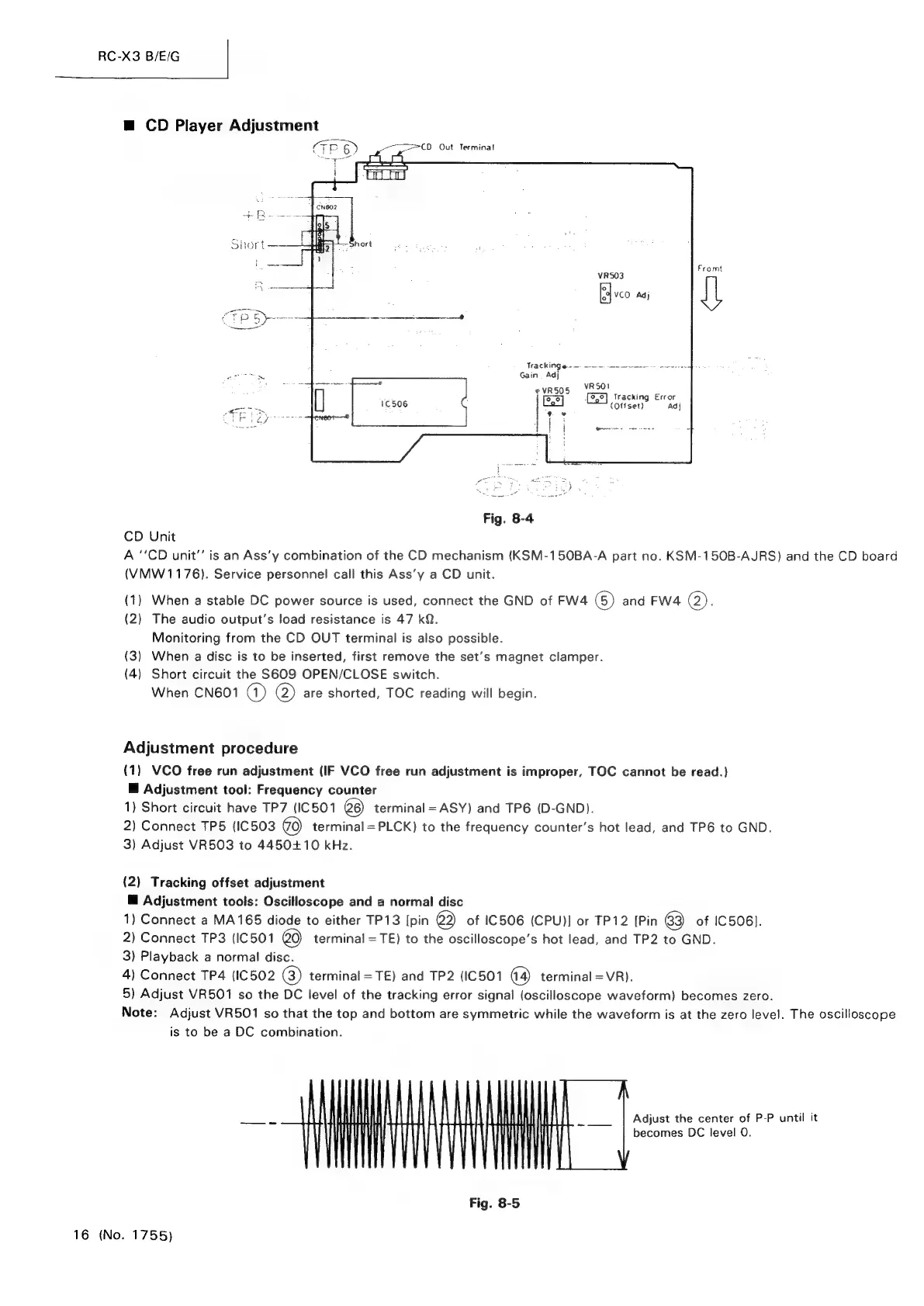
CD
Player
Adjustment
Fromt
VRSO3
VCO
Adj
TRACKING
Gm.
em
nee
ne
ee
ee
Gain
Adj
evrso5
VRSO!
Tracking
Error
(Offset)
Adj
Fig.
8-4
CD
Unit
A
‘‘CD
unit’
is
an
Ass'y
combination
of
the
CD
mechanism
(KSM-150BA-A
part
no.
KSM-150B-AJRS)
and
the
CD
board
(VMW
1176).
Service
personnel!
call
this
Ass’y
a
CD
unit.
(1)
When
a
stable
DC
power
source
is
used,
connect
the
GND
of
FW4
(6)
and
FW4
(2);
(2)
The
audio
output’s
load
resistance
is
47
kQ.
Monitoring
from
the
CD
OUT
terminal
is
also
possible.
(3)
When
a
disc
is
to
be
inserted,
first
remove
the
set’s
magnet
clamper.
(4)
Short
circuit
the
S609
OPEN/CLOSE
switch.
When
CN601
GQ)
@)
are
shorted,
TOC
reading
will
begin.
Adjustment
procedure
(1)
VCO
free
run
adjustment
(IF
VCO
free
run
adjustment
is
improper,
TOC
cannot
be
read.)
@
Adjustment
tool:
Frequency
counter
1)
Short
circuit
have
TP7
(IC501
6)
terminal
=
ASY)
and
TP6
(D-GND).
2)
Connect
TP5
(IC503
terminal
=PLCK)
to
the
frequency
counter’s
hot
lead,
and
TP6
to
GND.
3)
Adjust
VR503
to
4450+10
kHz.
(2)
Tracking
offset
adjustment
@
Adjustment
toois:
Oscilloscope
and
a
normal
disc
1)
Connect
a
MA165
diode
to
either
TP13
[pin
2)
of
IC506
(CPU)]
or
TP12
[Pin
63)
of
IC506).
2)
Connect
TP3
(IC501
20)
terminal
=
TE)
to
the
oscilloscope’s
hot
lead,
and
TP2
to
GND.
3)
Playback
a
normal
disc.
4)
Connect
TP4
(IC502
(3)
terminal
=TE)
and
TP2
(IC501
terminal
=
VR).
5)
Adjust
VR501
so
the
DC
level
of
the
tracking
error
signal
(oscilloscope
waveform)
becomes
zero.
Note:
Adjust
VR501
so
that
the
top
and
bottom
are
symmetric
while
the
waveform
is
at
the
zero
level.
The
oscilloscope
is
to
be
a
DC
combination.
___If
HLM
UTI
LA
NI
Adjust
the
center
of
P-P
until
it
|
WV
|
ii!
iI
|
itl
becomes
DC
level
0.
Fig.
8-5
16
(No.
1755)