EasyManua.ls Logo

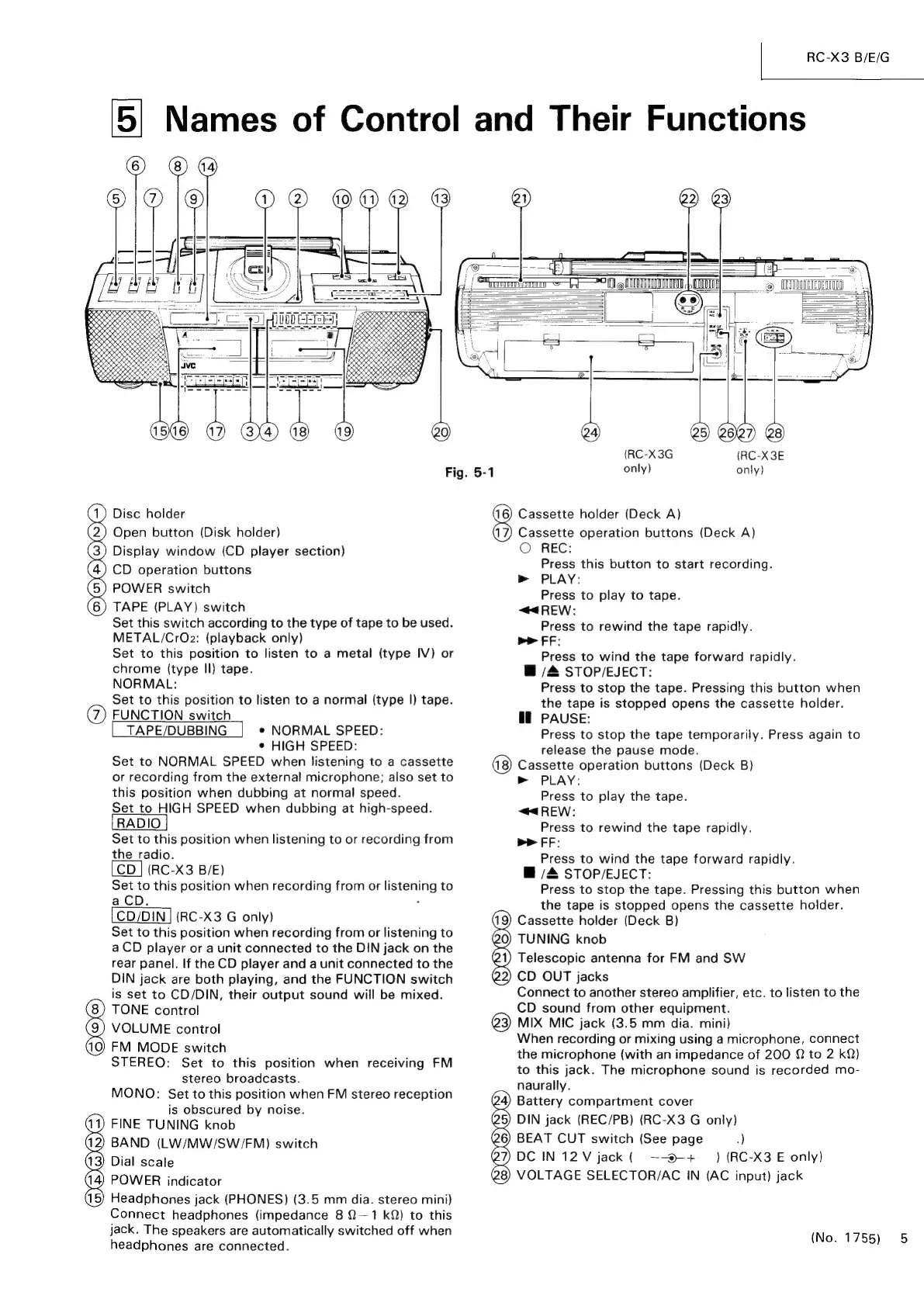
JVC RC-X3 - Names of Control and Their Functions

JVC RC-X3
41 pages
Print Icon
To Next Page IconTo Next Page
To Previous Page IconTo Previous Page
Loading...
|
RC-X3
B/E/G
5]
Names
of
Control
and
Their
Functions
@2)
Seen
em
————D
IMTTINTTNN
|
ITE
|
REEBEILOSESEER
/
sees
%
|
BERBERS
Fig.
5-1
Disc
holder
Open
button
(Disk
holder)
Display
window
(CD
player
section)
CD
operation
buttons
POWER
switch
TAPE
(PLAY)
switch
Set
this
switch
according
to
the
type
of
tape
to
be
used.
METAL/CrOz2:
(playback
only)
Set
to
this
position
to
listen
to
a
metal
(type
IV)
or
chrome
(type
Il)
tape.
NORMAL:
Set
to
this
position
to
listen
to
a
normal
(type
|)
tape.
FUNCTION
switch
TAPE/DUBBING
e
NORMAL
SPEED:
¢
HIGH
SPEED:
Set
to
NORMAL
SPEED
when
listening
to
a
cassette
or
recording
from
the
external
microphone;
also
set
to
this
position
when
dubbing
at
normal
speed.
Set
to
HIGH
SPEED
when
dubbing
at
high-speed.
Set
to
this
position
when
listening
to
or
recording
from
the
radio.
[CD
]
(RC-X3
B/E)
Set
to
this
position
when
recording
from
or
listening
to
a
CD.
:
CD/DIN
|
(RC-X3
G
only)
Set
to
this
position
when
recording
from
or
listening
to
a
CD
player
or
a
unit
connected
to
the
DIN
jack
on
the
rear
panel.
If
the
CD
player
and
a
unit
connected
to
the
DIN
jack
are
both
playing,
and
the
FUNCTION
switch
is
set
to
CD/DIN,
their
output
sound
will
be
mixed.
TONE
control
VOLUME
control
FM
MODE
switch
STEREO:
Set
to
this
position
when
receiving
FM
stereo
broadcasts.
MONO:
Set
to
this
position
when
FM
stereo
reception
is
obscured
by
noise.
FINE
TUNING
knob
BAND
(LW/MW/SW/FM)
switch
Dial
scale
POWER
indicator
Headphones
jack
(PHONES)
(3.5
mm
dia.
stereo
mini)
Connect
headphones
(impedance
8
Q—1
kQ)
to
this
jack.
The
speakers
are
automatically
switched
off
when
headphones
are
connected.
oO
(2)
(3)
(4)
5)
6)
@
QOS)
GOO)
=
(RC-X3G
only)
(RC-X3E
only)
Cassette
holder
(Deck
A)
Cassette
operation
buttons
(Deck
A)
©
REC:
Press
this
button
to
start
recording.
m
PLAY:
Press
to
play
to
tape.
“@4REW:
Press
to
rewind
the
tape
rapidly.
mr
FF:
Press
to
wind
the
tape
forward
rapidly.
B
/&
STOP/EJECT:
Press
to
stop
the
tape.
Pressing
this
button
when
the
tape
is
stopped
opens
the
cassette
holder.
HE
PAUSE:
Press
to
stop
the
tape
temporarily.
Press
again
to
release
the
pause
mode.
Cassette
operation
buttons
(Deck
B)
>
PLAY:
Press
to
play
the
tape.
“<4
REW:
Press
to
rewind
the
tape
rapidly.
bP
rr:
Press
to
wind
the
tape
forward
rapidly.
@
/4
STOP/EJECT:
Press
to
stop
the
tape.
Pressing
this
button
when
the
tape
is
stopped
opens
the
cassette
holder.
(19)
Cassette
holder
(Deck
B)
@0)
TUNING
knob
Q1)
Telescopic
antenna
for
FM
and
SW
@2)
CD
OUT
jacks
Connect
to
another
stereo
amplifier,
etc.
to
listen
to
the
CD
sound
from
other
equipment.
3)
MIX
MIC
jack
(3.5
mm
dia.
mini)
When
recording
or
mixing
using
a
microphone,
connect
the
microphone
(with
an
impedance
of
200
Q
to
2
kQ)
to
this
jack.
The
microphone
sound
is
recorded
mo-
naurally.
Battery
compartment
cover
DIN
jack
(REC/PB)
(RC-X3
G
only)
BEAT
CUT
switch
(See
page
)
DC
IN
12
V
jack
(
~-®-+
_
)
(RC-X3
E
only)
VOLTAGE
SELECTOR/AC
IN
(AC
input)
jack
Qe)
24)
25)
26)
@7)
28)
(No.
1755)
5