EasyManua.ls Logo

JVC RC-X3 - Page 18

JVC RC-X3
41 pages
Print Icon
To Next Page IconTo Next Page
To Previous Page IconTo Previous Page
Loading...
RC-X3
B/E/G
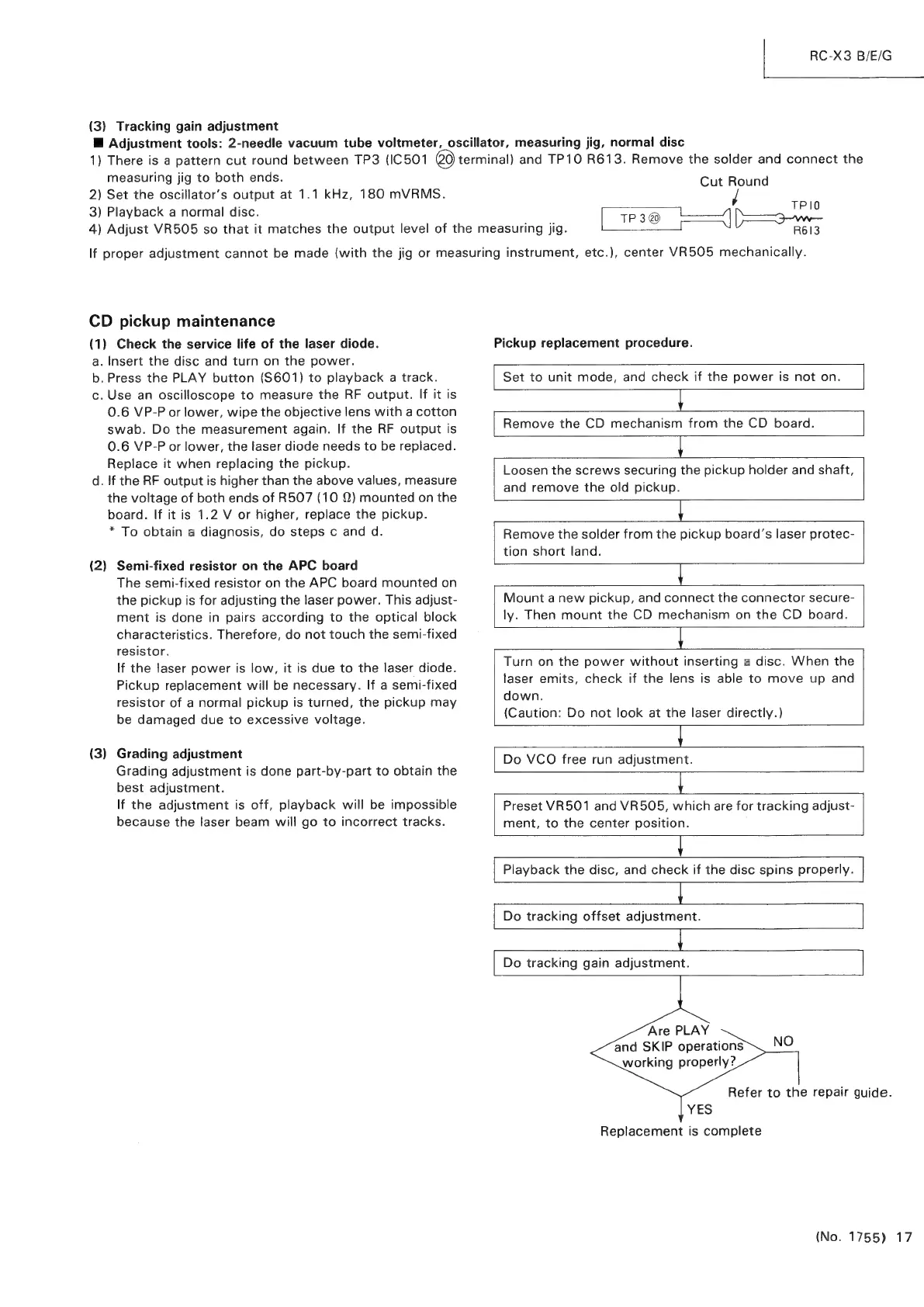
(3)
Tracking
gain
adjustment
Hi
Adjustment
tools:
2-needle
vacuum
tube
voltmeter,
oscillator,
measuring
jig,
normal
disc
1)
There
is
a
pattern
cut
round
between
TP3
(IC501
0
terminal)
and
TP10
R613.
Remove
the
solder
and
connect
the
measuring
jig
to
both
ends.
Cut
Round
2)
Set
the
oscillator’s
output
at
1.1
kHz,
180
mVRMS.
sae
3)
Playback
a
normal
disc.
[tPs@
Lp
3
4)
Adjust
VR505
so
that
it
matches
the
output
level
of
the
measuring
jig.
R613
If
proper
adjustment
cannot
be
made
(with
the
jig
or
measuring
instrument,
etc.),
center
VR505
mechanically.
CD
pickup
maintenance
(1)
Check
the
service
life
of
the
laser
diode.
Pickup
replacement
procedure.
a.
Insert
the
disc
and
turn
on
the
power.
b.
Press
the
PLAY
button
(S601)
to
playback
a
track.
Set
to
unit
mode,
and
check
if
the
power
is
not
on.
c.
Use
an
oscilloscope
to
measure
the
RF
output.
If
it
is
0.6
VP-P
or
lower,
wipe
the
objective
lens
with
a
cotton
swab.
Do
the
measurement
again.
If
the
RF
output
is
Remove
the
CD
mechanism
from
the
CD
board.
0.6
VP-P
or
lower,
the
laser
diode
needs
to
be
replaced.
=
Replace
tt
wen
Replacing
she
pienie:
Loosen
the
screws
securing
the
pickup
holder
and
shaft,
d.
If
the
RF
output
is
higher
than
the
above
values,
measure
and
remove
the
old
pickup
the
voltage
of
both
ends
of
R507
(10
2)
mounted
on
the
L_
:
board.
If
it
is
1.2
V
or
higher,
replace
the
pickup.
|
*
To
obtain
a
diagnosis,
do
steps
c
and
d.
Remove
the
solder
from
the
pickup
board's
laser
protec-
tion
short
land.
(2)
Semi-fixed
resistor
on
the
APC
board
ae
The
semi-fixed
resistor
on
the
APC
board
mounted
on
the
pickup
is
for
adjusting
the
laser
power.
This
adjust-
Mount
a
new
pickup,
and
connect
the
connector
secure-
ment
is
done
in
pairs
according
to
the
optical
block
ly.
Then
mount
the
CD
mechanism
on
the
CD
board.
characteristics.
Therefore,
do
not
touch
the
semi-fixed
|
resistor.
Turn
on
the
power
without
inserting
a
disc.
When
the
laser
emits,
check
if
the
lens
is
able
to
move
up
and
down.
(Caution:
Do
not
look
at
the
laser
directly.)
ae
Do
VCO
free
run
adjustment.
If
the
laser
power
is
low,
it
is
due
to
the
laser
diode.
Pickup
replacement
will
be
necessary.
If
a
semi-fixed
resistor
of
a
normal
pickup
is
turned,
the
pickup
may
be
damaged
due
to
excessive
voltage.
(3)
Grading
adjustment
Grading
adjustment
is
done
part-by-part
to
obtain
the
best
adjustment.
Ey
If
the
adjustment
is
off,
playback
will
be
impossible
Preset
VR501
and
VR505,
which
are
for
tracking
adjust-
because
the
laser
beam
will
go
to
incorrect
tracks.
ment,
to
the
center
position.
Playback
the
disc,
and
check
if
the
disc
spins
properly.
Sn
Do
tracking
offset
adjustment.
Do
tracking
gain
adjustment.
Are
PLAY
and
SKIP
operations\_NO
working
properly?
Refer
to
the
repair
guide.
YES
Replacement
is
complete
(No.
1755)
17