Listening to an external device
1
Set the volume level of the System to
minimum.
2
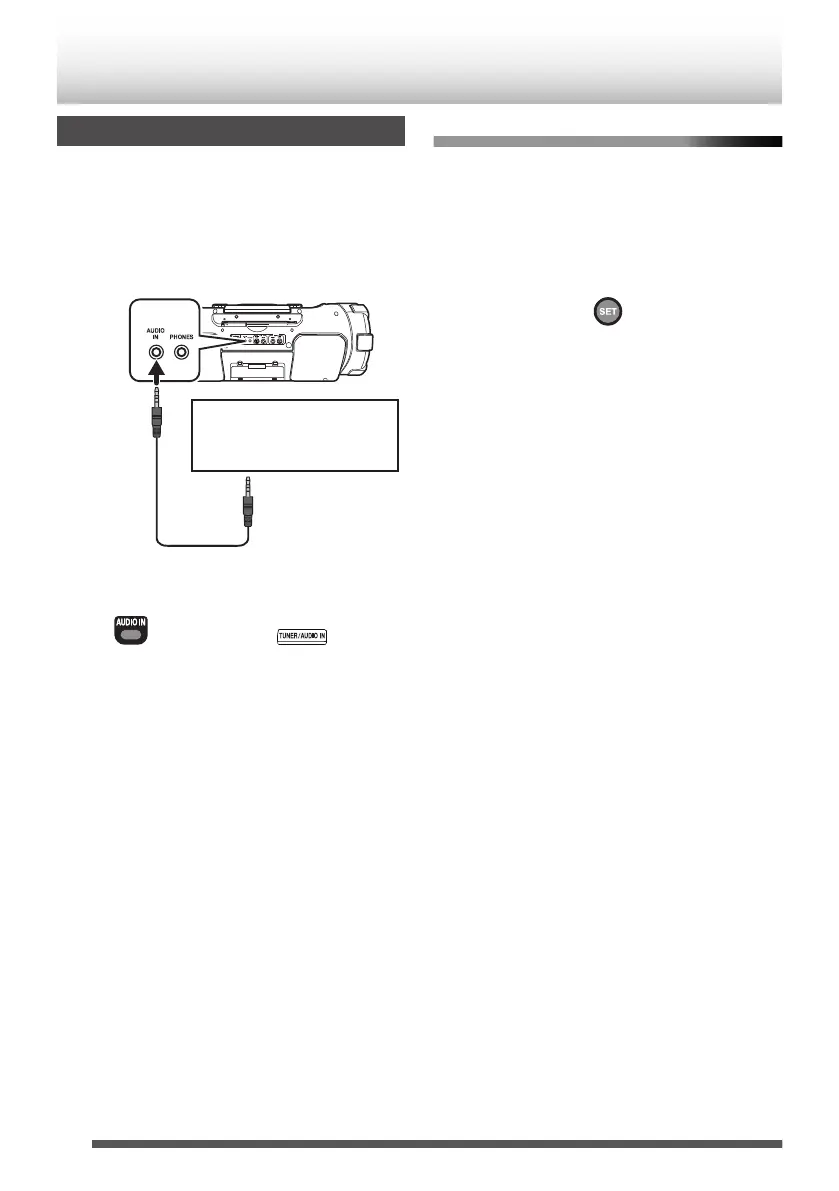
Connect the external device.
Refer also to the instruction manual for the
external device.
.
Digital audio player, TV, or
other audio device
Headphone jack and
audio output jack
Stereo mini
plug cord
(not supplied)
3
Press [AUDIO IN] to select “AUDIO IN”.
.
Main unitRemote control
(Press repeatedly)
4
Start playback of the external device.
5
Adjust the volume of the System and of
the external device.
Adjusting the audio input level
Adjust the audio input level when there is a contrast
between the volume of the external device
connected to the AUDIO IN jack and that of other
sources.
When “AUDIO IN” is selected as the source,
press [SET].
.
Each time you press the button, the input level
changes as follows:
“LEVEL1” Æ “LEVEL2” Æ “LEVEL3” Æ (back to
the beginning)
“LEVEL1” : Standard audio input level
“LEVEL2” : Higher level than “LEVEL1”
“LEVEL3” : Higher level than “LEVEL2”
The initial setting is “LEVEL3”.
26
External device


 To Next Page