7
Optional Equipment
Connection
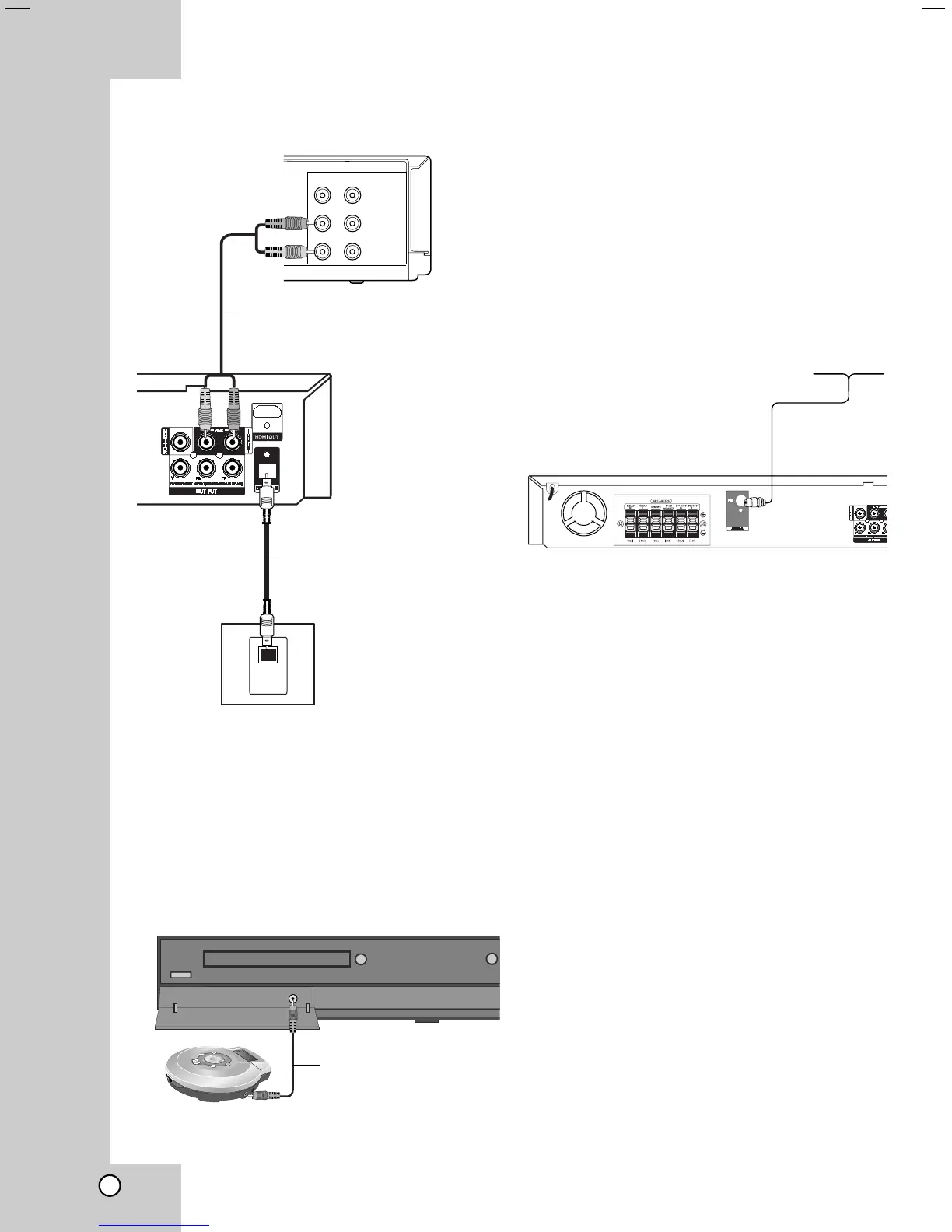
AUX IN connection (A)
Connect a Output of auxiliary device to the AUX
AUDIO Input (L/R) Connector.
OPTICAL IN connection (O)
Connect an optical output of DVD Player (or Digital
Device etc) to the OPTICAL IN connector.
AUDIO IN connection (D)
Connect a output of portable device (MP3 or PMP
etc) to the AUDIO input connector.
Antenna Connection
Connect the supplied FM antenna for listening to the
radio.
Connect the FM Wire antenna to the FM antenna
connector.
Notes:
•
Be sure to fully extend the FM wire antenna.
• After connecting the FM Wire antenna, keep it as
horizontal as possible.
VIDEO
OUT IN
AUDIO (L)
AUDIO (R)
OPTICAL
OUT
Rear of DVD/CD Receiver
O
A
Auxiliary device
DVD Player
(or Digital
Device, etc)
To AUDIO OUT (L/R)
To AV IN AUDIO (L/R)
D
Portable device
To AUDIO OUT
To AUDIO IN
FM Wire Antenna
(supplied)
(not supplied)
(not supplied)
(not supplied)


 To Next Page