EasyManua.ls Logo

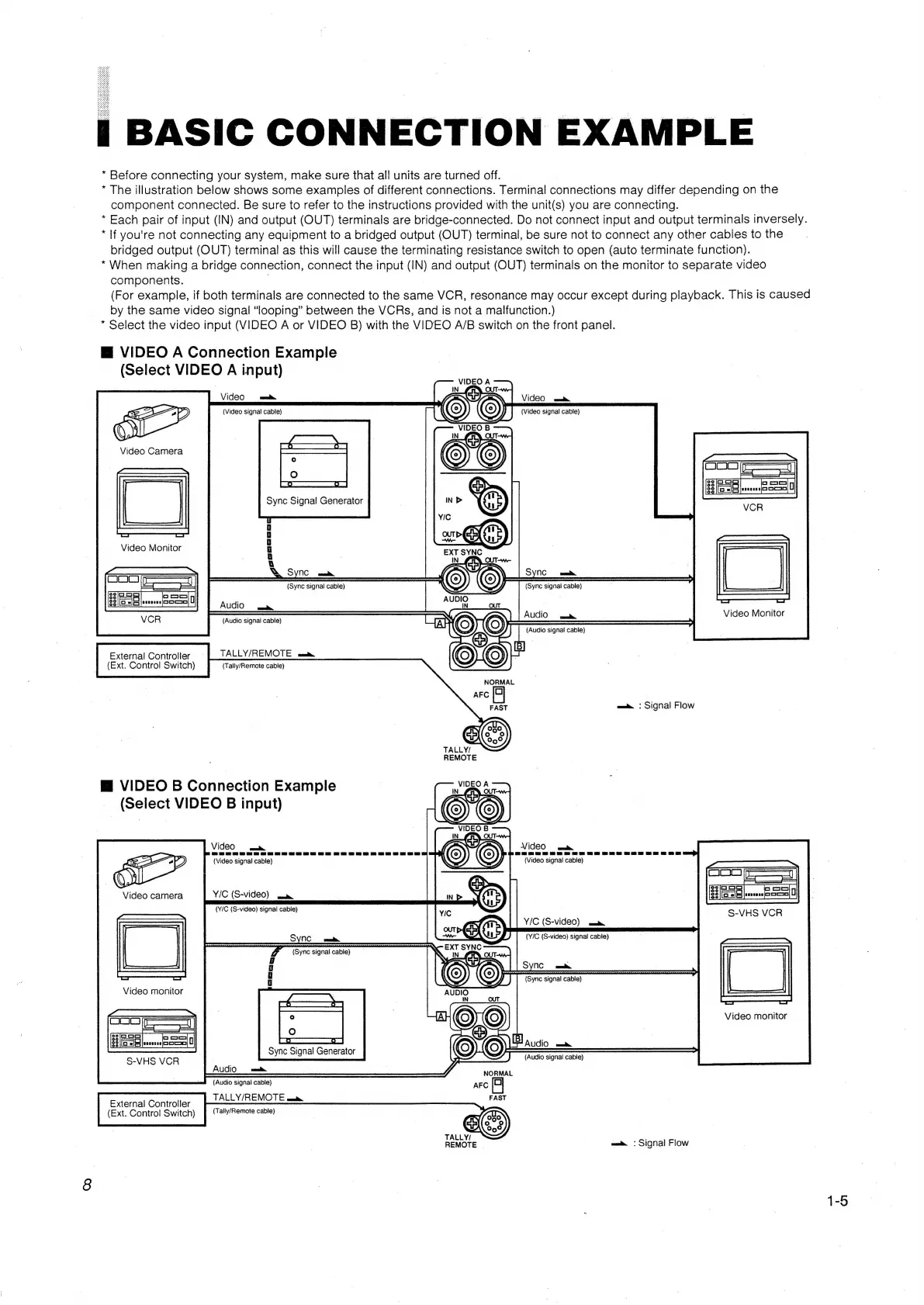
JVC TM-1010PN - Basic Connection Example

JVC TM-1010PN
7 pages
Print Icon
To Next Page IconTo Next Page
To Previous Page IconTo Previous Page
Loading...
*
Before
connecting
your
system,
make
sure
that
all
units
are
turned
off.
*
The
illustration
below
shows
some
examples
of
different
connections.
Terminal
connections
may
differ
depending
on
the
component
connected.
Be
sure
to
refer
to
the
instructions
provided
with
the
unit(s)
you
are
connecting.
*
Each
pair
of
input
(IN)
and
output
(OUT)
terminals
are
bridge-connected.
Do
not
connect
input
and
output
terminals
inversely.
*
If
you're
not
connecting
any
equipment
to
a
bridged
output
(OUT)
terminal,
be
sure
not
to
connect
any
other
cables
to
the
bridged
output
(OUT)
terminal
as
this
will
cause
the
terminating
resistance
switch
to
open
(auto
terminate
function).
*When
making
a
bridge
connection,
connect
the input
(IN)
and
output
(OUT)
terminals
on
the
monitor
to
separate
video
components.
.
(For
example,
if
both
terminals
are
connected
to
the
same
VCR,
resonance
may
occur
except
during
playback.
This
is
caused
by
the
same
video
signal
“looping”
between
the
VCRs,
and
is
not
a
malfunction.)
*
Select
the
video
input
(VIDEO
A
or
VIDEO
B)
with
the
VIDEO
A/B
switch
on
the
front
panel.
M@
VIDEO
A
Connection
Example
(Select
VIDEO
A
input)
(Video
signal
cable)
90
oo
oo
oo
Video
Monitor
(Audio
signa!
cable)
TALLY/REMOTE
maim
(Tally/Remote
cable)
External
Controller
(Ext.
Control
Switch)
NORMAL
AFC
FAST
eam
©
Signal
Flow
TALLY/
REMOTE
VIDEO
B
Connection
Example
_
(Select
VIDEO
B
input)
VideO
mm
Poe
gg
a
SG
eG
GG
<r
Pp
(Video
signal
cable)
Video
camera
Y/C
(S-Vide0)
ame
(Y/C
(S-video)
signal
cable)
|
Y/C
(S-video)
mm
(Y/C
(S-video)
signal
cable)
y
SYNC
_n
(Sync
signai
cable)
2
ne
ee
A
©
Video
monitor
OOb
a
Sync
Signal
Generator
I
NEA
J
(Radio
signal
cable)
S-VHS
VCR
|
Bal
6
eee
NORMAL
(Audio
signal
cable)
AFC
S$
nc
a
(Sync
signal
cable)
*
@
|
a
a
TALLY/REMOTE
namtm.
(Tally/Remote
cable)
External
Controller
(Ext.
Control
Switch)
TALLY/
:
REMOTE
mam
©
Signal
Flow
1-5

Related product manuals