EasyManua.ls Logo

K-array Kommander-KA02 - Page 12

K-array Kommander-KA02
24 pages
Print Icon
To Next Page IconTo Next Page
To Previous Page IconTo Previous Page
Loading...
10
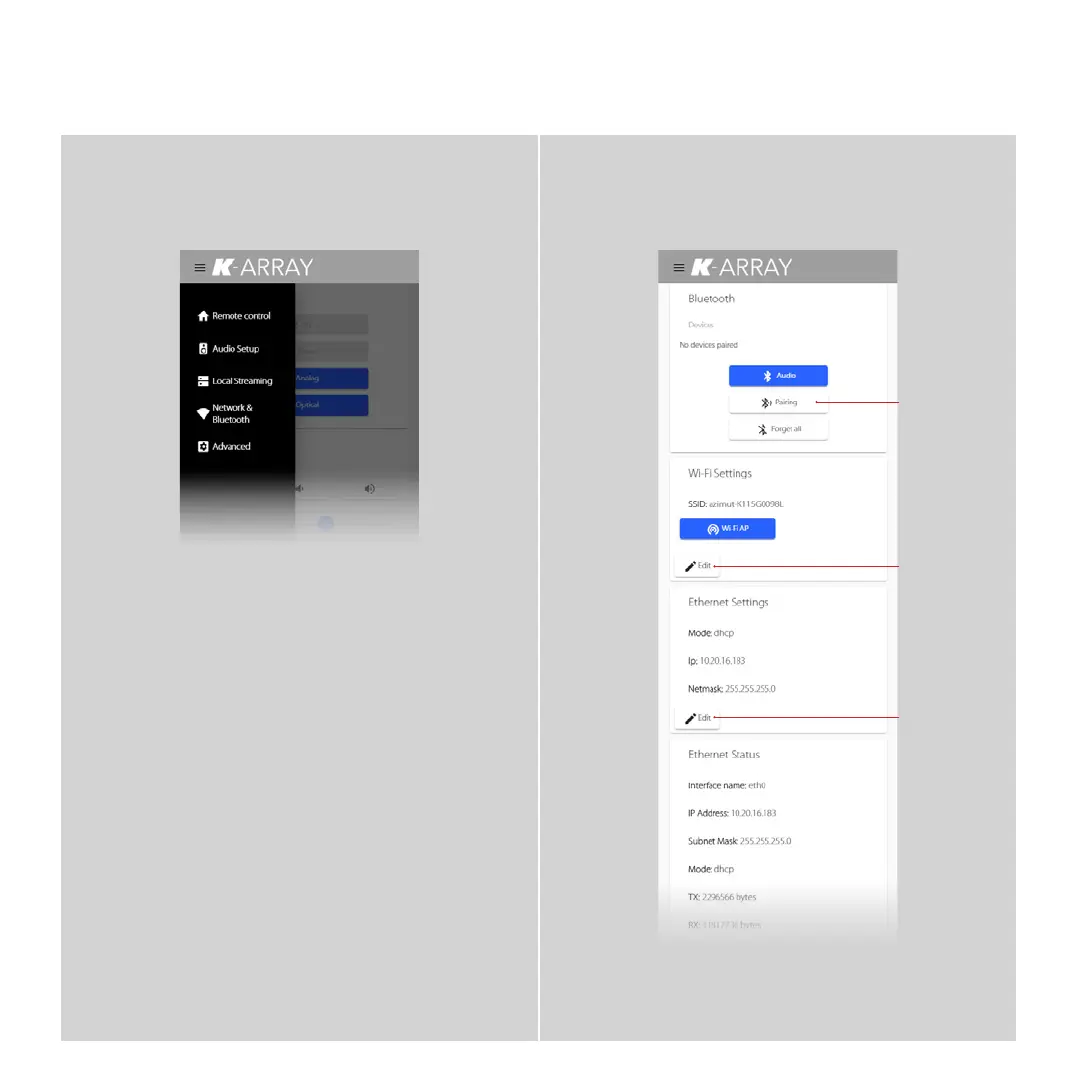
Network & Bluetooth
Click this button
to set the system
in Pairing mode
waiting for a
connection.
Click this button
to set a new
password for the
local Wi-Fi of the
Azimut system
Click this button
to change
Ethernet settings
(i.e. a static IP
address and
a different
netmask)
Pairing
Edit Password
Edit Ethernet
Main Menu
Remote Control
The default view with Audio Sources
and Players Selections.
Audio Setup
User equalizer and level tuning.
Local Streaming
Manage a group of devices by a single
Azimut system.
Network & Bluetooth
Modify network and Bluetooth settings.
Advanced
Set advanced features.
Kommander -KA02
User Guide

Related product manuals