7
AUDIO CONTROL
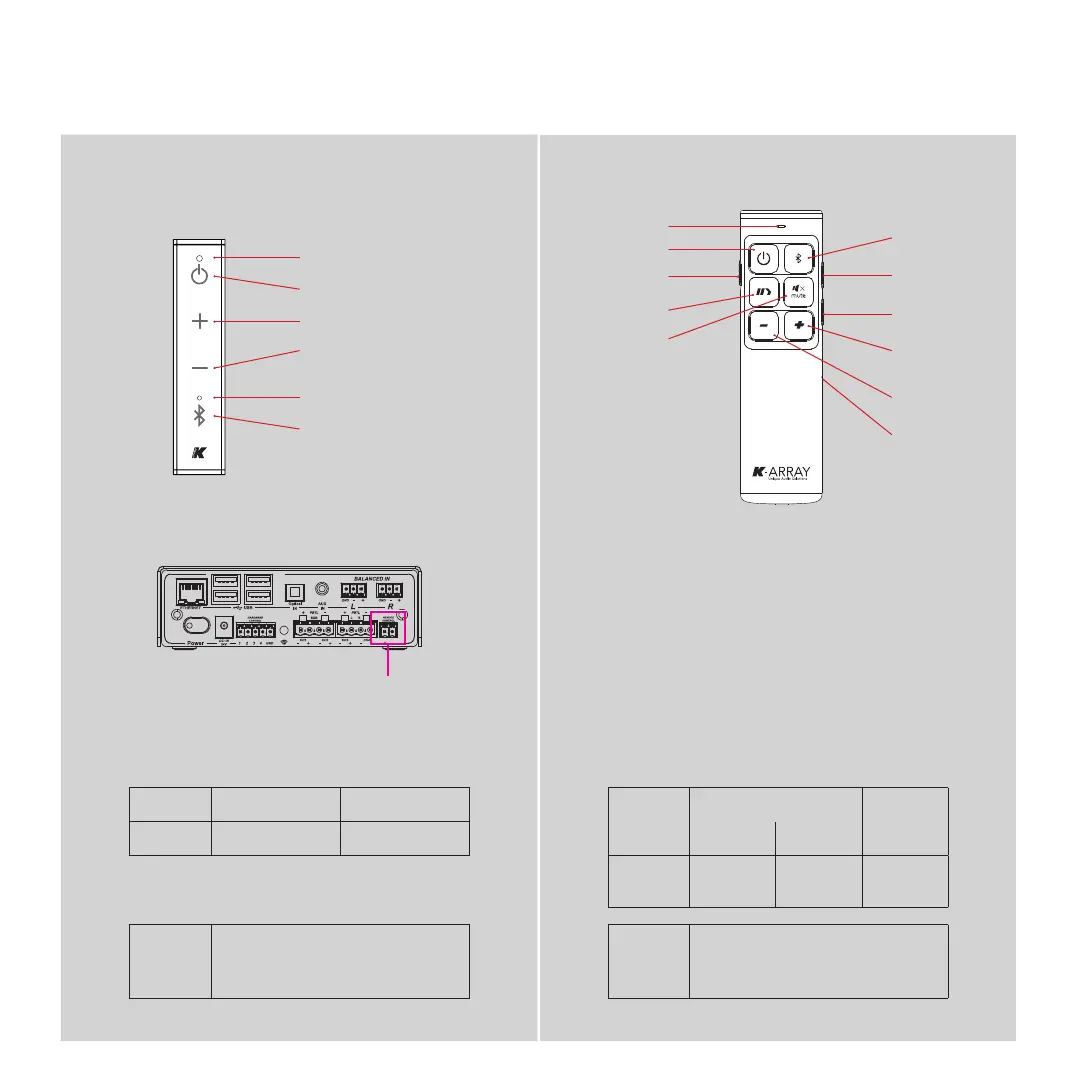
Status LED
System power
Power switch
Status LED
Skip forward
Skip back
System power
Charge port
Volume up
Mute
Play/Pause
Volume down
Volume up
Volume down
Bluetooth
Bluetooth
Pairing LED
Wired Remote Wireless Remote
Standby Power On
Status LED pulse blinking solid white
Command
Battery
low
received not received
Status LED single blink long blinking flashing
Bluetooth
Pairing
Press the Bluetooth button to set the
system to Bluetooth pairing mode
Bluetooth
Pairing
Hold down the Bluetooth button for 10
seconds to set the system to Bluetooth
Pairing mode
The wireless remote provides complete control over the
Azimut playback features.
The remote includes a high-efficiency rechargeable battery
with a switch that can extend the batter life when powered off.
When the battery discharges to approximately 10% remaining
life, the Status LED begins flashing: connect the remote’s
charge port to a standard USB port to recharge the internal
battery; use the provided cable.
Kommander -KA02
User Guide
Wiered remote
inlet



 To Next Page