15
USB Player
A B C D
General
192.168.10.1
Settings
Back
Custom Button A
Enabled
Action URL
PUT Data (leave empty for GET requests)
Custom Button B
Enabled
Action URL
PUT Data (leave empty for GET requests)
Custom Button C
Enabled
Action URL
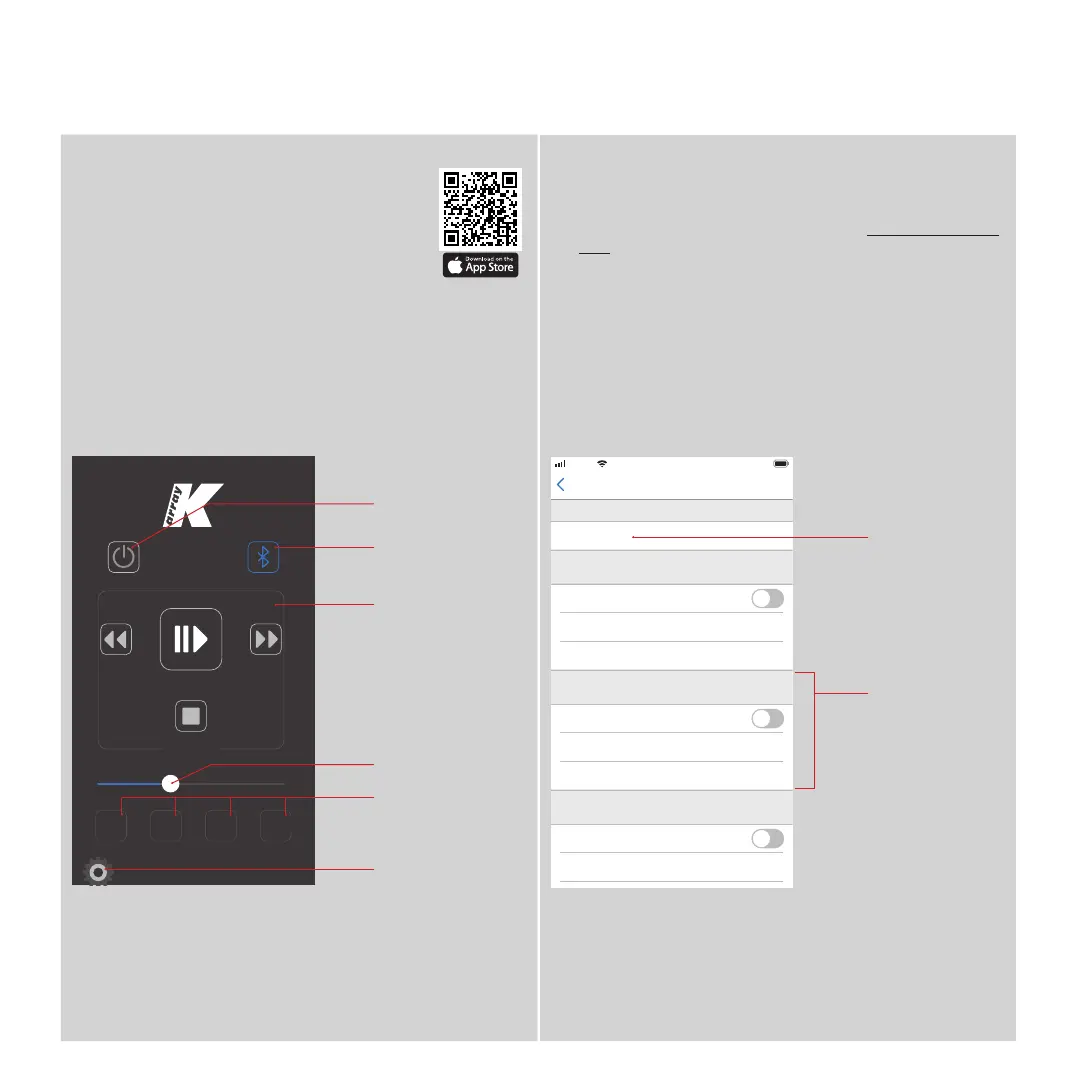
Azimut Remote App
Azimut Remote is a iOS application that
allows the user to remotely control a single
Kommander-KA02 amplifier unit via an Ethernet
connection.
Azimut Remote offers an easy to use interface for managing
audio playback and Bluetooth Pairing, as well as four
completely user-programmable buttons. .
In order to connect the Azimut Remote to the Azimut system:
1. Be sure that the Azimut system and your iOS device are connected to
the same network.
2. Launch the Azimut Discovery application (see Azimut Remote App,
p. 15). The app will show the discovered Azimut Systems on the
network: make note of the IP address of the device you want to control
with the Azimut Remote app.
3. Launch the Azimut Remote app and open the Settings feature.
4. Insert the IP address of the device you want to control in the General
field on top of the page.
5. Click on Back: the app is now linked to your Azimut System
Kommander -KA02
User Guide
Play back
Controls
Programmable
buttons
Settings button
Volume Control
Bluetooth
Pairing button
IP address of
the device you
want to control
Button B
settings
Standby button



 To Next Page