KaCool D 02.02.201742
Installation and Connection
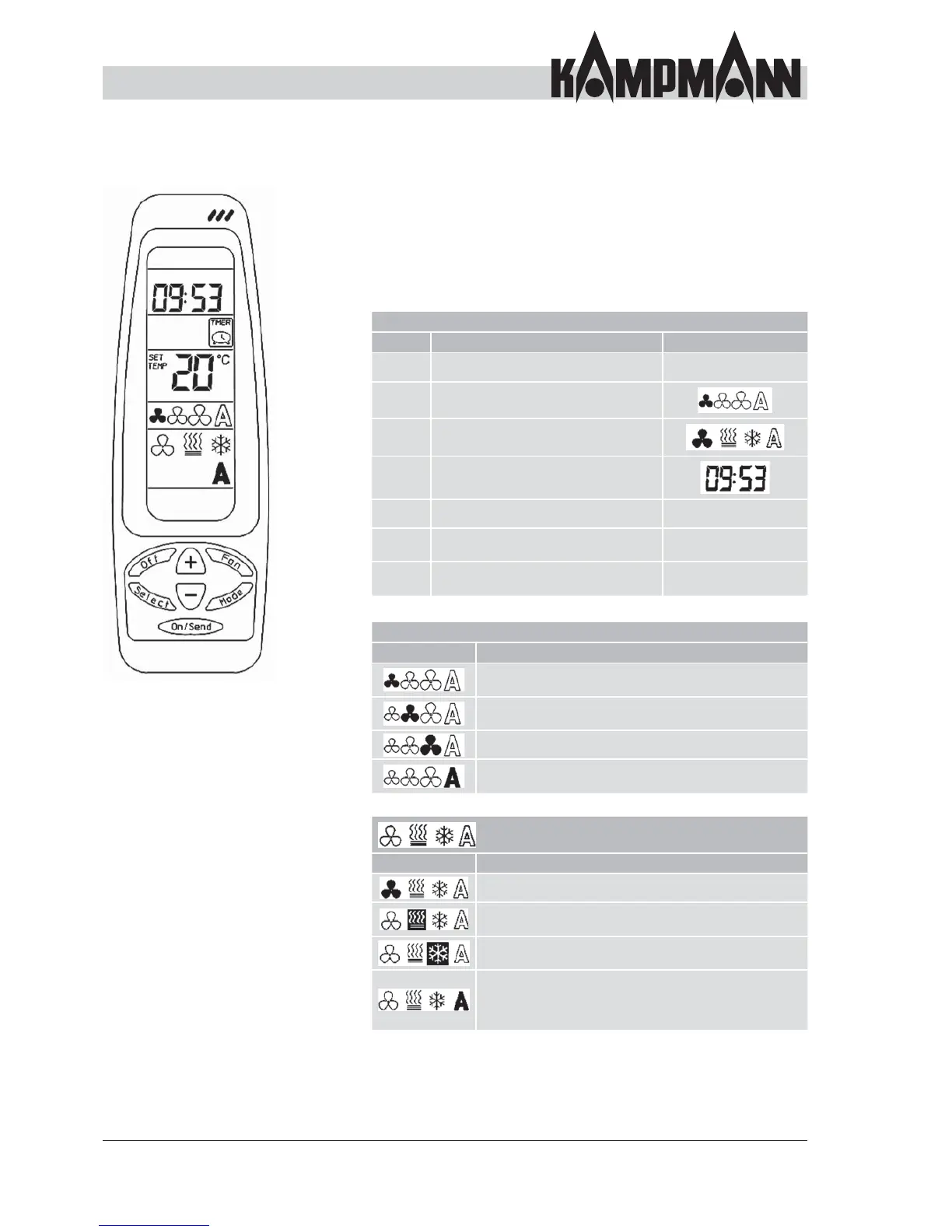
Control overview
Infra-red transmitter/remote control
The buttons on the remote control can be used to change the
function of the cassette. The display on the remote control
initially changes by pressing the buttons. Once all desired
changes have been set, these are sent to the cassette by
pressing the On/Send button. The settings are not transferred
to the cassette if the On/Send button is not pressed.
Button function
Button Description Display
OFF Disable the ceiling cassette – – –
FAN Change the fan speed
MODE Change the operating mode
Select
Select Set the clock
(Save with On/Send)
On/Send Save the changed data
+
Increase the set values
(e.g. temperature)
– – –
-
Reduce the set values
(e.g. temperature)
– – –
Priority Display Speed
Set value Priority
Low fan speed, low air volume and
output
Medium fan speed, average air volume and
output
High fan speed, high air volume and output
Automatic adjustment of the speed once the room
temperature deviates to the setpoint temperature
Priority Display Operating mode
Set value Priority
Only recirculating mode, only the fan operates
Heating mode, the cassette heats the room to the
setpoint temperature
Cooling mode, the cassette cools the room to the
setpoint temperature
Automatic mode, the cassette changes over automatically
between heating and cooling mode depending on the
room temperature deviation. Only suitable for 4-pipe
systems.



 To Next Page