53
CAP MENU (TURNTABLE ANTENNA SETTINGS)
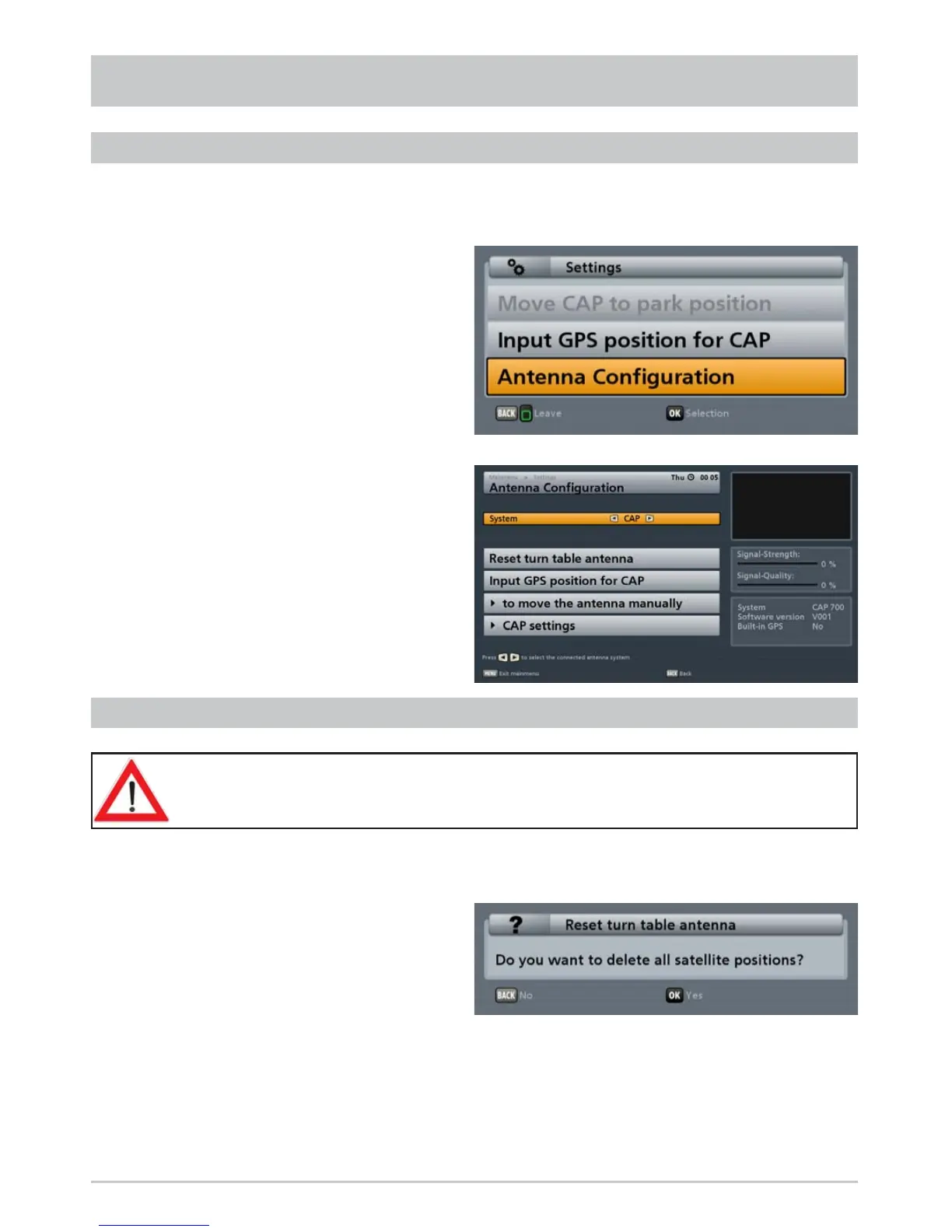
Press the
(green) button. The following display appears:
Use the
buttons to select the
“Antenna Confi guration” line and press
the
button to confi rm.
The following display appears:
You can also call up this menu via
the main menu “Settings”, “Antenna
Confi guration” (System: CAP).
Use the
buttons to select the “Reset turn table antenna” line and press the
button to
confi rm. The following display appears:
RESETTING THE CAP SYSTEM (TURNTABLE ANTENNA) (RESET)
All satellite positions found by a search will be deleted.
Press the
button to confi rm, or the
button to cancel.
Note: Before exchanging any component of the system (such as the receiver) the turntable
should be moved to its park position by means of the “Reset turn table antenna” command.
The “Reset” deletes all previously saved satellite positions. The satellite data in the
UFS 940sw receiver are however retained.
CALLING UP THE CAP MENU



 To Next Page