Home
Kemper
Musical Instrument Amplifier
PROFILER
Main Manual
Page 26 (Compliance Statement)
Kemper PROFILER - Compliance Statement
315 pages
Manual
Save Page as PDF
To Next Page
To Next Page
To Previous Page
To Previous Page
Loading...
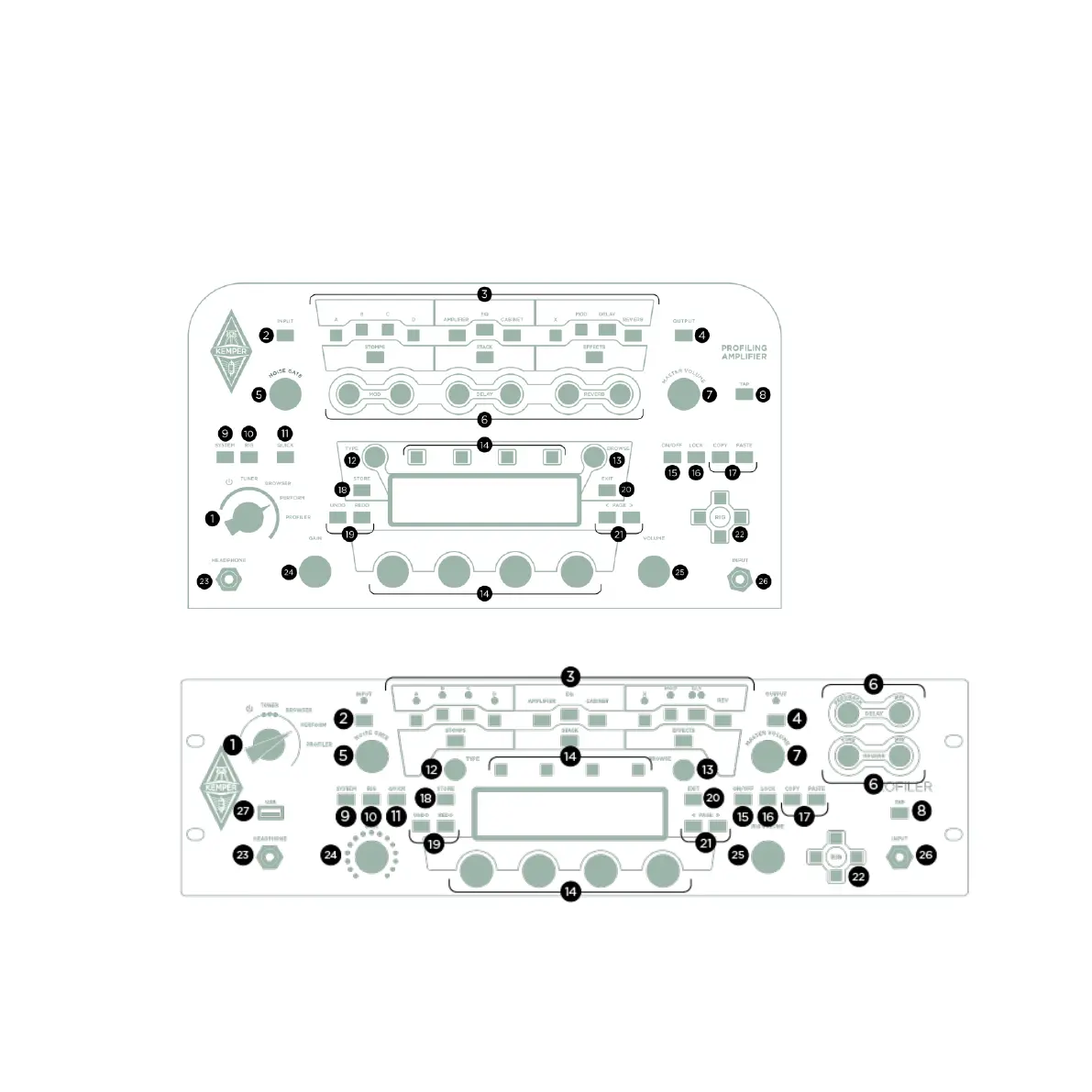
Front Panel Controls Hea
d, PowerHead, Rack
, and PowerRack
26
Front Panel Controls Head
,
PowerHead
,
Rack, and PowerRack
PROFILER Head and PowerH
ead
PROFILER Rack and PowerR
ack
25
27
Table of Contents
Main Page
Legal Notice
2
Table of Contents
3
Table of Contents
19
About this Main Manual
19
Rigs and Signal Chain
20
Effect Modules
21
Effect Presets
22
Effect Select Screen
22
Clear Effect
23
Autoload
23
Load Defaults
24
Load Type
24
Auto Type
24
Stack Section
25
Front Panel Controls Head, Powerhead, Rack, and Powerrack
26
Chicken Head Knob
27
Input Led
29
Module and Section Buttons
29
Output Led
30
NOISE GATE Knob
30
Direct Control Knobs
31
MASTER VOLUME Knob
31
TAP Button
32
SYSTEM Button
32
RIG Button
32
QUICK Button
33
TYPE Knob
33
BROWSE Knob
33
Soft Buttons and Soft Knobs
34
ON/OFF Button
34
LOCK Button
34
COPY and PASTE Buttons
35
STORE Button
35
UNDO and REDO Buttons
36
EXIT Button
36
PAGE> Buttons
36
RIG Navigation Cross
37
HEADPHONE Output
37
GAIN Knob
37
RIG VOLUME Knob
37
Front INPUT
38
Usb
38
Back Panel Overview Head, Powerhead, Rack, and Powerrack
39
Main Output
40
Monitor Output
40
Direct Output/Send
41
RETURN and ALTERNATIVE INPUT
41
Power
42
Network
42
Switch/Pedal
42
MIDI
43
S/PDIF INPUT and OUTPUT
43
Speaker Output
43
Kensington® Lock Connector
43
Front Panel Controls Stage
44
On/Off Button
45
Mode Select Buttons
45
INPUT Button
45
Input Led
47
Module and Section Buttons
48
OUTPUT/MASTER Button
48
Output Led
49
MASTER VOLUME Knob
49
SYSTEM Button
50
PEDALS Button
50
RIG Button
50
TYPE Knob
50
BROWSE Knob
51
Soft Buttons and Soft Knobs
51
MORPH Button
51
LOCK Button
52
EDIT Button
52
COPY and PASTE Buttons (N/A)
53
STORE Button
53
Button
54
PAGE> Buttons
54
GAIN Knob
54
Up/Down Buttons
55
Rig Buttons
55
TAP Button
55
TUNER Button
56
Effect Buttons I-IIII
56
Looper
56
Back Panel Overview Stage
58
Input
58
Return
58
Send 1+2
59
Main Output
59
Monitor Output
60
HEADPHONE Output
60
S/PDIF INPUT and OUTPUT
61
Switch/Pedal
61
MIDI
61
Usb
62
Kensington® Lock Connector
62
Power
62
Basic Setups
63
Using the Tuner
65
Rig Settings
67
Tagging
67
Favorites
69
Rig Spillover off
69
Snapshots
69
Panorama
70
Transpose
70
DLY+REV Routing
70
Rig Volume
70
Tempo
72
Tap Tempo
73
Beat Scanner
74
MIDI Clock
74
Volume Pedal
74
Parallel Path
75
Morph
77
Working with Amplifier Profiles, Cabinet Profiles, Power Amps and Guitar Cabinets
78
Separating Amps and Cabinets: Cabdriver
78
Browsing Amps or Cabinets
79
Direct Profiles
80
Direct Amp Profiles
82
Cabinet Impulse Responses
83
Merging Studio Profiles and Direct Amp Profiles
83
Running a Guitar Speaker Cabinet from a Power Amplifier, "Monitor Cab off
86
The Built-In Power Amplifier
89
The Sound of Guitar Cabinets Versus MIC'ed Speakers
92
Pure Cabinet
94
KEMPER Kone / KEMPER Kabinet
95
Using KEMPER Kone with PROFILER Powerhead or Powerrack
99
KEMPER Kone Wiring
101
Output Section
102
Output Volumes and Output Volume Link
102
Output Sources
104
Main Output
113
Monitor Output
113
Output Equalizers
114
Output Filters
114
Space
114
Auxiliary Input
115
Constant Latency
118
Instrument Input and Reamping
119
Input Source Select
119
Reamping
121
Alternative Procedure for Input Leveling
125
Expression Pedals and Foot Switches
126
Pedal Controllers
126
Expression Pedal Recommendation
128
Connecting Pedals to PROFILER Remote or PROFILER Stage
129
Four Pedals: Luxury
130
Three Pedals: Comfortable
131
Two Pedals: Mainstream
132
One Pedal: Purist
133
Additional Switches Required
134
Connecting a PROFILER Switch
135
Single and Dual Switches of Other Brands
135
Connecting Pedals and Switches to PROFILER Head, Powerhead, Rack or Powerrack
136
Volume Pedal Function
138
Morphing
139
Monitor Volume Pedal (MIDI Control Change #73)
143
Stack Section
144
Amplifier
144
Cabinet
149
Effects
151
Wah Effects (Orange)
154
Wah Parameters
156
Distortion (Red)
159
Booster (Red)
161
Shaper (Red)
162
Bit Shaper
163
Recti Shaper
163
Equalizer (Yellow)
164
Graphic Equalizer
164
Studio Equalizer
164
Metal Equalizer
165
Acoustic Simulator
165
Stereo Widener
167
Phase Widener
167
Delay Widener
167
Compressor (Cyan)
169
Auto Swell
170
Noise Gate (Cyan)
171
Noise Gate 4:1
171
Chorus (Blue)
172
Vintage Chorus
172
Hyper Chorus
173
Air Chorus
174
Micro Pitch
175
Vibrato
176
Rotary Speaker
176
Tremolo / Auto Panner
179
Phaser and Flanger (Purple)
180
Phaser
180
Vibe Phaser
182
Flanger
182
Phaser Oneway & Flanger Oneway
182
Pitch Shifter (White)
183
Transpose
184
Pedal Pitch
185
Pedal Vinyl Stop
186
Chromatic Pitch
186
Harmonic Pitch
188
Analog Octaver
192
Delay (Green)
194
Single Delay
202
Two Tap Delay
203
Serial Two Tap Delay
204
Dual Delay
205
Rhythm Delay
206
Quad Delay
208
Legacy Delay
209
Pitch Shifter Delay (Light Green)
210
Chromatic Type
210
Harmonic Type
210
Loop Pitch Type
210
Crystal Type
211
Crystal Delay
211
Loop Pitch Delay
212
Frequency Shifter Delay
213
Dual Chromatic Delay & Dual Harmonic Delay
214
Dual Crystal Delay
215
Dual Loop Pitch Delay
216
Melody Delay
217
Quad Chromatic Delay & Quad Harmonic Delay
218
Reverb (Green)
219
Spring Reverb
219
Natural Reverb
221
Easy Reverb
226
Echo Reverb
226
Cirrus Reverb
227
Formant Reverb
228
Ionosphere Reverb
229
DLY and REV Modules
230
Space
234
Legacy Reverb
234
Effect Loop (Pink)
235
System Settings
239
LCD / HW Setup / Brightness / User Interface
239
User Interface 2
241
Audio Setup
242
Pedal Links
243
Pedal
243
Remote Settings
243
MIDI Program Change Assignments and Settings
244
Date and Time
244
Device Information
245
Bass Players: Special Hints and Features
246
Performance Mode
248
Loading Performances
250
Foot Control
250
PROFILER Remote
251
Up/Down Buttons
252
Rig Buttons
252
TAP Button
252
TUNER Button
253
Effect Buttons I-IIII
253
Assigning an Effect Module
254
Unassigning an Effect Module
254
Assigning a Second Effect Module
254
More Assignments
255
Toggling Effects
255
Storing Assignments
255
Assignments Without Remote
255
Keeping Oversight
256
Action & Freeze
256
Latched / Momentary
256
Locking Effect Buttons
256
LOOPER Button
257
Workflow
260
Advanced Looper Functions
262
Connecting Expression Pedals and External Switches
263
Remote Settings
263
Cabling
264
MIDI
267
Continuous Controllers
268
Effect Switches
269
Rig Change in Performance Mode
271
Rig Change in Browser Mode
274
MIDI Global Channel
275
MIDI Clock
275
Transmitting MIDI Commands to Two External Devices in Performance Mode
276
Transmitting Pedal Controllers for Morphing, Wah, Volume, and Pitch to Two External Devices
276
Transmitting User Interface to MIDI Global Channel
277
Nrpn
277
Getting Organized
278
Views
278
Favorite Rigs
279
Erase Non-Favorites
280
KEMPER Rig Manager
280
Updates, Backups and Sharing Sounds
281
Operating System Updates
281
Creating Backups
283
Restoring Backups
283
Importing Rigs, Performances, and Presets
284
Export of Rigs and Presets
284
Screen Symbols
286
PROFILING an Amp
287
General Considerations
287
PROFILING with Effects in the Recording Chain
288
Monitoring While Taking Profiles
288
Considerations Regarding Noise and Hum
289
Other Considerations
289
Making Connections
290
Connections for PROFILING a Guitar Amplifier
290
Connections for PROFILING a Combination of Amp and Stomp Box
293
Connections for PROFILING a Computer-Based Guitar Amp Simulation
294
Taking a PROFILE
294
Levels
295
Evaluating the PROFILE
296
Refining the PROFILE
297
The Resulting PROFILE
297
How to PROFILE an Amp Without a Cabinet (Direct Amp Profiles)
299
How to Create Merged Profiles
302
PROFILING a Rotary Speaker Cabinet
304
Under the Hood
305
Trouble Shooting
306
Customer Support
308
Technical Specifications
309
Other manuals for Kemper PROFILER
Quick Start
132 pages
The Basics & Profiling Guide
144 pages
Related product manuals
Kemper PROFILER Stage
180 pages
Kemper PROFILER Remote
96 pages
Kemper Profiling Amp
2 pages
Kemper Profiling Amplifier
54 pages


 To Next Page