Should you experience any problems with your
dryer, it has the capability of transmitting data via
your telephone to the Kenmore Connect Team. This
gives you the capability of speaking directly to our
specially trained technicians. The technician records
the data transmitted from your machine and uses it
to analyze the issue, providing a fast and effective
diagnosis.
Using the Kenrnore Connect TM System
Follow the technician's instructions and perform
the following steps when requested.
If you experience problems with your dryer, call
1-800-4-MY-HOME ®. Only use the Kenmore Connect
System feature when instructed to do so by the
Kenmore Connect Team. The transmission sounds that
you will hear are normal and sound similar to a fax
machine.
Kenmore Connect cannot be activated unless your
dryer is turned on by pressing the POWER button. If
your dryer is unable to turn on, then troubleshooting
must be done without using Kenmore Connect.
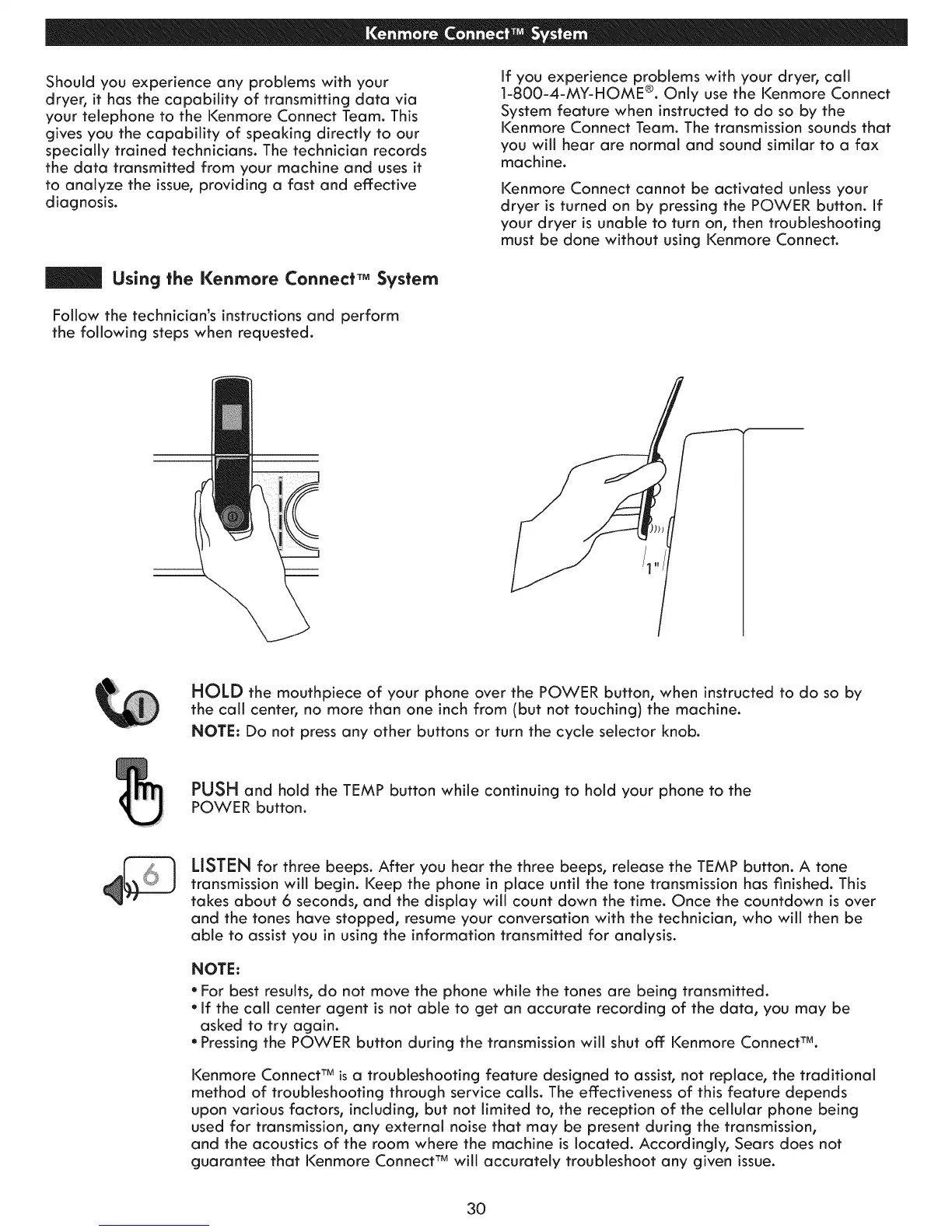
HOLD the mouthpiece of your phone over the POWER button, when instructed to do so by
the call center, no more than one inch from (but not touching) the machine.
NOTE: Do not press any other buttons or turn the cycle selector knob.
PUSH and hold the TEMP button while continuing to hold your phone to the
POWER button.
LISTEN for three beeps. After you hear the three beeps, release the TEMP button. A tone
transmission will begin. Keep the phone in place until the tone transmission has finished. This
takes about 6 seconds, and the display will count down the time. Once the countdown is over
and the tones have stopped, resume your conversation with the technician, who will then be
able to assist you in using the information transmitted for analysis.
NOTE:
* For best results, do not move the phone while the tones are being transmitted.
"If the call center agent is not able to get an accurate recording of the data, you may be
asked to try again.
"Pressing the POWER button during the transmission will shut off Kenmore Connect TM.
Kenmore Connect TM is a troubleshooting feature designed to assist, not replace, the traditional
method of troubleshooting through service calls. The effectiveness of this feature depends
upon various factors, including, but not limited to, the reception of the cellular phone being
used for transmission, any external noise that may be present during the transmission,
and the acoustics of the room where the machine is located. Accordingly, Sears does not
guarantee that I<enmore Connect TM will accurately troubleshoot any given issue.
3O



 To Next Page