EasyManua.ls Logo

Kenwood Basic M1D - Speakers; Connecting Speaker Systems; Speaker Cable Preparation; Ground Connection

Kenwood Basic M1D
8 pages
Print Icon
To Next Page IconTo Next Page
To Previous Page IconTo Previous Page
Loading...
Speakers
This
amplifier
has
two
pairs
of
speaker
terminals,
©
SPEAKERS
A
and
SPEAKERS
B.
Connecting
one
speaker
system
Connect
speakers
rated
at
4
ohms
or
more
to
the
SPEAKERS
A
terminals.
7
Connecting
two
speaker
systems
To
connect.an
additional
pair
of
speakers,
use
the
B
ter-
minals.
In
this
case,
each
speaker
must
be
rated
at
8.
ohms
or
more.
Connecting
an
ordinary
speaker
system
.
Connect
the
left
speaker
to
the
LEFT
SPEAKERS
A
or
B
terminals
and
the
right
speaker
to
the
RIGHT
SPEAKERS
A
or
B
terminals.
At
this
time,
be
sure
to
connect
the
(+)
terminals
of
the
speakers
to
the
(+)
terminals
of
the
amplifier
and
(—
—)
terminals
in
the
same
manner
respectively.
Note:
——_—____________________________—____—-
Me
tips
23
aE
cOnner
es
wires
pono
not
t
tough
ade
acent
terminals.
|
|
Warning!
Particular
attention
must
be
given
to
making
good
disc:
trical
contact
at
the
amplifier-output
and
speaker
ter-
minals.
Poor
or
loose
connections
can
cause
sparking
or
burning
at
the
terminals
because
of
the
vely
high
power
that
the
amplifier
can
deliver.
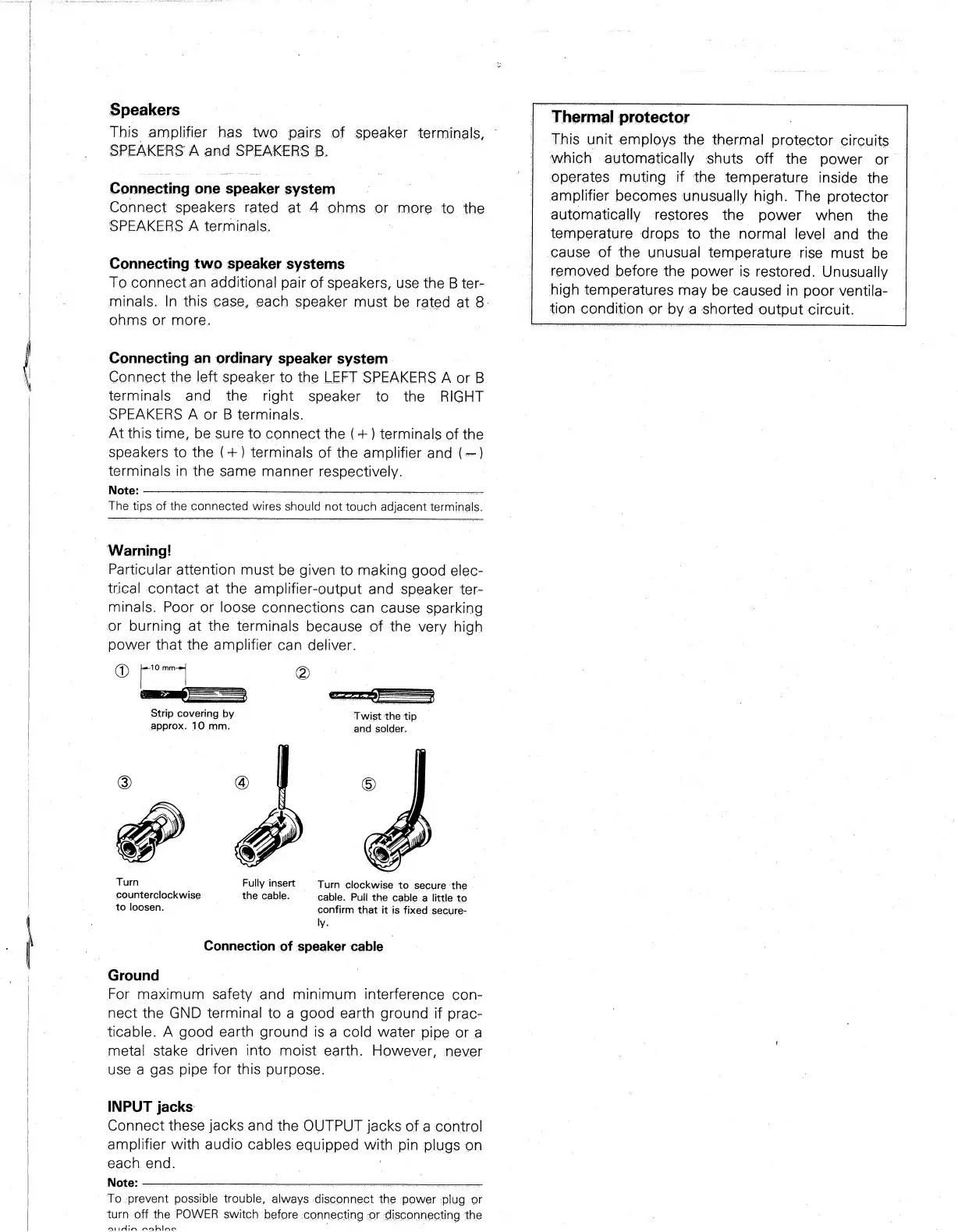
"Strip
covering
by
evict
eh
tip
approx.
10
mm.
.
and
solder,
Turn
Fully
insert
Turn
clockwise
to
secure
‘the
.
counterclockwise
the
cable.
cable.
Pull
the
cable_a
little
to
to
loosen.
confirm
that
it
is
fixed
secure-
ly.
Connection
of
speaker
cable
Ground
For
maximum
safety
and
minimum
interference
con-
nect
the
GND
terminal
to
a
good
earth
ground
if
prac-
ticable.
A
good
earth
ground
is
a
cold
water
pipe
or
a
metal
stake
driven
into
moist
earth.
However,
never
use
a
gas
pipe
for
this
purpose.
INPUT
jacks:
Connect
these
jacks
and
the
OUTPUT
jacks
of
a
control
amplifier
with
audio
cables
equipped
wath
pin
plugs
on
each
end.
Note:
To.
orevet
eussibl
ridble:
awave
Aconncet
_
power
peal
or
turn
off
the
POWER
switch
before
connecting
or
disconnecting
the
“At
nin
nahine
[Thermal
protector
This
unit
employs
the
thermal
protector
circuits
which
automatically
shuts
off
the
power
or
i
operates
muting
if
the
temperature
inside
the
amplifier
becomes
unusually
high.
The
protector
automatically
restores
the
power
when
_
the
temperature
drops
to
the
normal
level
and
the
cause
of
the
unusual
temperature
rise
must
be
removed
before
the
power
is
restored.
Unusually
|
high
temperatures
may
be
caused
in
poor
ventila-
|
tion
condition
or
by
a
shorted
output
circuit.

Related product manuals