EasyManua.ls Logo

Kenwood BASIC M2 - Idle Current

Kenwood BASIC M2
20 pages
Print Icon
To Next Page IconTo Next Page
To Previous Page IconTo Previous Page
Loading...
Connect
a
DC
voltmeter
to
SPEAKER
B
terminal.
Connect
a
DC
voltmeter
across
R85
(L)
R86
(R)
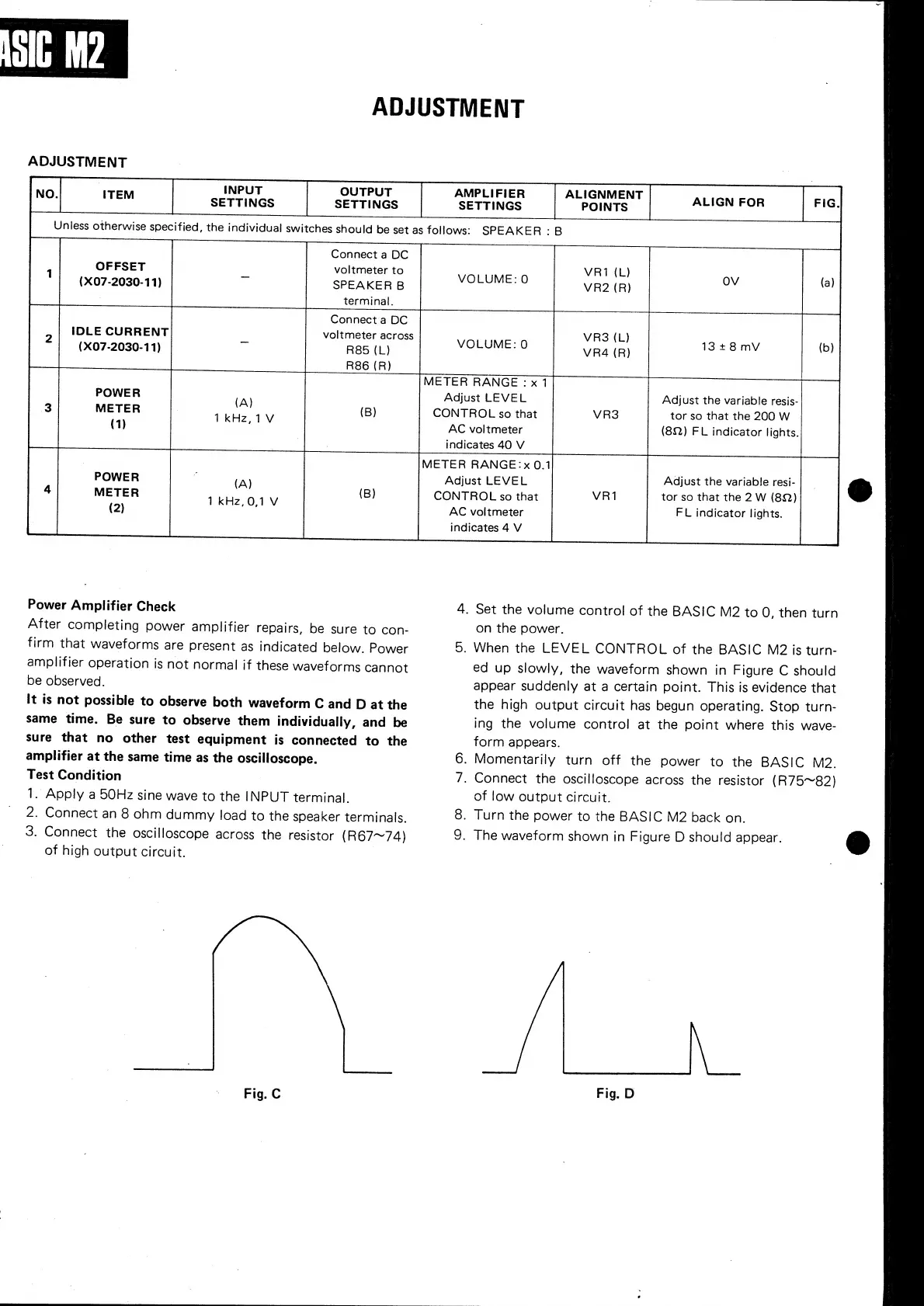
IDLE
CURRENT
(X07-2030-11)
(A)
(B)
Power
Amplifier
Check
After
completing
power
amplifier
repairs,
be
sure
to
con-
firm
that
waveforms
are
present
as
indicated
below.
Power
amplifier
operation
is
not
normal
if
these
waveforms
cannot
be
observed.
It
is
not
possible
to
observe
both
waveform
C
and
D
at
the
same
time.
Be
sure
to
observe
them
individually,
and
be
sure
that
no
other
test
equipment
is
connected
to
the
amplifier
at
the
same
time
as
the
oscilloscope.
Test
Condition
1.
Apply
a
50Hz
sine
wave
to
the
INPUT
terminal.
2.
Connect
an
8
ohm
dummy
load
to
the
speaker
terminals.
3.
Connect
the
oscilloscope
across
the
resistor
(R67~74)
of
high
output
circuit.
SN
Fig.
C
.
VR1
(L)
VOLUME:
0
METER
RANGE
:
x
1
Adjust
LEVEL
CONTROL
so
that
AC
voltmeter
indicates
40
V
METER
RANGE:x
0.1
Adjust
LEVEL
CONTROL
so
that
AC
voltmeter
indicates
4
V
(A)
ADJUSTMENT
VR3
(L)
VR4
(R)
13+8mV
(b)
Adjust
the
variable
resis-
tor
so
that
the
200
W
(8Q)
FL
indicator
lights.
Adjust
the
variable
resi-
tor
so
that
the
2
W
(8Q)
FL
indicator
lights.
.
Set
the
volume
control
of
the
BASIC
M2
to
O,
then
turn
on
the
power.
.
When
the
LEVEL
CONTROL
of
the
BASIC
M2
is
turn-
ed
up
slowly,
the
waveform
shown
in
Figure
C
should
appear
suddenly
at
a
certain
point.
This
is
evidence
that
the
high
output
circuit
has
begun
operating.
Stop
turn-
ing
the
volume
control
at
the
point
where
this
wave-
form
appears.
.
Momentarily
turn
off
the
power
to
the
BASIC
M2.
.
Connect
the
oscilloscope
across
the
resistor
(R75~82)
of
low
output
circuit.
.
Turn
the
power
to
the
BASIC
M2
back
on.
.
The
waveform
shown
in
Figure
D
should
appear.
JL
Fig.
D

Related product manuals