EasyManua.ls Logo

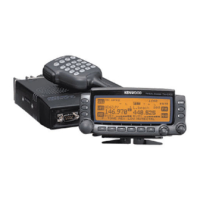
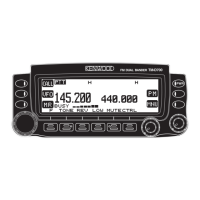
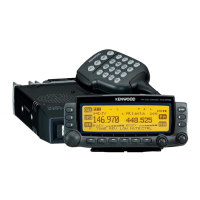
Kenwood D700 - User Manual

Kenwood D700
2 pages
Print Icon
To Next Page IconTo Next Page
Loading...
Set-up for Kenwood D700 with the AVMAP G4T
NOTE: These instructions are for those of us who have little to no experience with the Kenwood
D700 and/or the AVMAP G4T!
1. Kenwood D700 set-up.
a. While programming the Kenwood D700 and/or the AVMAP G4T, the
communication cable should be disconnected. Strange and/or bad things
can occur if you fail to head this warning!
b. Starting with the Kenwood D700. Note: Items in [ ] are buttons and { } are
items you enter and/or ‘see’ on the radio screen.
c. Turn on the radio.
d. Make sure that {T}, {CT} and {DCS} do not appear at the top of your
D700 screen, if they do press the [TONE] button until none of these
appear.
e. Press the menu button [MNU] and use the control knob to get to the APRS
setup menu {APRS 3-X} (the X here can be any letter or number) and
press the [OK] button to select/enter.
f. Use the [é] and [ê] buttons to go to different screens in the APRS menu
and the [OK] button to select/enter that particular screen.
g. Once you make your selection and/or entry push the [OK] button again to
save the selection/entry. Then go back to ‘f.’ above to get to the next
APRS screen and enter all the Table 1 settings below.
Table 1. (D700 Settings)
Screen # Item Select/Enter
3-1 CALL SIGN {your call sign}
3-2 GPS UNIT- NEMA
FORMAT
{NEMA96}
3-3 WAYPOINT
{9 DIGITS NEMA}
3-5 POS AMBIGUITY
{OFF}
3-7 POS LIMIT
{OFF}
3-B PACKET PATH
{WIDE1-1,WIDE2-2}
3-C PACKET TRANSMIT
METHOD
{AUTO}
3-D PACKET TRANSMIT
INTERVAL
{3 MIN.}
NOTE: Smaller times (<5min) are for
mobile units while stationary stations will
use longer times (~10 min. and up)
3-J PACKET TRANSFER
RATE
{1200 bps}
h. Press the [ESC] button to leave the APRS setup screen and return the
D700 user screen.
i. You can now power down the radio and it will keep your settings.
2. AVMAP G4T set-up.
Question and Answer IconNeed help?

Do you have a question about the Kenwood D700 and is the answer not in the manual?

Summary

Kenwood D700 Setup

Initial D700 Radio Configuration

Steps to power on the D700, clear display codes, and navigate the APRS setup menu.

D700 APRS Settings Table

Key configuration parameters for the Kenwood D700 APRS setup, including Call Sign and Packet Rate.

Finalizing D700 Setup

Exiting the APRS setup screen and powering down the radio to save configuration settings.

AVMAP G4 T Setup

AVMAP G4 T Configuration and Software Notes

Instructions for AVMAP G4T setup, including menu navigation, option selection, and software version checks.

Connecting and Powering Up Radios

Procedure for powering down both units, connecting cables, and powering them up for operation.

Overview

This document provides a comprehensive guide for setting up and integrating the Kenwood D700 radio with the AVMAP G4T GPS unit, specifically tailored for users who may be new to either or both devices. The primary function of this setup is to enable Automatic Packet Reporting System (APRS) capabilities, allowing for the transmission and reception of position data and other information.

Kenwood D700 Set-up

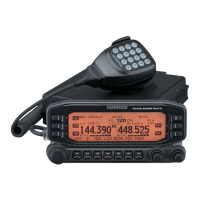
The Kenwood D700 is a dual-band amateur radio transceiver designed for various communication modes, including voice and data. When configured with the AVMAP G4T, its key function is to act as a data modem (TNC) for APRS, transmitting GPS coordinates received from the AVMAP G4T over the air.

Usage Features:

  • Initial Setup: Before any programming, it's crucial to disconnect the communication cable to prevent unexpected issues. The radio is turned on, and the display is checked to ensure that {T}, {CT}, and {DCS} indicators are not present; if they are, the [TONE] button is pressed until they disappear.
  • Menu Navigation: The [MNU] button accesses the main menu. The control knob is used to navigate to the APRS setup menu ({APRS 3-X}), and the [OK] button is used to select and enter sub-menus. The [↑] and [↓] buttons facilitate movement between different screens within the APRS menu.
  • APRS Configuration: The document details specific settings for APRS operation, which are entered via the menu system. These include:
    • Call Sign (3-1): Users enter their unique amateur radio call sign.
    • GPS Unit - NEMA Format (3-2): Configured to {NEMA96} to ensure compatibility with the AVMAP G4T's NMEA output.
    • Waypoint (3-3): Set to {9 DIGITS NEMA} for precise waypoint reporting.
    • POS Ambiguity (3-5) and POS Limit (3-7): Both are set to {OFF}, indicating that full position data will be transmitted without intentional degradation or limits.
    • Packet Path (3-B): Configured as {WIDE1-1,WIDE2-2}, a common APRS path for wider area coverage.
    • Packet Transmit Method (3-C): Set to {AUTO}, allowing the radio to automatically manage packet transmissions.
    • Packet Transmit Interval (3-D): Recommended at {3 MIN.} for mobile units, with a note that stationary stations might use longer intervals (10 minutes or more). This setting dictates how frequently the radio broadcasts its position.
    • Packet Transfer Rate (3-J): Set to {1200 bps} (bits per second), the standard speed for APRS data transmission over amateur radio.
  • Saving Settings: After each selection or entry, the [OK] button must be pressed again to save the changes.
  • Exiting Setup: The [ESC] button is used to exit the APRS setup screen and return to the D700 user screen.
  • Power Down: Once settings are saved, the radio can be powered down, and it will retain the configured settings.

AVMAP G4T Set-up

The AVMAP G4T is a GPS unit that, in this setup, provides precise location data to the Kenwood D700 for APRS transmissions.

Usage Features:

  • Initial Setup: Similar to the D700, the communication cable should be disconnected during programming.
  • Power On: The [Page] button is pressed to turn on the G4T.
  • Navigation: The [cursor knob] (the tall center knob with four arrows) is used to move the cursor and select items. The [+] button confirms selections.
  • Passenger Mode: After the "Welcome on board" greeting, {YES} is selected when prompted about "Would you like to drive in Passenger Mode?", followed by the [+] button.
  • System Setup: The [MENU] button is pressed twice to reach the {MAIN MENU}. The [cursor knob] is used to select {System Setup}, and the [+] button confirms.
  • Simulator Check: Within {System Setup}, the {Simulator} tab is selected, and the {Simulation} box is ensured to be unchecked to prevent the unit from operating in a simulated mode.
  • Software Version Specifics:
    • Ver. 2.06: Users navigate to the {Interface} tab, select {NEMA} under {Serial Interface}, and then {NEMA 9600} under {External Port Driver}. [ESC] is pressed twice to exit.
    • Ver. 2.07 or higher: Users navigate to the {Interface} tab, select {APRS} under {Interface}, and then {9600} under {Baud Rate}. [ESC] is pressed twice to exit. A note indicates that some users might see "Radio Link" instead of "APRS." These settings ensure the G4T outputs data in a format and speed compatible with the D700.
  • Power Down: The [PAGE] button is pushed and held to initiate a three-second power-down countdown, turning the G4T off. A note warns that timing is crucial to prevent the unit from powering itself back up.

Making it All Work! (Integration and Operation)

This section details the crucial steps to connect the two devices and begin APRS operation.

Usage Features:

  • Power Off: Both the Kenwood D700 and AVMAP G4T must be turned OFF before connecting the cable.
  • Cable Connection:
    • The four-pole 2.5mm communication cable end connects to the G4T's TMC receptacle.
    • The three-pole 2.5mm end connects to the D700's GPS receptacle.
    • Important Note: Users are warned against reversing the cable ends and to ensure the G4T connection is to the TMC receptacle, not the adjacent ANT receptacle, checking for a secure "click."
  • Power On: Both units are powered on.
  • D700 TNC Activation: If the Kenwood D700 powers up in VFO (voice communications) mode, the [F] button is pushed and held for 1 second, then the [TNC] button is pressed. This action opens the D700's internal TNC, enabling communication with the G4T.
  • Verification of Connection: A successful connection is indicated by a blinking {GPS} icon at the top of the D700 screen and a constantly displayed {1200} to its right. The blinking {GPS} signifies that the AVMAP G4T is actively communicating ("TALKING") with the D700.
  • Initiating Position Transmission: To begin transmitting the current position, the [F] button is pushed and held for 1 second, followed by pressing the [Beacon] button. This sends the GPS data received from the AVMAP G4T over the air via APRS.

Maintenance Features:

While the document doesn't explicitly detail ongoing maintenance, the initial setup instructions imply best practices that contribute to device longevity and reliable operation:

  • Cable Disconnection during Programming: This prevents electrical interference or misconfigurations that could damage the devices or corrupt settings.
  • Secure Cable Connections: Ensuring cables are correctly and securely plugged in prevents intermittent connections, data loss, and potential wear on the ports.
  • Proper Power-Down Procedures: Following the specified power-down sequence for the AVMAP G4T helps prevent data corruption or system instability.

In essence, this guide transforms two distinct devices into a powerful APRS station, enabling users to track and report their positions effectively within the amateur radio network. The detailed, step-by-step instructions, coupled with critical warnings and verification steps, ensure a smooth setup process for even novice users.

Kenwood D700 Specifications

General IconGeneral
Antenna Impedance50 ohms
TypeMobile
Frequency Range144-148 MHz (VHF), 430-450 MHz (UHF)
ModeFM
Power Requirement13.8V DC
FeaturesAPRS

Related product manuals