Widget
19English
Widget
Widget
1
Press the [HOME] button.
2
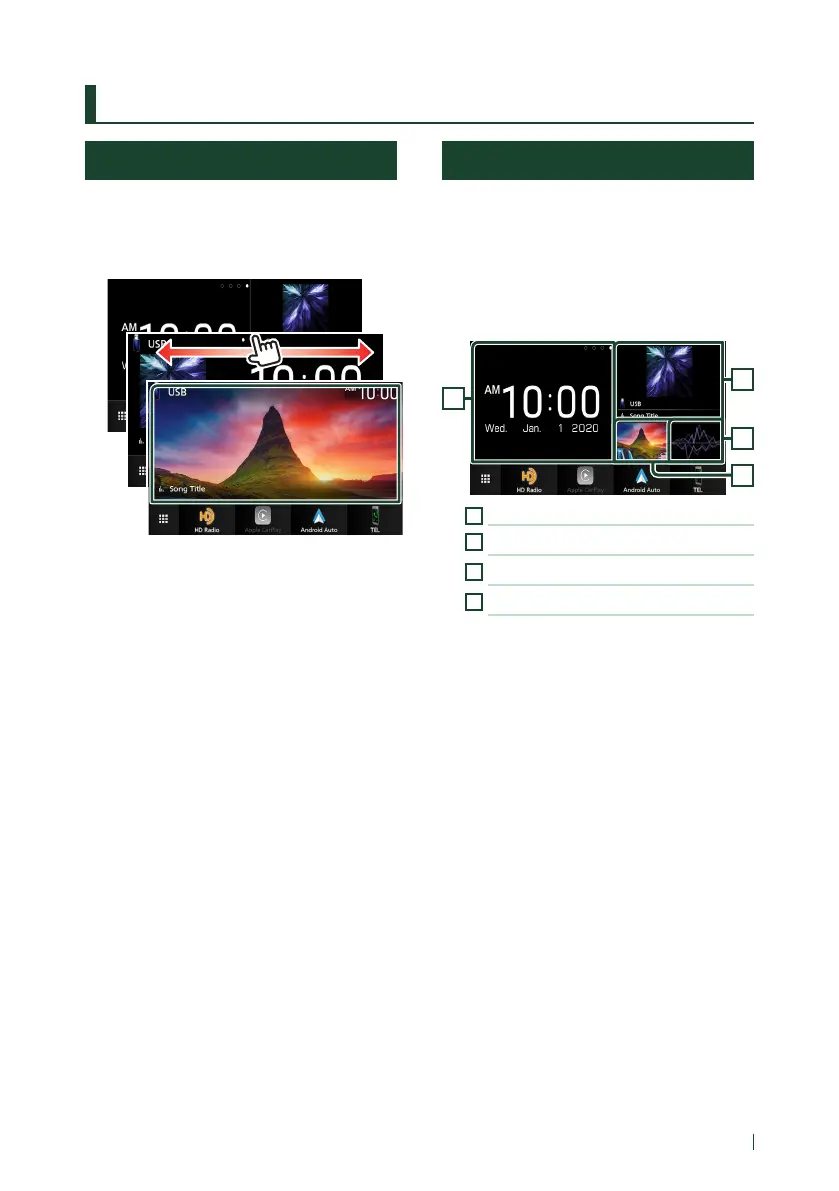
You can change the widget by flicking left
or right on the widget area.
Widget list
• Multi Widget *
1
• Clock Widget
• Tire Pressure Widget *
2
• Rader Widget *
2
• Climate Widget *
2
• Photo Frame Widget
*1 Up to 3 pages can be set to the multi widget screen.
*2 This can be selected when a compatible ADS adapter
is connected.
Multi Widget
You can place a widget on each of the
following areas. Up to 4 widgets can be placed
per a multi widget screen.
1
Press the [HOME] button.
2
Flick the widget area to the left/right to
display the multi widget.
1
2
3
4
1
Widget (L)
2
Widget (M)
3
Widget (S1)
4
Widget (S2)
Ñ Replace the widget
● To move the widget
1
Touch and hold the widget.
Widget customize mode is activated.
2
Drag the widget to the desired position.
● To delete the widget
1
Touch and hold the widget.
Widget customize mode is activated.
2
Touch [×] on the right top corner of the
widget.
The selected widget is deleted.


 To Next Page
 Loading...




