HD Radio™ Tuner
48
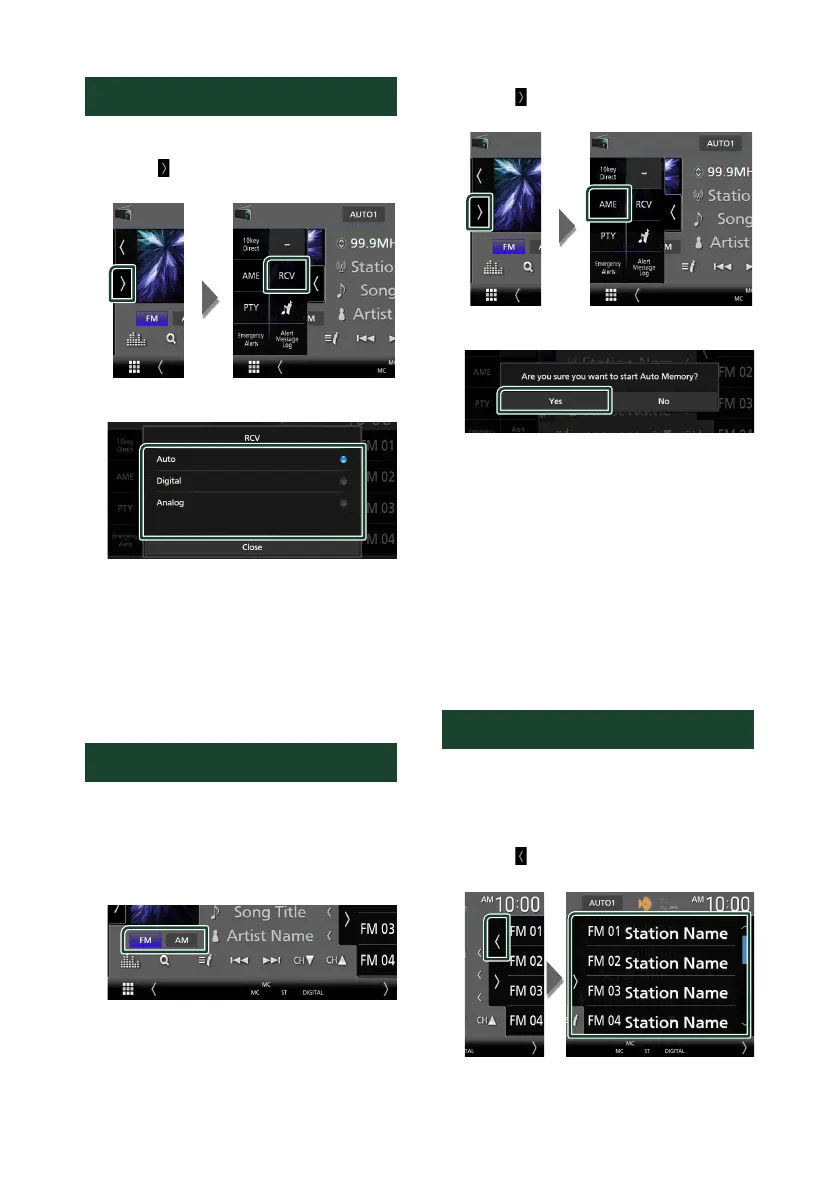
Receive Mode
You can set the radio broadcasts receive mode.
1
Touch [ ] on the left side of the screen.
Touch [RCV].
2
Select a receive mode.
■ [Auto]
Switch between digital and analog audio
automatically.
■ [Digital]
Select this to tune to digital audio only.
■ [Analog]
Select this to tune to analog audio only.
Memory Operation
Ñ Auto memory
You can store stations with good reception in
the memory automatically.
1
Touch desired band key.
2
Touch [ ] on the left side of the screen.
Touch [AME].
3
Touch [Ye s].
Auto memory starts.
Ñ Manual memory
You can store the currently being received
station or channel in the memory.
1
Select the station or channel you wish to
store in the memory.
2
Touch [FM#] (#:1-15) or [AM#] (#:1-5)
in which you want to store the station
or channel for 2 seconds until a beep
sounds.
Selecting Operation
Ñ Preset select
You can list and select memorized stations or
channels.
1
Touch [ ] on the right side of the screen.
Select a station or channel from the list.


 To Next Page
 Loading...





