Controlling Audio
93English
Sound Effect
You can set sound effects.
1
Press the [MENU] button.
Popup menu appears.
2
Touch [Audio].
Audio screen appears.
3
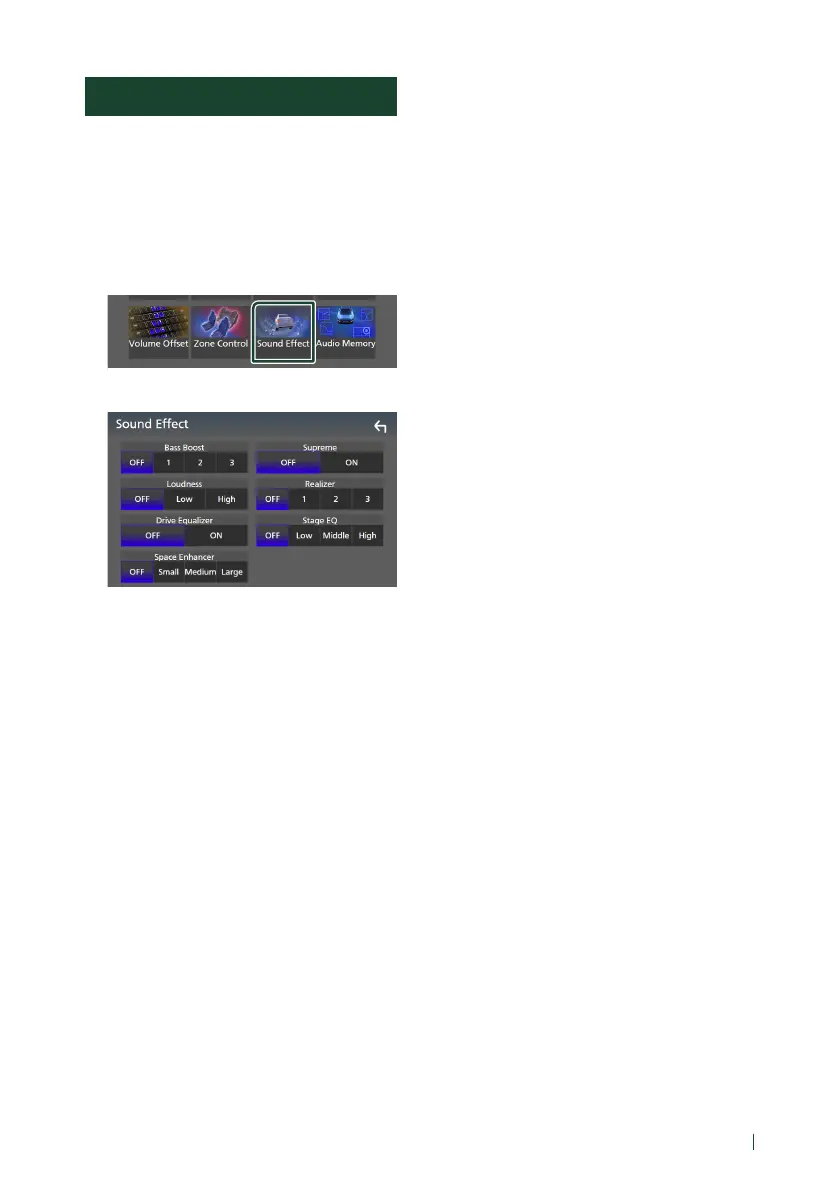
Touch [Sound Effect].
4
Set each parameter as follows.
■ [Bass Boost]
Set the amount of bass boost “OFF”/ “1”/ “2”/
“3”.
■ [Loudness]
Set the amount of boost of low and high
tones.
“OFF”, “Low”, “High”
■ [Drive Equalizer]
Reduces the driving noise by raising the
bandwidth.
“OFF”, “ON”
■ [Space Enhancer]
Select the feeling of sound space
enhancement.
“OFF”/ “Small”/ “Medium”/ “Large”.
This setting is not available for the HD Radio
tuner source.
■ [Supreme]
Turn ON/OFF the Supreme function.
Technology to extrapolate and supplement
with proprietary algorithm, the high-
frequency range that is cut off when
encoding.
■ [Realizer]
Virtually make the sound more realistic using
the Digital Signal Processor (DSP) system.
Select the level from “OFF”/ “1”/ “2”/ “3”.
■ [Stage EQ]
You can adjust the height of speakers
virtually to suit your listening position.
“OFF”/ “Low”/ “Middle”/ “High”.


 To Next Page
 Loading...





