English
|
15
General control
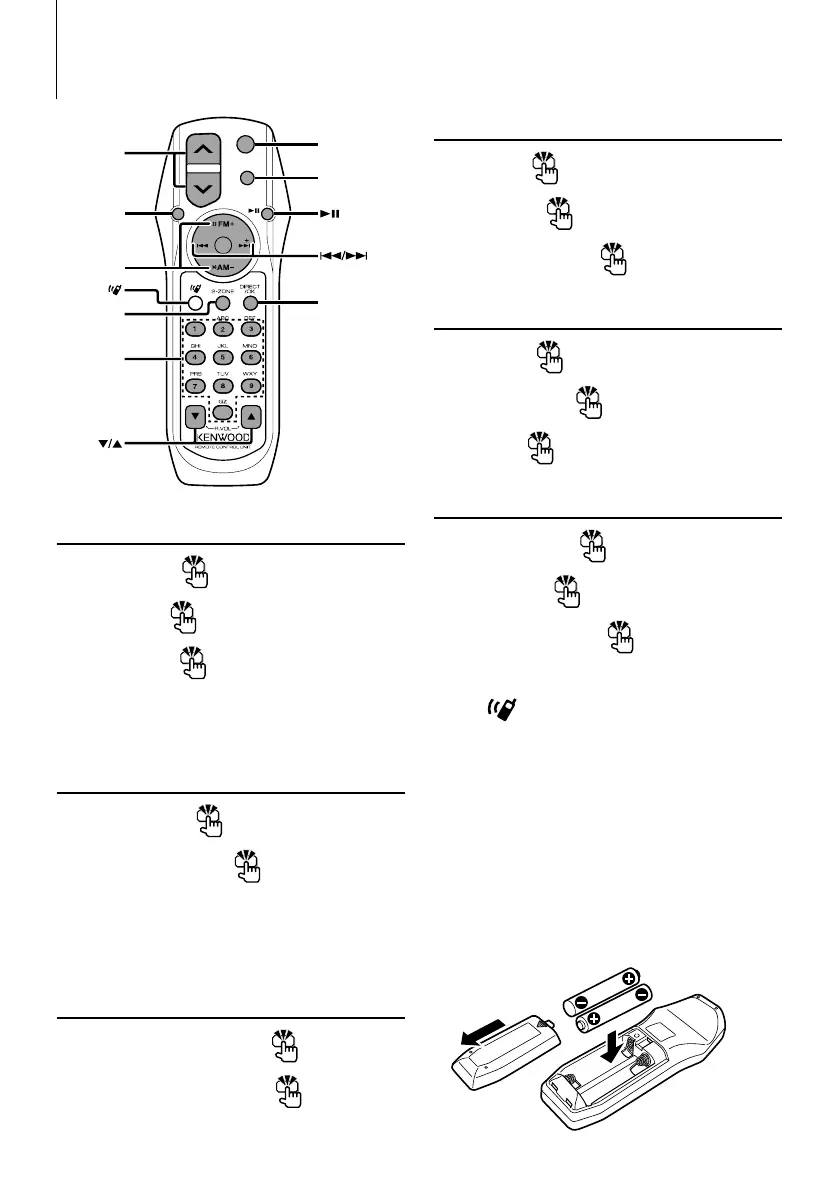
Volume control [VOL]
Source select [SRC]
Volume reduce [ATT]
When the button is pressed again, the volume returns
to the previous level. When the volume is reduced,
the "ATT" indicator ashes.
In Audio control
Audio item select [AUD]
Adjusts the Audio item [VOL]
⁄
• Refer to <Audio Control> (page 6) for the operation
method, such as the procedures for Audio control and
others operations.
Dual Zone control
Dual zone system on and o [2-ZONE]
Rear channel volume control
[5]/ [∞]
Basic Operations of remote control
In Tuner/HD Radio source
Band select [FM]/[AM]
Station select
[4]/[¢]
Recall preset stations [1] — [6]
In CD/USB source
Music select [4]/[¢]
Folder/Disc select [FM]/[AM]
Pause/Play [38]
In Satellite Radio tuner source
Preset band select [FM]
Channel select [4]/[¢]
Recall preset channels [1] — [6]
⁄
About [ ]
This button is used when Bluetooth HANDS FREE
BOX is connected. For more information, refer to the
instruction manual of Bluetooth HANDS FREE BOX.
¤
• Do not set the remote control in hot places such as
on the dashboard.
Loading and Replacing battery
Use two “AA”/ “R6”-size batteries.
Slide the cover while pressing downwards to remove
it as illustrated.
Insert the batteries with the + and – poles aligned
properly, following the illustration inside the case.
SRC
VOL
AT T
AU D
ATT
DIRECT
0 — 9
SRC
VOL
AUD
2-ZONE
FM/AM
*
*
*KDC-X492/MP438U/MP408U only
B64-3955-00EnglishKr1.indd15B64-3955-00EnglishKr1.indd15 07.11.125:19:59PM07.11.125:19:59PM



 To Next Page
 Loading...