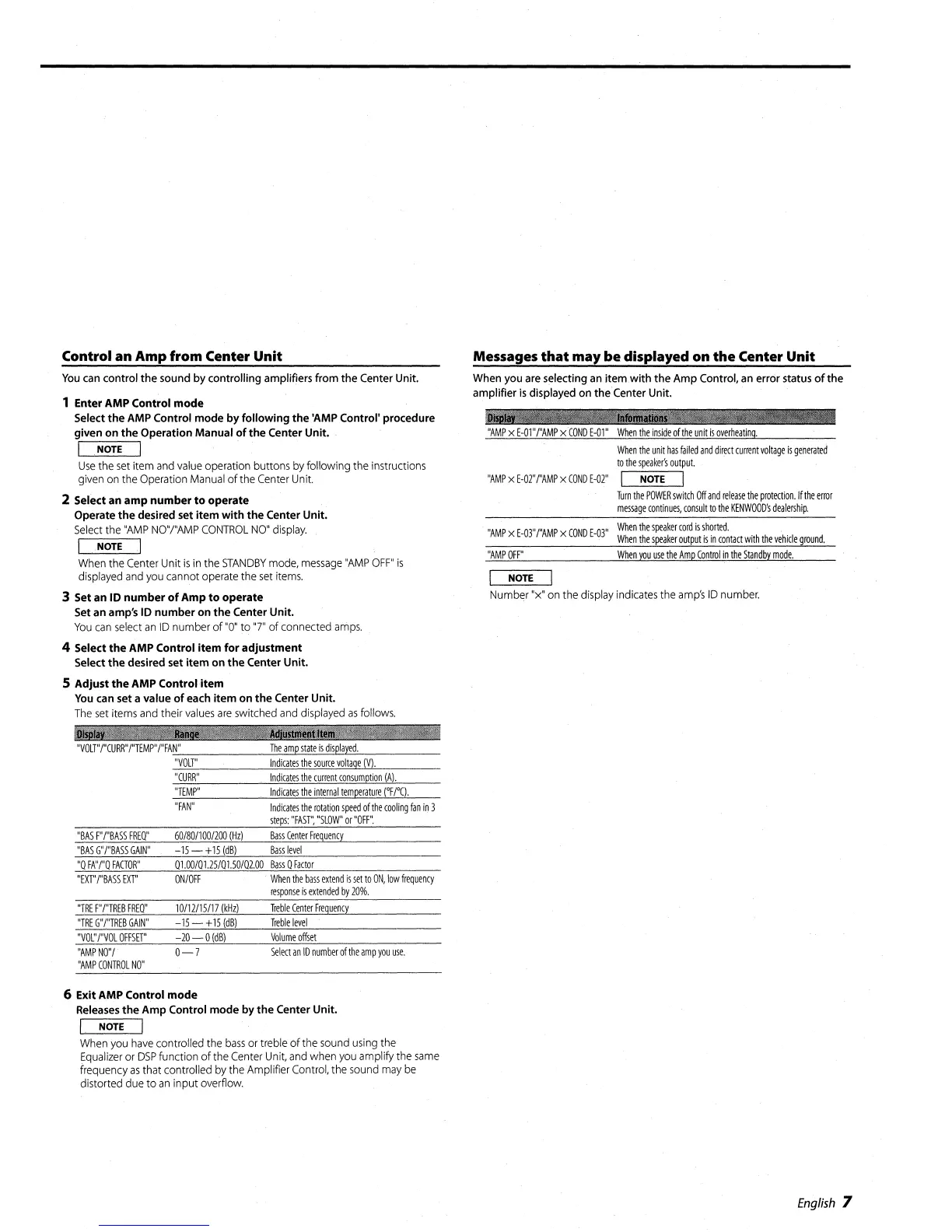
Control an Amp from Center
Unit
You
can
control
the
sound
by
controlling amplifiers from
the
Center Unit.
1
Enter
AMP
Control
mode
Select
the
AMP Control
mode
by
following
the
'AMP
Control'
procedure
given
on
the
Operation
Manual
of
the
Center
Unit.
I
NOTE
I
Use
the
set
item and value operation buttons
by
following the instructions
given on the Operation Manual
of
the Center Unit.
2 Select
an
amp
number
to
operate
Operate
the
desired set
item
with
the
Center
Unit.
Select the
"AMP
NO"j"AMP
CONTROL
NO"
display.
I
.NOTEI
When the Center Unit
is
in the
STANDBY
mode,
message
"AMP
OFF"
is
displayed and you cannot operate the
set
items.
3 Set
an
10
number
of
Amp
to
operate
Set an amp's
10
number
on
the
Center
Unit.
You
can
select
an
ID
number
of
"0"
to
"7"
of
connected
amps.
4 Select
the
AMP
Control
item
for
adjustment
Select
the
desired set
item
on
the
Center
Unit.
5
Adjust
the
AMP
Control
item
You
can set a value
of
each
item
on
the
Center Unit.
The
set
items and their values
are
switched and displayed
as
follows.
_I;
...
'
.............
"VOLT"/"CURR"/"TEMP"/"FAN"
The
amp
state
is
displayed.
"VOLT"
Indicates
the
source
voltage
(V).
"CURR"
Indicates
the
current
consumption
(A).
"TEMP"
Indicates
the
internal
temperature
nrC).
"FAN"
Indicates
the
rotation
speed
of
the
cooling
fan
in
3
steps:
"FAST'~
"SLOW"
or
"OFF".
Messages
that
may
be
displayed on
the
Center Unit
When you are selecting an
item
with
the
Amp
Control, an error status
of
the
amplifier
is
displayed on
theCenter
Unit.
1liii'
11_llb
....
!1
-j
"AMP
x
E-01
"/"AMP
x
COND
E-Ol"
When
the
inside
of
the
unit
is
overheating.
When
the
unit
has
failed
and
direct
current
voltage
is
generated
to
the
spea
ker's
output.
"AMP
x
E-02"/"AMP
x
COND
E-02"
I
NOTE
I
Turn
the
POWER
switch
Off
and
release
the
protection.
If
the
error
message
continues,
consult
to
the
KENWOOD's
dealership.
"AMP
x
E-03"/"AMP
x
COND
E-03''
When
the
speaker
cord
is
shorted.
When
the
speaker
output
is
in
contact
with
the
vehicle
ground.
"AMP
OFF"
When
you
use
the
Amp
Control
in
the
Standby
mode.
NOTE
Number "x" on the display indicates the
amp's
ID
number.
"BAS
F"
I"BASS
FREO"
"BAS
G"/"BASS
GAIN"
"0
FA"
/"0
FACTOR"
"EXT"I"BASS
EXT"
"TRE
F"
/"TREB
FREO"
"TRE
G"/"TREB
GAIN"
"VO~'
I"VOL
OFFSET"
"AMP
NO"I
"AMP
CONTROL
NO"
60/80/100/200
(Hz)
-15
-,
+15
(dB)
01.00/01.25/01.50/02.00
ONIOFF
10112/15/17
(kHz)
-15-+15
(dB)
-20-0
(dBl
0-7
Bass
Center
Frequency
Bass
level
Bass
o
Factor
When
the
bass
extend
is
set
to
ON,
low
frequency
response
is
extended
by
20%.
Treble
Center
Frequency
Treble
level
Volume
offset
Select
an
10
number
of
the
amp
you
use.
6
Exit
AMP
Control
mode
Releases
the
Amp
Control
mode
by
the
Center
Unit.
I
NOTE
I
When you
have
controlled the
bass
or treble
of
the sound using the
Equalizer or
DSP
function
of
the Center Unit, and when you amplify the
same
frequency
as
that controlled by the Amplifier Control, the sound may
be
distorted due
to
an
input overfiow.
English
7




 To Next Page